Text&ampWriting

gpt-oss Playground

Explore OpenAI’s open-weight AI models for free. Test gpt-oss-120b and gpt-oss-20b with adjustable reasoning in the gpt-oss playground.

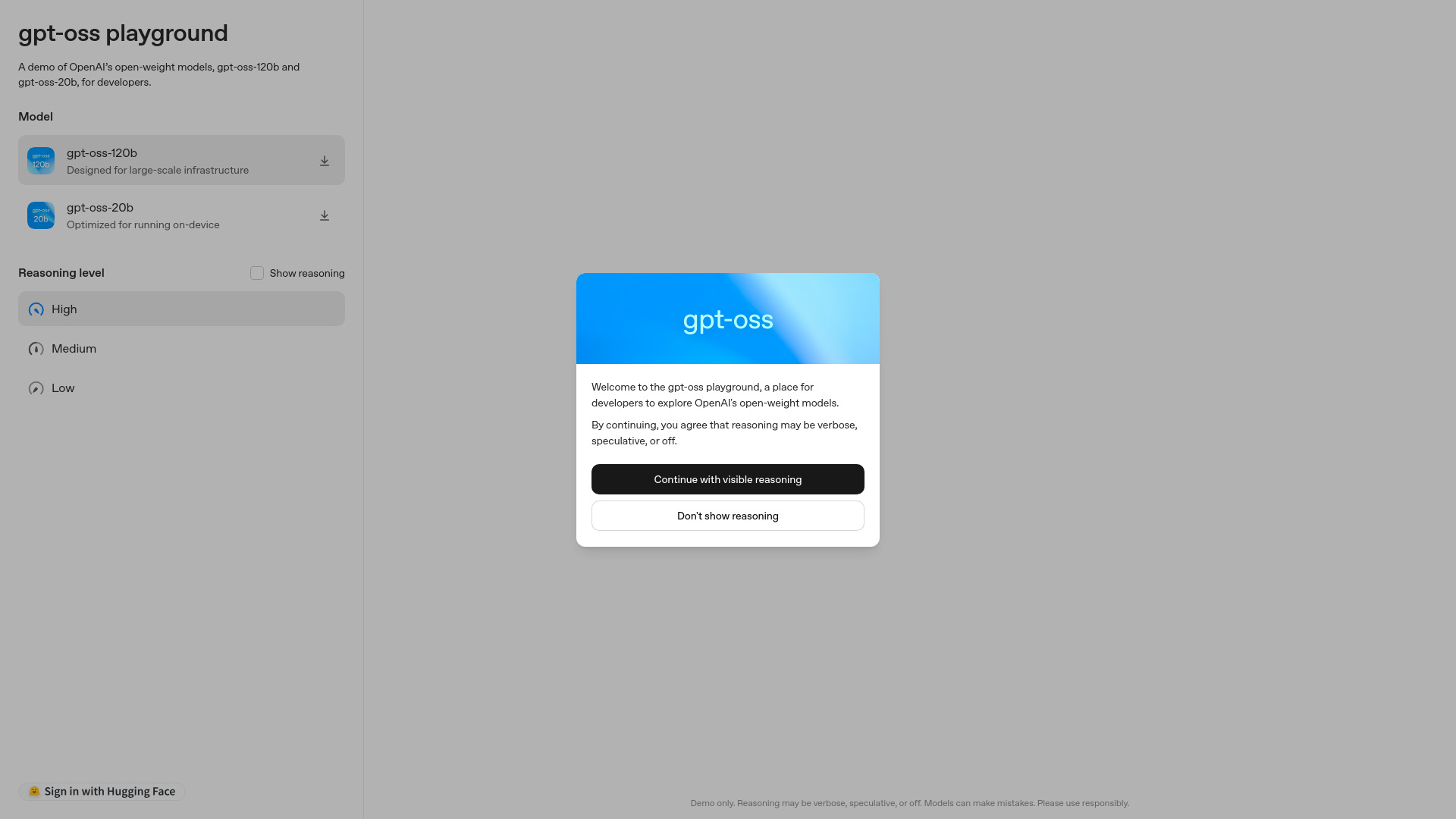
gpt-oss Playground website preview

What Is gpt-oss Playground?

gpt-oss Playground is an interactive environment for exploring OpenAI’s open-weight language models and experimenting with adjustable reasoning. It brings together gpt-oss-120b and gpt-oss-20b, allowing developers to compare how different model sizes respond to prompts, follow instructions, and approach demanding tasks. The larger model is suited to deployments with substantial computing resources, while the smaller model offers a more accessible starting point for local and edge applications on compatible hardware.

Featured on aitop-tools.com, gpt-oss Playground helps users move from reading about model capabilities to testing them directly. Developers, researchers, and technical teams can explore potential applications, refine prompts, and examine how reasoning effort affects results. These experiments provide useful context when deciding whether an open-weight model fits a project’s goals and deployment constraints.

How to Use gpt-oss Playground

Begin by choosing the model you want to evaluate. Select gpt-oss-120b to explore the larger model’s capabilities, or try gpt-oss-20b when investigating a smaller model for deployments with tighter resource budgets. Choose a reasoning level—Low, Medium, or High—then enter a prompt with a clear objective. Include relevant context, constraints, and your preferred answer format to make the response easier to assess.

After reviewing the result, repeat the same task with another reasoning setting or model. Keeping the prompt consistent makes differences easier to identify. Examine accuracy, instruction following, completeness, and response time rather than judging quality by answer length alone. If the interface displays reasoning text, treat it as additional material to evaluate: it may contain mistakes or speculative statements and should not be assumed to faithfully explain every internal operation.

For more useful comparisons, prepare a small collection of representative tasks. Include routine requests, complex problems, and examples that have caused difficulties in previous experiments. Recording the results can help reveal which configurations deserve further testing.

Key Features of gpt-oss Playground

  • Access to Two Open-Weight Models: Compare gpt-oss-120b and gpt-oss-20b within one testing environment. Explore how model size influences response quality and assess which option warrants closer evaluation for your application.
  • Adjustable Reasoning Effort: Switch between Low, Medium, and High settings to investigate how additional reasoning effort affects a task. These controls help users explore trade-offs between problem-solving performance, generation time, and computational requirements.
  • Visible Reasoning Output: Where reasoning text is displayed, users can inspect intermediate discussion alongside the final answer. This material can support experimentation, although it may be incomplete, inaccurate, or unsuitable as an explanation for end users.
  • Accessible Experimentation Interface: Model selection, reasoning controls, and prompt entry make it straightforward to run comparisons. Developers can revise instructions and examine results without first building a complete application around the models.

Together, these features support early evaluation and prompt development. The playground gives teams a practical way to explore model behavior before investing in deployment infrastructure, application integration, or more extensive testing.

Why Choose gpt-oss Playground?

gpt-oss Playground is useful for teams that want direct experience with OpenAI’s open-weight models. Instead of relying only on general capability descriptions, users can test prompts drawn from their own workflows. This makes it easier to identify promising applications, recognize recurring errors, and determine where additional guidance or validation will be necessary.

The combination of two model sizes and adjustable reasoning creates several useful comparison points. A straightforward extraction task may work well with a lower reasoning setting, while a difficult planning or coding problem may benefit from more effort. Results depend on the task, so experimenting with actual examples is more informative than assuming that one configuration will always perform best.

Open-weight availability also gives developers options for hosting and adapting models, subject to applicable licensing and technical requirements. Playground experiments can inform those decisions, but deployment planning still requires separate assessments of hardware, operating costs, security, and performance under realistic workloads.

Use Cases and Applications

Software developers can use gpt-oss Playground to explore code explanation, debugging suggestions, test planning, and programming assistance. Comparing responses across reasoning settings can show whether additional effort improves a difficult task or simply produces a longer answer. Generated code should still undergo review and execution in an appropriate testing environment.

Product and business teams can investigate document summarization, information extraction, drafting, and question answering using sample content. These experiments help establish whether a model follows formatting requirements, preserves important details, and handles incomplete information appropriately. Testing challenging examples is especially useful when an application depends on consistent outputs.

Researchers and educators can compare responses to logic problems, multi-step instructions, and analytical questions. Teams considering local or edge deployment can also explore gpt-oss-20b’s behavior before testing it on their intended hardware. Browser-based results provide an initial view of model capabilities; device compatibility, memory use, and local inference speed require measurement in the target environment.

Product source: gpt-oss Playground official website. Check the provider for current plans, limits and availability.

FAQ

gpt-oss Playground questions and answers

Product context and practical checks for evaluating gpt-oss Playground.

What is gpt-oss Playground used for?

Explore OpenAI’s open-weight AI models for free. Test gpt-oss-120b and gpt-oss-20b with adjustable reasoning in the gpt-oss playground.

How do I get started with gpt-oss Playground?

Begin by choosing the model you want to evaluate. Select gpt-oss-120b to explore the larger model’s capabilities, or try gpt-oss-20b when investigating a smaller model for deployments with tighter resource budgets. Choose a reasoning level—Low, Medium, or High—then enter a prompt with a clear objective. Include relevant context, constraints, and your preferred answer format to make the response easier to assess.After reviewing the result, repeat the same task with another reasoning setting or model. Keeping the prompt consistent makes differences easier to identify. Examine accuracy, instruction following, completeness, and response time rather than judging quality by answer length alone. If the interface displays reasoning text, treat it as additional material to evaluate: it may contain mistakes or speculative statements and should not be assumed to faithfully explain every internal operation.For more useful comparisons, prepare a small collection of representative tasks. Include routine requests, complex problems, and examples that have caused difficulties in previous experiments. Recording the results can help reveal which configurations deserve further testing.

Which capabilities are described for gpt-oss Playground?

Access to Two Open-Weight Models: Compare gpt-oss-120b and gpt-oss-20b within one testing environment. Explore how model size influences response quality and assess which option warrants closer evaluation for your application. Adjustable Reasoning Effort: Switch between Low, Medium, and High settings to investigate how additional reasoning effort affects a task. These controls help users explore trade-offs between problem-solving performance, generation time, and computational requirements. Visible Reasoning Output: Where reasoning text is displayed, users can inspect intermediate discussion alongside the final answer. This material can support experimentation, although it may be incomplete, inaccurate, or unsuitable as an explanation for end users. Accessible Experimentation Interface: Model selection, reasoning controls, and prompt entry make it straightforward to run comparisons. Developers can revise instructions and examine results without first building a complete application around the models. Together, these features support early evaluation and prompt development. The playground gives teams a practical way to explore model behavior before investing in deployment infrastructure, application integration, or more extensive testing.

What projects can I evaluate gpt-oss Playground for?

Software developers can use gpt-oss Playground to explore code explanation, debugging suggestions, test planning, and programming assistance. Comparing responses across reasoning settings can show whether additional effort improves a difficult task or simply produces a longer answer. Generated code should still undergo review and execution in an appropriate testing environment.Product and business teams can investigate document summarization, information extraction, drafting, and question answering using sample content. These experiments help establish whether a model follows formatting requirements, preserves important details, and handles incomplete information appropriately. Testing challenging examples is especially useful when an application depends on consistent outputs.Researchers and educators can compare responses to logic problems, multi-step instructions, and analytical questions. Teams considering local or edge deployment can also explore gpt-oss-20b’s behavior before testing it on their intended hardware. Browser-based results provide an initial view of model capabilities; device compatibility, memory use, and local inference speed require measurement in the target environment.

How does gpt-oss Playground handle access to two open-weight models?

Access to Two Open-Weight Models: Compare gpt-oss-120b and gpt-oss-20b within one testing environment. Explore how model size influences response quality and assess which option warrants closer evaluation for your application.

How does gpt-oss Playground handle adjustable reasoning effort?

Adjustable Reasoning Effort: Switch between Low, Medium, and High settings to investigate how additional reasoning effort affects a task. These controls help users explore trade-offs between problem-solving performance, generation time, and computational requirements.

What should I compare before choosing a gpt-oss Playground plan?

Check gpt-oss Playground’s current pricing page for included usage, renewal terms and any credit charges. Compare the cost of a usable result, including retries, rather than assuming that account registration includes free usage.

What inputs should I prepare for a gpt-oss Playground trial?

Identify the files, text or account connections your task needs. Confirm that the product accepts those inputs and offers controls for reviewing its work.

How can I check the quality of a gpt-oss Playground result?

Test one representative task and inspect the result for accuracy and completeness. Record where manual corrections or extra tools are needed.

Where is the official gpt-oss Playground website?

The website linked from this profile is https://gpt-oss.com. Use the provider’s own documentation, account area and support channels to confirm current product details.

Visit gpt-oss Playground