AI Search Engine

Google Trends Monitor

Track real-time Google Trends with AI-powered insights & ready-to-use content ideas—stay ahead of the curve, effortlessly.

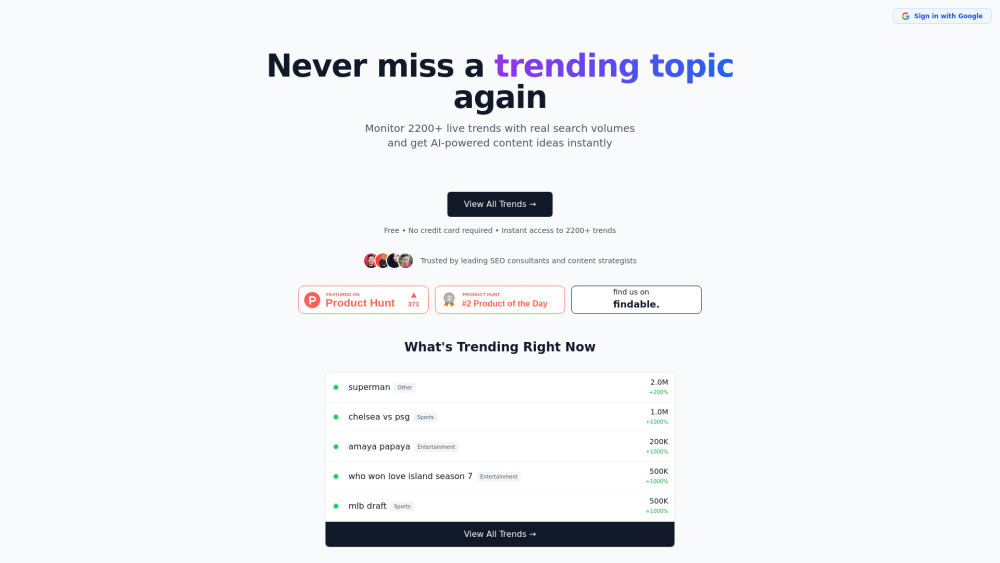
Google Trends Monitor website preview

Google Trends Monitor Website screenshot

Introducing Google Trends Monitor: Your Real-Time AI Pulse for Search & Content

Google Trends Monitor is a next-generation intelligence platform that transforms raw Google Trends data into actionable, AI-enhanced insights. Unlike static trend dashboards, it delivers over 2,200 live, verified search trends—each with precise monthly search volume metrics—and instantly generates strategic, niche-aware content angles powered by large language models. Built for forward-thinking marketers, SEO strategists, and editorial teams, it turns fleeting search spikes into sustainable content opportunities.

How Google Trends Monitor Works — In Three Smart Steps

Start by scanning the dynamic trend feed—refreshed every hour directly from Google’s public API. Click any trend to unlock granular analytics: exact search volume, growth velocity (up/down %), regional heatmaps, and semantically clustered related queries. Then activate the AI Insight Engine: describe your audience or goal (e.g., “B2B SaaS blog post for founders”), and receive tailored content frameworks—including headline variants, outline suggestions, and angle differentiation tips—grounded in real user intent.

Why Google Trends Monitor Stands Out

2,200+ live, verified trends — no estimates, no delays

Exact search volumes (not normalized "interest scores")

Context-aware AI that generates publish-ready ideas—not just keywords

Hourly auto-sync with Google Trends’ official data stream

Intuitive category filtering (Tech, Health, Finance, Lifestyle, Education & more)

Trend deep-dive view: related queries, rising subtopics, and seasonal patterns

Who Uses Google Trends Monitor — And Why It Delivers ROI

Content teams launching viral-first campaigns before competitors catch on.

SEO agencies validating keyword potential with hard search-volume data—not guesswork.

Bloggers and creators aligning editorial calendars with authentic, high-intent demand.

Product marketers uncovering unmet needs through emergent query clusters.

Niche publishers using category filters to dominate vertical-specific trend cycles.

Product source: Google Trends Monitor official website. Check the provider for current plans, limits and availability.

FAQ

Google Trends Monitor questions and answers

Product context and practical checks for evaluating Google Trends Monitor.

What is Google Trends Monitor used for?

Track real-time Google Trends with AI-powered insights & ready-to-use content ideas—stay ahead of the curve, effortlessly.

How do I get started with Google Trends Monitor?

Start by scanning the dynamic trend feed—refreshed every hour directly from Google’s public API. Click any trend to unlock granular analytics: exact search volume, growth velocity (up/down %), regional heatmaps, and semantically clustered related queries. Then activate the AI Insight Engine: describe your audience or goal (e.g., “B2B SaaS blog post for founders”), and receive tailored content frameworks—including headline variants, outline suggestions, and angle differentiation tips—grounded in real user intent.

What projects can I evaluate Google Trends Monitor for?

Content teams launching viral-first campaigns before competitors catch on.SEO agencies validating keyword potential with hard search-volume data—not guesswork.Bloggers and creators aligning editorial calendars with authentic, high-intent demand.Product marketers uncovering unmet needs through emergent query clusters.Niche publishers using category filters to dominate vertical-specific trend cycles.

What should I compare before choosing a Google Trends Monitor plan?

Check Google Trends Monitor’s current pricing page for included usage, renewal terms and any credit charges. Compare the cost of a usable result, including retries, rather than assuming that account registration includes free usage.

What inputs should I prepare for a Google Trends Monitor trial?

Compare support for source documents, style instructions, outlines and length limits. Check whether citations link to real material rather than merely looking like references.

How can I check the quality of a Google Trends Monitor result?

Verify names, dates, quotations and factual claims against the original sources. Edit tone, remove repetition and make sure the text answers the intended reader’s question.

Which export options should I check in Google Trends Monitor?

Check export to plain text, Markdown, documents or your publishing system. Formatting, headings and working links matter when moving a draft into production.

What is a practical way to test Google Trends Monitor against alternatives?

Use a real brief and a short source document. Compare factual accuracy, structure and editing time rather than accepting the longest or most confident draft.

What should I review before uploading material to Google Trends Monitor?

Read the provider’s rules on access, retention, deletion and use of uploaded material. Start with a non-confidential sample that you have permission to use.

Where is the official Google Trends Monitor website?

The website linked from this profile is https://llmseotrends.com. Use the provider’s own documentation, account area and support channels to confirm current product details.

Visit Google Trends Monitor