AI Chatbot

Glia

Glia unifies digital & voice support with AI—delivering seamless, intelligent customer experiences across every channel.

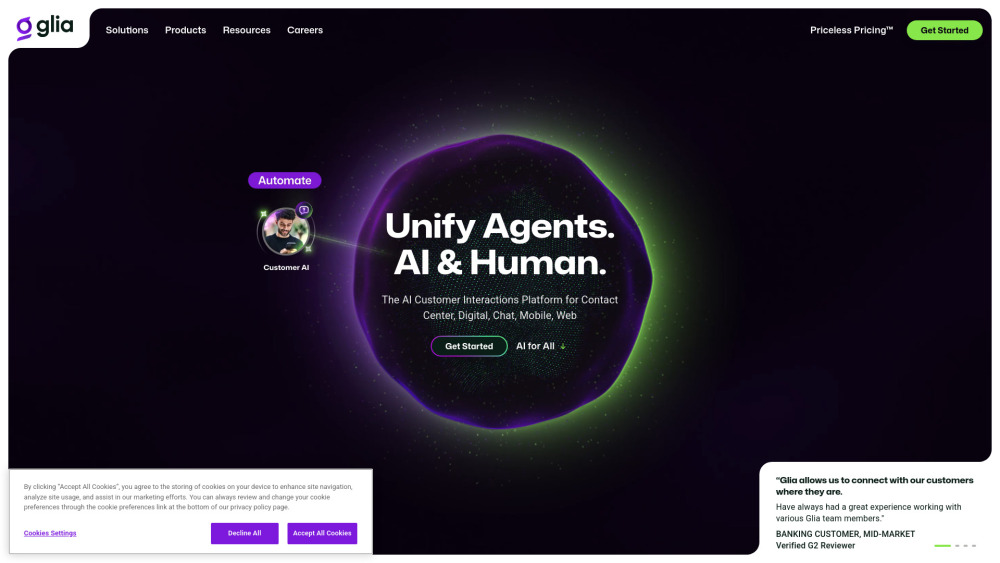
Glia website preview

Glia Website screenshot

Glia: AI Contact Center Software for Unified Digital & Voice CX

Glia redefines modern customer engagement with its purpose-built AI Contact Center platform—engineered to unify digital and voice experiences into a single, intelligent, and human-centered ecosystem. Unlike legacy systems fragmented by channel, Glia delivers end-to-end automation, real-time agent augmentation, and deep behavioral analytics—all within one cohesive architecture. Designed for mission-critical industries including banking, insurance, healthcare, and credit unions, Glia empowers customers, frontline agents, operations leaders, and C-suite executives with role-specific AI tools—without hidden usage fees. Its breakthrough Priceless Pricing™ model removes traditional cost barriers: no per-minute charges, no seat-based licensing, and no token limits—just predictable, scalable investment in CX excellence.

How Glia Unifies Digital & Voice CX

Glia bridges the gap between conversational AI and human expertise—not by replacing agents, but by elevating every interaction across voice calls, chat, SMS, co-browsing, and video. Its ChannelLess® architecture ensures context continuity whether a customer starts on mobile web and escalates to voice—or begins with an IVR and transitions seamlessly to a live agent with full interaction history. AI Virtual Assistants resolve routine inquiries instantly; AI CoPilots guide agents through complex workflows, suggest next-best actions, and auto-complete post-call tasks; while predictive routing, sentiment-aware queuing, and cognitive quality management ensure the right customer connects to the right resource—every time.

Glia’s Unified AI Capabilities

AI Virtual Assistants — Intelligent Self-Service Across Channels

AI CoPilots — Real-Time Agent Augmentation & Workflow Automation

AI Insights Engine — Actionable Analytics for Supervisors & Ops Teams

Executive Intelligence Hub — Strategic KPIs, Forecasting & ROI Dashboards

Intelligent Voice Suite — Voice AI Automation, Predictive Transfers, Cognitive QA, and Adaptive Forecasting

Intelligent Digital Suite — Context-Aware Messaging, High-Touch Co-Browse, and Dynamic Self-Service

ChannelLess® Architecture — Unified Context, Identity, and Journey Orchestration

Compliance-First Reporting — HIPAA, SOC 2, and PCI-DSS Ready Analytics & Audit Trails

Enterprise-Grade Security — End-to-end encryption, zero-trust access, and regional data residency options

Real-World Applications Across Industries

24/7 Overflow & After-Hours Digital-First Support

Frictionless Online Banking & Account Management

Virtual Branch Engagement with Live Video + Co-Browse

Personalized Loan Application & Onboarding Journeys

IT Helpdesk Automation with Integrated Knowledge Graphs

Deposit Growth Campaigns with Behavioral Triggers

M&A Integration Support for Unified Customer Portfolios

Regulatory-Compliant Patient Engagement (Healthcare)

Member-Centric Service for Credit Unions

Claims Assistance & Policy Servicing (Insurance)

Cross-Sell & Retention Optimization via Predictive CX

Product source: Glia official website. Check the provider for current plans, limits and availability.

FAQ

Glia questions and answers

Product context and practical checks for evaluating Glia.

What is Glia used for?

Glia unifies digital & voice support with AI—delivering seamless, intelligent customer experiences across every channel.

How do I get started with Glia?

Open the official Glia website and identify the workflow that matches your task. Use a short recording with names, numbers and more than one speaker, or a script with difficult pronunciation. Review the exported audio or transcript in full.

Which capabilities are described for Glia?

AI Virtual Assistants — Intelligent Self-Service Across ChannelsAI CoPilots — Real-Time Agent Augmentation & Workflow AutomationAI Insights Engine — Actionable Analytics for Supervisors & Ops TeamsExecutive Intelligence Hub — Strategic KPIs, Forecasting & ROI DashboardsIntelligent Voice Suite — Voice AI Automation, Predictive Transfers, Cognitive QA, and Adaptive ForecastingIntelligent Digital Suite — Context-Aware Messaging, High-Touch Co-Browse, and Dynamic Self-ServiceChannelLess® Architecture — Unified Context, Identity, and Journey OrchestrationCompliance-First Reporting — HIPAA, SOC 2, and PCI-DSS Ready Analytics & Audit TrailsEnterprise-Grade Security — End-to-end encryption, zero-trust access, and regional data residency options

What projects can I evaluate Glia for?

24/7 Overflow & After-Hours Digital-First SupportFrictionless Online Banking & Account ManagementVirtual Branch Engagement with Live Video + Co-BrowsePersonalized Loan Application & Onboarding JourneysIT Helpdesk Automation with Integrated Knowledge GraphsDeposit Growth Campaigns with Behavioral TriggersM&A Integration Support for Unified Customer PortfoliosRegulatory-Compliant Patient Engagement (Healthcare)Member-Centric Service for Credit UnionsClaims Assistance & Policy Servicing (Insurance)Cross-Sell & Retention Optimization via Predictive CX

What should I compare before choosing a Glia plan?

Explore Glia’s straightforward, value-driven pricing tiers—including unlimited AI interactions, seats, and channels—at glia.com/pricing. Confirm current prices and allowances on the provider’s website before purchasing.

What inputs should I prepare for a Glia trial?

Compare recording length, file types, language support and speaker handling. For voice generation, check pronunciation controls and permission to use any reference voice.

How can I check the quality of a Glia result?

Listen for mispronounced names, unnatural pauses, clipped words and noise. For transcripts, compare the text with the recording and correct speaker labels.

Which export options should I check in Glia?

Check audio format, sample rate, separate tracks, captions and timestamp exports. Confirm that the result works in your editing or accessibility workflow.

What is a practical way to test Glia against alternatives?

Use a short recording with names, numbers and more than one speaker, or a script with difficult pronunciation. Review the exported audio or transcript in full.

Where is the official Glia website?

The website linked from this profile is https://www.glia.com. Use the provider’s own documentation, account area and support channels to confirm current product details.

Visit Glia