Summarizer

Genei - Chrome Extension

Supercharge your research with Genei - Chrome Extension. AI summarisation and research enhancement in one powerful tool. Maximize productivity.

Genei - Chrome Extension website preview

Genei - Chrome Extension Website screenshot

Introducing Genei - Chrome Extension: AI Summarisation and Research Enhancement

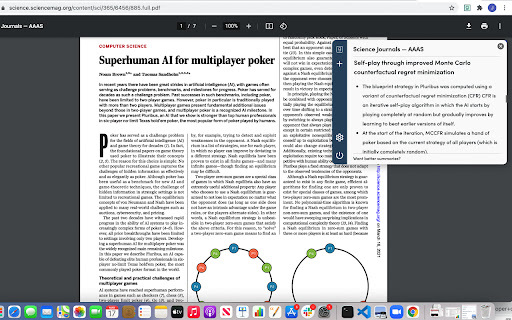
Genei is a powerful WebApp and Chrome Extension designed to revolutionize the way you approach background reading and research. With advanced AI capabilities, Genei offers a range of features that streamline the summarization process and enhance your overall research experience.

Discover the Power of Genei AI Chrome Extension

Whether you're a student, researcher, or professional, Genei is your go-to tool for extracting key information from lengthy texts and organizing your research effectively. By signing up on the website or installing the Chrome Extension, you gain access to a world of possibilities.

How to Make the Most of Genei AI Chrome Extension

Getting started with Genei is a breeze. Simply create an account on the website or install the Chrome Extension. Once you're set up, you can upload your documents for quick and accurate summarization or utilize the semantic-based search feature to find relevant information effortlessly.

Unlocking the Core Features of Genei AI Chrome Extension

AI Summarisation

Genei employs cutting-edge AI algorithms to analyze and extract the key points from any given text. Say goodbye to tedious manual summarization and let Genei do the heavy lifting for you.

Semantic/Question-based Search

With Genei's semantic-based search functionality, you can effortlessly find the answers you need. Simply input your query, and Genei will provide you with relevant and comprehensive results.

Cloud Storage

Genei offers seamless integration with cloud storage platforms, allowing you to store and access your research materials securely. Say goodbye to the hassle of managing multiple files and enjoy the convenience of centralized storage.

Document Editing

Genei understands that research is an iterative process. That's why it provides a built-in document editing feature, enabling you to make changes, add annotations, and collaborate with ease.

Genei AI Chrome Extension: Empowering Your Research

Summarizing Articles, Papers, and Reports

Whether you're dealing with extensive articles, lengthy papers, or comprehensive reports, Genei is here to help. It condenses the essential information, allowing you to grasp the key findings and insights efficiently.

Organizing Reading into Projects

With Genei, you can effortlessly organize your reading materials into projects. Group related documents together, add notes, and maintain a structured approach to your research.

Product source: Genei - Chrome Extension official website. Check the provider for current plans, limits and availability.

FAQ

Genei - Chrome Extension questions and answers

Product context and practical checks for evaluating Genei - Chrome Extension.

What is Genei - Chrome Extension used for?

Supercharge your research with Genei - Chrome Extension. AI summarisation and research enhancement in one powerful tool. Maximize productivity.

How do I get started with Genei - Chrome Extension?

Getting started with Genei is a breeze. Simply create an account on the website or install the Chrome Extension. Once you're set up, you can upload your documents for quick and accurate summarization or utilize the semantic-based search feature to find relevant information effortlessly.

Which capabilities are described for Genei - Chrome Extension?

AI SummarisationGenei employs cutting-edge AI algorithms to analyze and extract the key points from any given text. Say goodbye to tedious manual summarization and let Genei do the heavy lifting for you.Semantic/Question-based SearchWith Genei's semantic-based search functionality, you can effortlessly find the answers you need. Simply input your query, and Genei will provide you with relevant and comprehensive results.Cloud StorageGenei offers seamless integration with cloud storage platforms, allowing you to store and access your research materials securely. Say goodbye to the hassle of managing multiple files and enjoy the convenience of centralized storage.Document EditingGenei understands that research is an iterative process. That's why it provides a built-in document editing feature, enabling you to make changes, add annotations, and collaborate with ease.

What should I compare before choosing a Genei - Chrome Extension plan?

Check Genei - Chrome Extension’s current pricing page for included usage, renewal terms and any credit charges. Compare the cost of a usable result, including retries, rather than assuming that account registration includes free usage.

What inputs should I prepare for a Genei - Chrome Extension trial?

Compare support for source documents, style instructions, outlines and length limits. Check whether citations link to real material rather than merely looking like references.

How can I check the quality of a Genei - Chrome Extension result?

Verify names, dates, quotations and factual claims against the original sources. Edit tone, remove repetition and make sure the text answers the intended reader’s question.

Which export options should I check in Genei - Chrome Extension?

Check export to plain text, Markdown, documents or your publishing system. Formatting, headings and working links matter when moving a draft into production.

What is a practical way to test Genei - Chrome Extension against alternatives?

Use a real brief and a short source document. Compare factual accuracy, structure and editing time rather than accepting the longest or most confident draft.

What should I review before uploading material to Genei - Chrome Extension?

Read the provider’s rules on access, retention, deletion and use of uploaded material. Start with a non-confidential sample that you have permission to use.

Where is the official Genei - Chrome Extension website?

The website linked from this profile is https://chromewebstore.google.com/detail/genei-browse-fast/nfjjljpdljpaiecclcjijdmpkbomifbn. Use the provider’s own documentation, account area and support channels to confirm current product details.

Visit Genei - Chrome Extension