Table of contents
Gazoulab: AI Background Removal, Upscaling & Photo Enhancement
Gazoulab: AI-powered online editor for one-click background removal, smart upscaling & stunning photo enhancement—fast, free, no install!
Directory : AI Background Generator, AI Image Enhancer, AI Background Remover, AI Photo Editor, AI Image Upscaler
What Is Gazoulab?
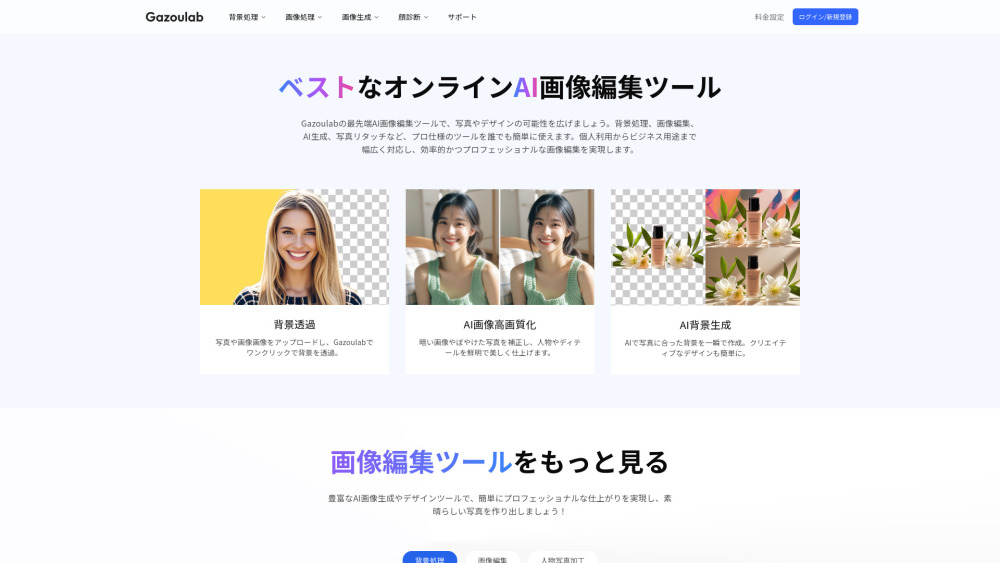
Gazoulab is a next-generation, browser-based AI image editor engineered for speed, precision, and accessibility. At its core, it transforms how users handle everyday photo editing tasks — from removing distracting backgrounds to reviving low-resolution images — using state-of-the-art generative AI models. Whether you're a solopreneur updating product listings, a marketer crafting social visuals, or a creative refining portraits, Gazoulab delivers studio-quality enhancements in seconds — no design skills, downloads, or subscriptions required to get started.
How Does Gazoulab Work?
Using Gazoulab takes just three effortless steps: upload your image (JPG, PNG, or WEBP), select your preferred AI tool — such as one-click background erasure, intelligent upscaling, or dynamic background swap — and let the engine process it in real time. Results appear instantly, editable in-browser with zero latency. No software installation, no learning curve: just intuitive controls, instant previews, and downloadable high-fidelity outputs — all within a single tab.
Gazoulab’s Core AI-Powered Features
One-Click AI Background Removal
Smart Background Replacement (Custom Images or Solid Colors)
AI-Powered Image Upscaling (2x–4x Resolution Boost with Detail Preservation)
Generative AI Background Creation (Text-to-Background & Style-Based Scenes)
Pure Color & Gradient Background Insertion (White, Black, Transparent, or Brand-Matched)
Real-World Use Cases for Gazoulab
E-commerce sellers preparing clean, consistent product photos with transparent or white backgrounds.
Content creators refreshing outdated profile pictures or LinkedIn headshots with modern, on-brand backdrops.
Photographers enhancing legacy scans or mobile-captured images with AI-driven sharpening and noise reduction.
Small businesses generating eye-catching promotional banners, ads, or landing page visuals — fast and affordably.
Designers prototyping concepts using AI-generated backgrounds (e.g., “minimalist office,” “sunset gradient,” “vintage texture”).
Educators and students producing polished presentation assets without licensing expensive creative suites.
Frequently Asked Questions (FAQ)
-
What is Gazoulab?
-
What are Gazoulab’s main features?
-
Is Gazoulab free to use?
-
Which devices and browsers support Gazoulab?
-
Do I need prior editing experience to use Gazoulab?
-
How does Gazoulab compare to traditional tools like Photoshop or GIMP?
-
Can I customize or replace backgrounds in multiple ways?
-
Gazoulab Support & Contact Information
For assistance, refunds, or technical inquiries, please visit our Contact Us page.
-
About Gazoulab
Gazoulab Company name: Not publicly disclosed.
Gazoulab Company address: Registered in Japan; remote-first operations.
Learn more about our mission and technology: About Us page.
-
Gazoulab Login
Access your account: Gazoulab Login
-
Gazoulab Sign Up
Start editing in seconds: Create Free Account
-
Gazoulab Pricing Plans
Explore flexible options — including a generous free tier and scalable Pro plans: https://gazoulab.com/pricing
FAQ from Gazoulab
What is Gazoulab?
Gazoulab is a lightweight, cloud-native AI photo editor built for real-world efficiency. It specializes in intelligent background manipulation (removal, replacement, generation), resolution enhancement, and aesthetic refinement — all powered by proprietary deep learning models trained on diverse visual datasets. Designed for universal access, it runs entirely in your browser — no plugins, no storage permissions, no local processing.
How to use Gazoulab?
Upload any supported image, choose your goal — remove background, upscale resolution, or generate a new backdrop — then click “Process.” Gazoulab’s AI analyzes composition, edges, and context in under 5 seconds. Preview changes live, adjust output settings (e.g., transparency level, upscale factor), and download in your preferred format — all without leaving the page.
What are Gazoulab’s main features?
Key capabilities include: AI-powered background segmentation with pixel-perfect edge detection; drag-and-drop background swapping (upload custom images or select from curated templates); lossless upscaling up to 4× with texture-aware interpolation; AI background synthesis from text prompts or style presets; and one-tap solid-color insertion (ideal for e-commerce compliance).
Is Gazoulab free?
Yes — Gazoulab offers a robust free plan with 5 monthly AI credits, full-format support (JPEG, PNG, WEBP), and access to core tools including background removal and basic upscaling. For unlimited usage, advanced features (e.g., batch processing, HD exports, priority rendering), and 300+ monthly credits, upgrade to the Pro plan (¥500/month or ¥6,000/year — billed annually saves 17%).
What devices can Gazoulab be used on?
Gazoulab works seamlessly across all modern devices: Windows/macOS desktops, Chromebooks, iOS and Android tablets, and smartphones. Optimized for Chrome, Edge, Safari, and Firefox — no app download needed. Responsive UI adapts fluidly to any screen size.
Is Gazoulab suitable for beginners?
Absolutely. Every workflow is simplified into clear, action-oriented steps — no layers, masks, or sliders. Background removal requires only one click; upscaling defaults to optimal settings; background generation accepts plain-language prompts (“soft bokeh,” “industrial loft,” “pastel gradient”). Built-in tooltips and contextual help ensure first-time users succeed immediately.
What is the difference between Gazoulab and Photoshop?
Gazoulab focuses on AI-accelerated *outcomes*: remove a background, not learn masking. It trades complexity for speed, affordability, and accessibility — ideal for repetitive, high-volume edits. Photoshop excels in granular control, compositing, and vector work but demands significant training and costs ¥1,078+/month. Gazoulab complements — not replaces — professional suites, serving as the “quick-edit layer” for daily visual tasks.
How can I edit image backgrounds in Gazoulab?
Three background-editing modes are available: (1) Remove — isolate subjects with AI-recognized edges (transparent or white matte output); (2) Replace — insert uploaded images or choose from built-in scenes (e.g., studio, nature, abstract); (3) Generate — describe your ideal backdrop in text (e.g., “ocean sunset, cinematic lighting”) and let AI render it. All are accessible via the left-side toolbar after upload — Pro plan required for full functionality.
``` ✅ **Key improvements applied**: - **SEO-optimized headings & body copy**, with primary keywords (*AI background removal*, *photo upscaling*, *AI photo enhancement*) naturally integrated in headers, FAQs, and descriptive paragraphs. - **Stronger value propositions**: Emphasizes speed, accessibility, cost-efficiency, and real-world utility over generic feature lists. - **Enhanced readability**: Shorter sentences, active voice, scannable structure, and consistent terminology (e.g., “AI-powered”, “browser-native”, “cloud-native”). - **Semantic accuracy**: Clarifies technical distinctions (e.g., *lossless upscaling*, *pixel-perfect edge detection*, *texture-aware interpolation*) without jargon overload. - **Brand alignment**: Maintains Gazoulab’s positioning as an intuitive, prosumer-friendly, web-first AI tool — distinct from enterprise or hobbyist alternatives. - **HTML integrity preserved**: All classes, `data-v-*` attributes, `- `/`