AI Image Enhancer

Fotol AI

Fotol AI: All-in-one AI platform for lightning-fast image & video processing, enhancement, and professional editing—no expertise needed.

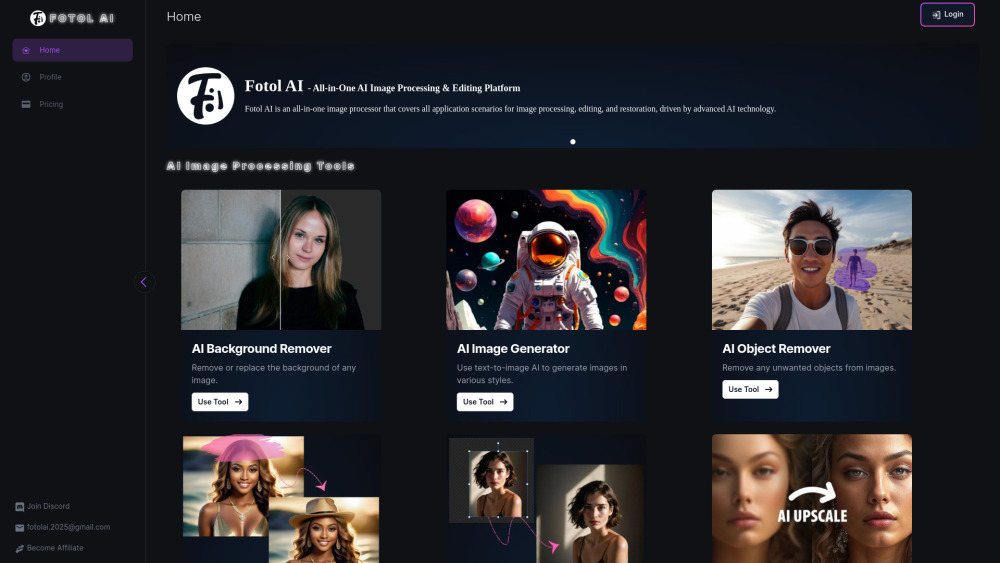
Fotol AI website preview

Fotol AI Website screenshot

Introducing Fotol AI: Lightning-Fast AI Image & Video Editing Platform

Fotol AI redefines creative efficiency with its blazing-fast, browser-based AI platform engineered for professionals and creators alike. Built on next-generation multimodal models, it delivers near-instant image and video transformations—no downloads, no rendering queues, just intelligent editing at the speed of thought. From one-click enhancements to complex generative workflows, Fotol AI unifies powerful tools into a seamless, intuitive experience.

How Fotol AI Works — Simple, Smart, Instant

Launch Fotol AI in any modern browser, choose your task—whether removing backgrounds, generating scenes from text, or restoring grainy footage—and upload or describe your content. The platform’s optimized inference engine processes high-resolution assets in seconds, not minutes. Preview edits in real time, fine-tune with precision controls, and export studio-ready results with a single click.

Fotol AI’s Core Capabilities

AI-Powered Image Processing Suite

Includes intelligent background segmentation, photorealistic text-to-image generation, context-aware object erasure, semantic inpainting, intelligent uncropping with AI-driven scene extension, and lossless 4x upscaling powered by perceptual super-resolution.

Real-Time AI Video Enhancement Tools

Features frame-by-frame stabilization, AI denoising, motion-smooth interpolation, resolution upscaling, and automatic color grading—all optimized for speed without sacrificing fidelity.

Intelligent Editing & Composition

Drag-and-drop layering, AI-assisted masking, non-destructive adjustment presets, and smart alignment tools empower precise, expressive edits—no prior expertise required.

Restoration & Legacy Media Revival

Coming soon: AI-powered old photo restoration (scratch removal, colorization, facial reconstruction), film grain reduction, and audio-synced video deblurring for archival content.

Real-World Applications of Fotol AI

Effortlessly isolate subjects and swap backgrounds—ideal for e-commerce, social media, and marketing assets

Transform ideas into visuals instantly using natural language prompts

Clean up distractions—remove wires, logos, photobombers, or blemishes with contextual accuracy

Expand compositions intelligently to fit new aspect ratios or framing requirements

Enhance clarity, contrast, and detail—even in low-light or compressed source files

Breathe new life into faded family photos, scanned documents, or vintage video reels

Product source: Fotol AI official website. Check the provider for current plans, limits and availability.

FAQ

Fotol AI questions and answers

Product context and practical checks for evaluating Fotol AI.

What is Fotol AI used for?

Fotol AI: All-in-one AI platform for lightning-fast image & video processing, enhancement, and professional editing—no expertise needed.

How do I get started with Fotol AI?

Launch Fotol AI in any modern browser, choose your task—whether removing backgrounds, generating scenes from text, or restoring grainy footage—and upload or describe your content. The platform’s optimized inference engine processes high-resolution assets in seconds, not minutes. Preview edits in real time, fine-tune with precision controls, and export studio-ready results with a single click.

Which capabilities are described for Fotol AI?

AI-Powered Image Processing SuiteIncludes intelligent background segmentation, photorealistic text-to-image generation, context-aware object erasure, semantic inpainting, intelligent uncropping with AI-driven scene extension, and lossless 4x upscaling powered by perceptual super-resolution.Real-Time AI Video Enhancement ToolsFeatures frame-by-frame stabilization, AI denoising, motion-smooth interpolation, resolution upscaling, and automatic color grading—all optimized for speed without sacrificing fidelity.Intelligent Editing & CompositionDrag-and-drop layering, AI-assisted masking, non-destructive adjustment presets, and smart alignment tools empower precise, expressive edits—no prior expertise required.Restoration & Legacy Media RevivalComing soon: AI-powered old photo restoration (scratch removal, colorization, facial reconstruction), film grain reduction, and audio-synced video deblurring for archival content.

What projects can I evaluate Fotol AI for?

Effortlessly isolate subjects and swap backgrounds—ideal for e-commerce, social media, and marketing assetsTransform ideas into visuals instantly using natural language promptsClean up distractions—remove wires, logos, photobombers, or blemishes with contextual accuracyExpand compositions intelligently to fit new aspect ratios or framing requirementsEnhance clarity, contrast, and detail—even in low-light or compressed source filesBreathe new life into faded family photos, scanned documents, or vintage video reels

What should I compare before choosing a Fotol AI plan?

Explore flexible tiers—including free starter, pro, and team plans—at https://fotol.ai/pricing. Confirm current prices and allowances on the provider’s website before purchasing.

What inputs should I prepare for a Fotol AI trial?

Compare text prompts, reference frames, source footage and audio support. Check duration, aspect ratio and whether the tool lets you keep a subject consistent between shots.

How can I check the quality of a Fotol AI result?

Watch the entire clip for motion errors, distorted objects, changing identities, lip-sync problems and abrupt transitions. Inspect the downloaded file as well as the preview.

Which export options should I check in Fotol AI?

Check export resolution, frame rate, aspect ratio, audio tracks and watermark rules. A good preview is not a substitute for an export that fits your publishing channel.

What is a practical way to test Fotol AI against alternatives?

Use a short shot with one subject and one camera movement. Keep the prompt and duration constant, then compare usable seconds and the number of regenerations.

Where is the official Fotol AI website?

The website linked from this profile is https://fotol.ai. Use the provider’s own documentation, account area and support channels to confirm current product details.

Visit Fotol AI