AI Cooking Assistant

FoodCoach - AI Food Scanner

FoodCoach scans food instantly with AI—personalized dietary insights, allergen alerts & nutrition facts in seconds. Eat smarter, not harder!

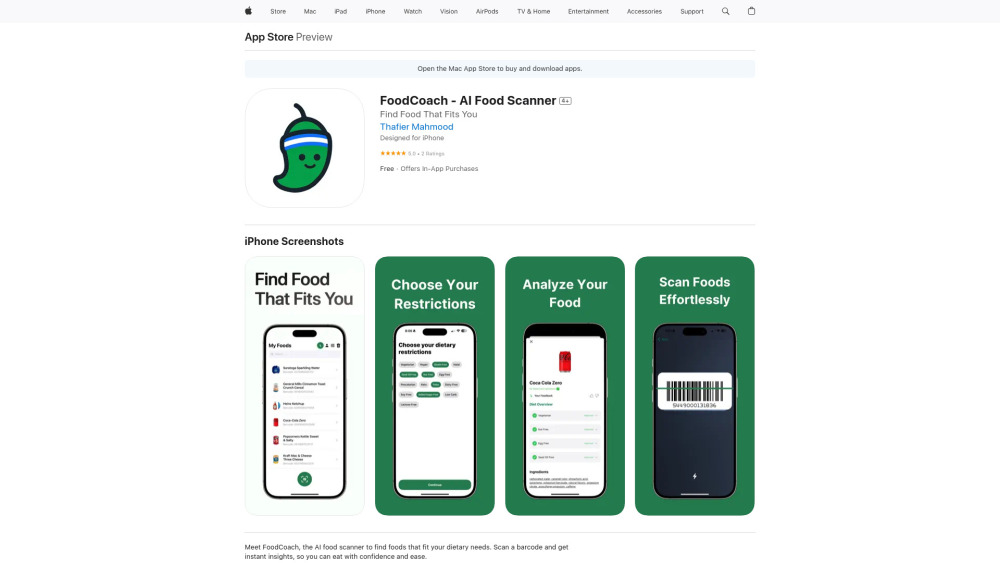
FoodCoach - AI Food Scanner website preview

FoodCoach - AI Food Scanner Website screenshot

Introducing FoodCoach — Your Intelligent Food Companion

FoodCoach is a next-generation AI food scanner that transforms how you interact with everyday groceries. Using advanced computer vision and nutritional AI, it decodes food labels in real time—going beyond barcodes to analyze ingredients, hidden allergens, certifications, and dietary compliance. Whether you follow a plant-based lifestyle, observe halal or kosher guidelines, manage celiac disease, or simply prioritize clean eating, FoodCoach delivers personalized, trustworthy insights at the point of decision.

How It Works — Simple, Smart, Instant

Begin by setting your profile: choose from 20+ dietary frameworks—including vegan, pescatarian, low-FODMAP, dairy-free, nut-free, halal-certified, or custom combinations. Then, open the camera, align it with any product’s barcode (or even ingredient panel), and let FoodCoach process the data in under two seconds. No manual label reading. No guesswork—just clear, actionable guidance powered by continuously updated food databases and regulatory intelligence.

Key Capabilities of FoodCoach

Real-time AI label interpretation

Barcode + image-based scanning for broader coverage

Allergen detection with severity scoring (e.g., “high-risk trace soy”)

Dietary alignment engine: flags compatibility across 15+ global standards

Personalized alerts for cross-contamination, processing aids, and certification validity

Real-World Scenarios Where FoodCoach Makes a Difference

Verify if a snack meets strict vegan standards—not just “plant-based” marketing.

Confirm halal authenticity by cross-referencing manufacturer certifications and ingredient sourcing.

Spot hidden gluten derivatives in sauces or seasonings before they trigger symptoms.

Get instant warnings for top-14 allergens—even when listed under technical names like “sodium caseinate” or “natural flavors.”

Compare two similar products side-by-side based on your unique health goals and restrictions.

Product source: FoodCoach - AI Food Scanner official website. Check the provider for current plans, limits and availability.

FAQ

FoodCoach - AI Food Scanner questions and answers

Product context and practical checks for evaluating FoodCoach - AI Food Scanner.

What is FoodCoach - AI Food Scanner used for?

FoodCoach scans food instantly with AI—personalized dietary insights, allergen alerts & nutrition facts in seconds. Eat smarter, not harder!

How do I get started with FoodCoach - AI Food Scanner?

Begin by setting your profile: choose from 20+ dietary frameworks—including vegan, pescatarian, low-FODMAP, dairy-free, nut-free, halal-certified, or custom combinations. Then, open the camera, align it with any product’s barcode (or even ingredient panel), and let FoodCoach process the data in under two seconds. No manual label reading. No guesswork—just clear, actionable guidance powered by continuously updated food databases and regulatory intelligence.

Which capabilities are described for FoodCoach - AI Food Scanner?

Real-time AI label interpretationBarcode + image-based scanning for broader coverageAllergen detection with severity scoring (e.g., “high-risk trace soy”)Dietary alignment engine: flags compatibility across 15+ global standardsPersonalized alerts for cross-contamination, processing aids, and certification validity

What should I compare before choosing a FoodCoach - AI Food Scanner plan?

Check FoodCoach - AI Food Scanner’s current pricing page for included usage, renewal terms and any credit charges. Compare the cost of a usable result, including retries, rather than assuming that account registration includes free usage.

What inputs should I prepare for a FoodCoach - AI Food Scanner trial?

Look for text prompts, image references, masks or sketches as appropriate. Compare composition control, supported upload types and the ability to revise a selected area.

How can I check the quality of a FoodCoach - AI Food Scanner result?

Inspect text, hands, edges, reflections and repeated objects at full size. Check that important product or brand details survive editing.

Which export options should I check in FoodCoach - AI Food Scanner?

Compare pixel dimensions, transparency, file formats and any enlargement options. Confirm that the downloaded result works in your design or publishing software.

What is a practical way to test FoodCoach - AI Food Scanner against alternatives?

Prepare a brief with a subject, composition, lighting and required output size. Test a first generation and a targeted revision to see how much control you retain.

What should I review before uploading material to FoodCoach - AI Food Scanner?

Read the provider’s rules on access, retention, deletion and use of uploaded material. Start with a non-confidential sample that you have permission to use.

Where is the official FoodCoach - AI Food Scanner website?

The website linked from this profile is https://apps.apple.com/us/app/foodcoach-ai-food-scanner/id6746601642. Use the provider’s own documentation, account area and support channels to confirm current product details.

Visit FoodCoach - AI Food Scanner