Table of contents
fluxcontext.app : AI Image Enhancement, Restoration & Transformation
fluxcontext.app: AI-powered online image enhancement, restoration & transformation—effortlessly elevate photos in seconds.
Directory : AI Image Enhancer, AI Photo Restoration, AI Image Generator, AI Photo Editor, AI Watermark Remover, Object Remover AI, AI Anime Generator
What is fluxcontext.app?
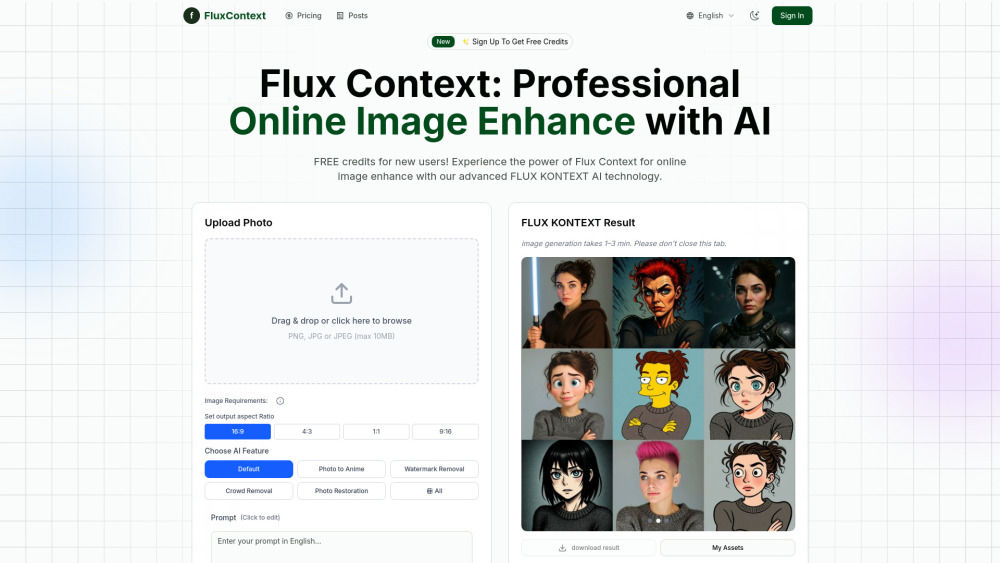
fluxcontext.app is a next-generation AI-powered image transformation platform built on proprietary FLUX KONTEXT intelligence. Designed for creators, photographers, designers, and everyday users, it delivers studio-grade enhancements—restoring faded memories, erasing visual distractions, reimagining realism as anime, and refining detail—all in seconds. Unlike generic upscalers, Flux Context understands context: lighting, texture, composition, and intent—so every output looks intentional, not algorithmic.
How to use fluxcontext.app?
Achieve professional results in under a minute: 1. Upload — Drag & drop any PNG, JPG, or JPEG (≤10MB). 2. Select & Customize — Choose from 6 intelligent modes (e.g., “Anime Style Transfer”, “Smart Crowd Erase”, “Legacy Photo Revive”) and fine-tune parameters like aspect ratio (1:1, 4:3, 16:9, 9:16), enhancement strength, or descriptive prompt guidance. 3. Generate & Export — Instantly preview, download high-res outputs (no compression), and share polished visuals—ready for social feeds, portfolios, or client delivery.
fluxcontext.app’s Core Capabilities
AI Anime Style Conversion
Intelligent Watermark & Text Removal
Context-Aware Crowd Elimination
Historic Photo Restoration
Seamless Object Replacement
Precision Image Enhancement Engine
Flexible Output Aspect Ratio Control
Real-World Use Cases
Turn personal photos into expressive anime portraits or manga-inspired scenes.
Clean stock images, screenshots, or marketing assets by removing logos, watermarks, and embedded text.
Reclaim serene landscapes or architecture shots by intelligently deleting photobombers and background crowds.
Breathe new life into scanned heirlooms—repair tears, reduce noise, restore color fidelity, and sharpen motion blur.
Swap objects non-destructively: replace signage, furniture, vehicles—or even skies—with photorealistic consistency.
Accelerate content creation for Instagram, TikTok, and newsletters with eye-catching, AI-refined visuals.
Elevate deliverables for clients—from e-commerce product shots to editorial illustrations—without hiring retouchers.
Frequently Asked Questions
-
What makes Flux Context different from other AI image tools?
-
How does fluxcontext.app protect user privacy and image ownership?
-
What are the pricing tiers—and do free credits include full features?
-
Which file types and resolutions yield optimal enhancement quality?
-
What’s the average processing time per image?
-
Can I combine multiple enhancement functions in one workflow?
-
Are there API access options for developers or enterprise integration?
-
Do enhanced images retain EXIF metadata or support batch processing?
-
fluxcontext.app Support & Contact
Reach our dedicated support team at [email protected]. For urgent inquiries, visit the Contact Us page.
-
About FluxContext
Company Name: FluxContext Mission: To democratize professional-grade visual intelligence through ethical, transparent, and context-aware AI.
Learn more about our vision, technology, and values on the About Us page.
-
fluxcontext.app Login
Access your dashboard: https://fluxcontext.app/auth/signin
-
fluxcontext.app Sign Up
Start with 10 free credits: https://fluxcontext.app/auth/signup
-
fluxcontext.app Pricing
Transparent, pay-as-you-go plans — no subscriptions required: https://fluxcontext.app/pricing
FAQ from fluxcontext.app
What is fluxcontext.app?
A purpose-built AI platform that transforms static images using contextual understanding—not just pixels. Leveraging FLUX KONTEXT’s multimodal architecture, it interprets scene semantics, artistic style, and degradation patterns to deliver natural, high-fidelity enhancements across restoration, transformation, and creative reinterpretation.
How to use fluxcontext.app?
No technical skills needed. Upload → Select mode (e.g., “Restore Old Photo”, “Remove People”, “Go Anime”) → Adjust optional settings (aspect ratio, prompt, intensity) → Click “Enhance”. Your result renders in seconds—download lossless PNG or JPG with full resolution retention.
What makes Flux Context different from other AI image tools?
Most tools apply global filters. Flux Context uses localized, context-sensitive inference—preserving facial expressions during crowd removal, maintaining brushstroke integrity in anime conversion, and distinguishing between dust specks and intentional texture in photo restoration. It’s AI with visual literacy.
How does fluxcontext.app protect user privacy and image ownership?
Your images are encrypted in transit and at rest. They’re deleted from servers within 24 hours of processing. FluxContext never stores, shares, sells, or trains models on your uploads—and explicitly prohibits third-party access. Full compliance with GDPR and CCPA standards.
What are the pricing tiers—and do free credits include full features?
Yes—free credits unlock all core functions (including watermark removal and anime conversion) with no feature gating. Paid plans start at $9 for 100 credits, offering priority processing, higher resolution limits, and watermark-free exports. Volume discounts available.
Which file types and resolutions yield optimal enhancement quality?
Best results come from originals ≥1200px on the shortest side. Supports JPG, PNG, and JPEG (up to 10MB). While low-res inputs are accepted, AI reconstruction performs best when meaningful detail exists—even if subtle. Avoid heavily compressed or blurry source files for critical projects.
What’s the average processing time per image?
Typically 45–90 seconds for standard tasks. Complex operations (e.g., multi-object replacement + style transfer) may take up to 2.5 minutes. All jobs include real-time progress tracking and email notifications upon completion.
Can I combine multiple enhancement functions in one workflow?
Yes—via sequential processing. Enhance once (e.g., restore), download, then re-upload for a second operation (e.g., convert to anime). Future updates will introduce native multi-stage pipelines with memory-aware context chaining.
Do enhanced images retain EXIF metadata or support batch processing?
EXIF data is preserved by default unless manually stripped during upload. Batch processing is currently available for Pro and Team plans—supporting up to 50 images per queue with customizable presets and auto-download ZIPs.