AI Tools Directory

Flowie – Custom Webflow Solutions

Unlock Webflow's potential with Flowie! Custom solutions, 500+ resources, video tutorials, code snippets, and AI Code Assistant. Explore pricing, reviews, and more!

Flowie – Custom Webflow Solutions website preview

Flowie – Custom Webflow Solutions Website screenshot

What is Flowie – Custom Webflow Solutions?

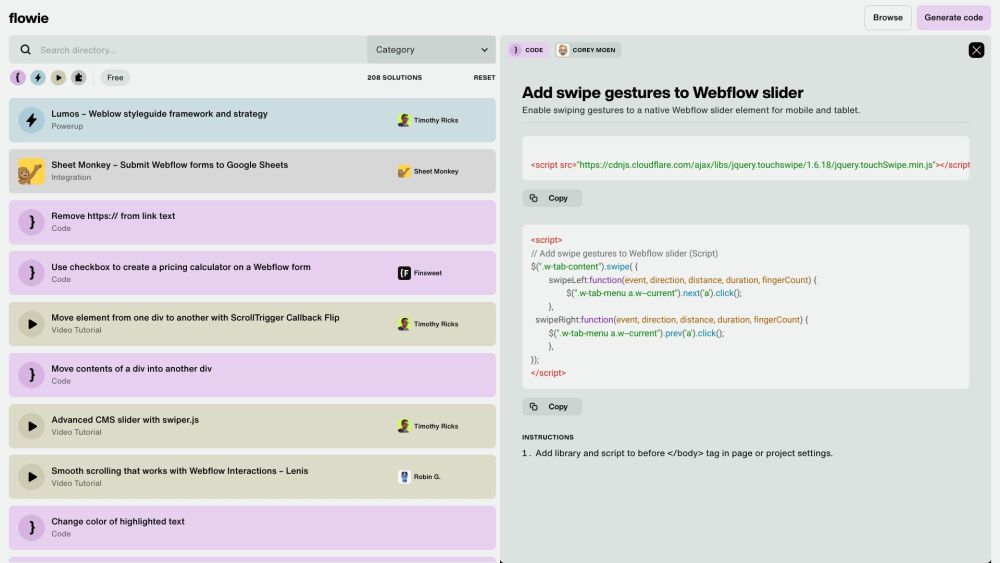
Flowie is a comprehensive platform dedicated to providing bespoke solutions for Webflow users. It features an extensive library of resources, including code snippets, video tutorials, unique power-ups, and an innovative AI Code Assistant. Users can explore over 500 pre-built solutions or create custom code with the help of the AI assistant.

How to use Flowie – Custom Webflow Solutions?

Using Flowie is straightforward. Users can navigate through various categories like CSS & Styling, Components, Forms, SEO, and more. The search functionality helps in locating specific solutions. Once a relevant solution is found, users can click to access the code or watch a video tutorial. The Webflow AI Code Assistant is available for those needing help with code generation. The platform is optimized for desktop and laptop browsers with a minimum width of 991px.

Flowie – Custom Webflow Solutions's Core Features

Key features of Flowie include browsing and searching for specific solutions, AI-assisted code generation, access to detailed video tutorials, and various power-ups. Integration options such as Google Sheets connectivity, automated abandoned cart recovery, multistep forms, and real-time pageview tracking in Webflow CMS are also provided.

Flowie – Custom Webflow Solutions's Use Cases

Flowie is ideal for Webflow designers and developers seeking to enhance their projects with custom solutions. It's particularly beneficial for those looking to save time by utilizing existing code snippets and video tutorials. Additionally, businesses aiming to optimize their Webflow sites for better styling, form handling, SEO, and more can greatly benefit from Flowie's resources.

Product source: Flowie – Custom Webflow Solutions official website. Check the provider for current plans, limits and availability.

FAQ

Flowie – Custom Webflow Solutions questions and answers

Product context and practical checks for evaluating Flowie – Custom Webflow Solutions.

What is Flowie – Custom Webflow Solutions used for?

Unlock Webflow's potential with Flowie! Custom solutions, 500+ resources, video tutorials, code snippets, and AI Code Assistant. Explore pricing, reviews, and more!

How do I get started with Flowie – Custom Webflow Solutions?

Using Flowie is straightforward. Users can navigate through various categories like CSS & Styling, Components, Forms, SEO, and more. The search functionality helps in locating specific solutions. Once a relevant solution is found, users can click to access the code or watch a video tutorial. The Webflow AI Code Assistant is available for those needing help with code generation. The platform is optimized for desktop and laptop browsers with a minimum width of 991px.

Which capabilities are described for Flowie – Custom Webflow Solutions?

Key features of Flowie include browsing and searching for specific solutions, AI-assisted code generation, access to detailed video tutorials, and various power-ups. Integration options such as Google Sheets connectivity, automated abandoned cart recovery, multistep forms, and real-time pageview tracking in Webflow CMS are also provided.

What projects can I evaluate Flowie – Custom Webflow Solutions for?

Flowie is ideal for Webflow designers and developers seeking to enhance their projects with custom solutions. It's particularly beneficial for those looking to save time by utilizing existing code snippets and video tutorials. Additionally, businesses aiming to optimize their Webflow sites for better styling, form handling, SEO, and more can greatly benefit from Flowie's resources.

What should I compare before choosing a Flowie – Custom Webflow Solutions plan?

Check Flowie – Custom Webflow Solutions’s current pricing page for included usage, renewal terms and any credit charges. Compare the cost of a usable result, including retries, rather than assuming that account registration includes free usage.

What inputs should I prepare for a Flowie – Custom Webflow Solutions trial?

Compare text prompts, reference frames, source footage and audio support. Check duration, aspect ratio and whether the tool lets you keep a subject consistent between shots.

How can I check the quality of a Flowie – Custom Webflow Solutions result?

Watch the entire clip for motion errors, distorted objects, changing identities, lip-sync problems and abrupt transitions. Inspect the downloaded file as well as the preview.

Which export options should I check in Flowie – Custom Webflow Solutions?

Check export resolution, frame rate, aspect ratio, audio tracks and watermark rules. A good preview is not a substitute for an export that fits your publishing channel.

What is a practical way to test Flowie – Custom Webflow Solutions against alternatives?

Use a short shot with one subject and one camera movement. Keep the prompt and duration constant, then compare usable seconds and the number of regenerations.

Where is the official Flowie – Custom Webflow Solutions website?

The website linked from this profile is https://www.promptdodo.com. Use the provider’s own documentation, account area and support channels to confirm current product details.

Visit Flowie – Custom Webflow Solutions