What is the ezCoders Chrome Extension?
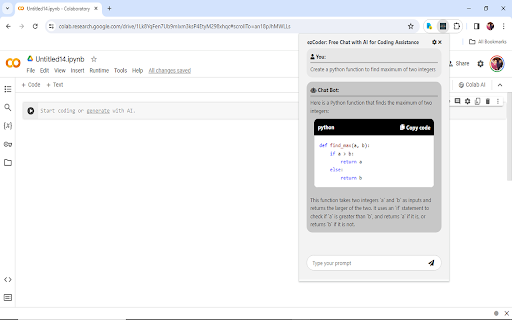
The ezCoders Chrome extension is a powerful tool designed to enhance the coding process by integrating AI-powered assistance directly within your browser. It allows developers to interact with an advanced AI to get help with coding challenges, making it easier to debug, solve problems, and write code more efficiently.
How to Use the ezCoders Chrome Extension?
To use ezCoders, first install the extension from the Chrome Web Store. Once installed, simply open your preferred coding environment, and you’ll be able to interact with the AI model in real-time. Ask coding-related questions, request code snippets, or even get help with debugging—right within your browser.
Core Features of the ezCoders Chrome Extension
AI-Powered Coding Assistance
The main feature of ezCoders is its AI chat support, providing users with instant assistance. Whether you need help solving an error or figuring out the next step in your coding process, the AI is available to provide insights and suggestions.
Key Use Cases of ezCoders Chrome Extension
Quick Access to Coding Solutions
From providing real-time answers to coding problems to generating example code snippets, ezCoders can assist developers of all levels. It’s especially useful for new programmers seeking guidance or experienced coders needing quick solutions.