AI Advertising Assistant

Dioptra

Dioptra is an open source data curation and management platform designed for computer vision, natural language processing (NLP), and large language models (LLMs). It helps users curate valuable unlabeled data, register metadata, diagnose model failure modes, and integrate with labeling and retraining stacks.

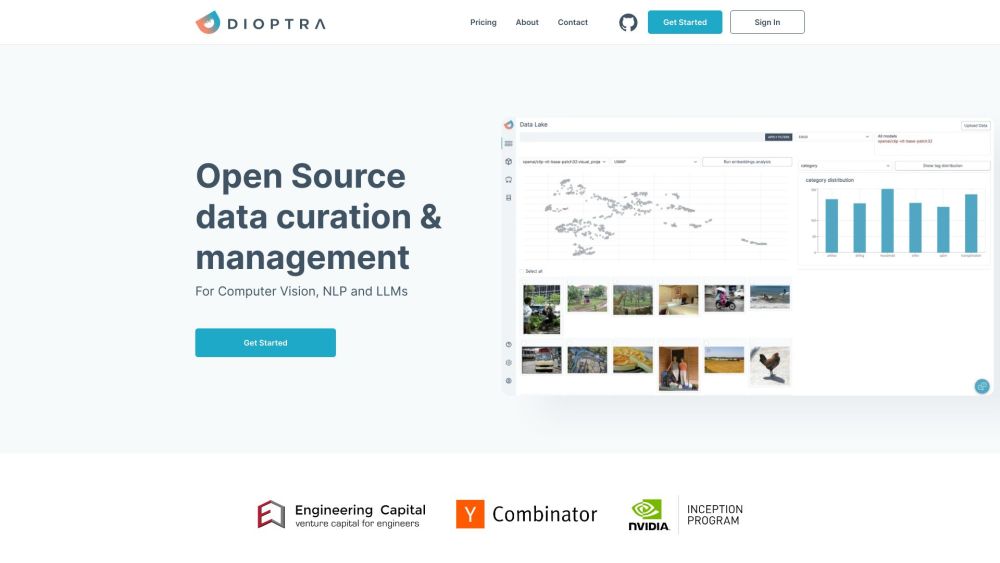
Dioptra website preview

Dioptra Website screenshot

What is Dioptra?

Dioptra is a versatile, open-source platform for data curation and management, specifically crafted for computer vision, natural language processing (NLP), and large language models (LLMs). It empowers users to curate essential unlabeled data, manage metadata, diagnose model performance issues, and seamlessly integrate with labeling and retraining processes.

How to use Dioptra?

1. Curate the most critical unlabeled data to enhance model accuracy and domain coverage.
2. Register your metadata with Dioptra to keep your data secure and accessible.
3. Diagnose and understand model failure modes and performance regressions using Dioptra's diagnostic tools.
4. Utilize active learning miners to select the most valuable unlabeled data.
5. Integrate Dioptra with your labeling and retraining workflows using its comprehensive APIs.

Dioptra's Core Features

1. Data Curation: Optimize your model by curating the most valuable unlabeled data. 2. Metadata Registration: Securely manage and access your data by registering metadata. 3. Diagnostics: Identify and resolve model issues using Dioptra's data-centric diagnostic tools. 4. Active Learning Miners: Efficiently sample the most valuable data for labeling. 5. Labeling and Retraining Integration: Seamlessly connect with your labeling and retraining systems.

Dioptra's Use Cases

1. Enhance model performance on difficult cases. 2. Accelerate training cycles by up to three times. 3. Reduce labeling expenses by up to 70%. 4. Systematically curate data at scale for specific applications.

  • Dioptra Support Email & Customer Service Contact

    For customer support, contact Dioptra at: [email protected]

  • Dioptra Company Information

    Company Name: Dioptra, Inc.

Product source: Dioptra official website. Check the provider for current plans, limits and availability.

FAQ

Dioptra questions and answers

Product context and practical checks for evaluating Dioptra.

What is Dioptra used for?

Dioptra is an open source data curation and management platform designed for computer vision, natural language processing (NLP), and large language models (LLMs). It helps users curate valuable unlabeled data, register metadata, diagnose model failure modes, and integrate with labeling and retraining stacks.

How do I get started with Dioptra?

1. Curate the most critical unlabeled data to enhance model accuracy and domain coverage. 2. Register your metadata with Dioptra to keep your data secure and accessible. 3. Diagnose and understand model failure modes and performance regressions using Dioptra's diagnostic tools. 4. Utilize active learning miners to select the most valuable unlabeled data. 5. Integrate Dioptra with your labeling and retraining workflows using its comprehensive APIs.

Which capabilities are described for Dioptra?

1. Data Curation: Optimize your model by curating the most valuable unlabeled data. 2. Metadata Registration: Securely manage and access your data by registering metadata. 3. Diagnostics: Identify and resolve model issues using Dioptra's data-centric diagnostic tools. 4. Active Learning Miners: Efficiently sample the most valuable data for labeling. 5. Labeling and Retraining Integration: Seamlessly connect with your labeling and retraining systems.

What projects can I evaluate Dioptra for?

1. Enhance model performance on difficult cases. 2. Accelerate training cycles by up to three times. 3. Reduce labeling expenses by up to 70%. 4. Systematically curate data at scale for specific applications. Dioptra Support Email & Customer Service Contact For customer support, contact Dioptra at: [email protected] Dioptra Company Information Company Name: Dioptra, Inc.

What should I compare before choosing a Dioptra plan?

Check Dioptra’s current pricing page for included usage, renewal terms and any credit charges. Compare the cost of a usable result, including retries, rather than assuming that account registration includes free usage.

What inputs should I prepare for a Dioptra trial?

Look for text prompts, image references, masks or sketches as appropriate. Compare composition control, supported upload types and the ability to revise a selected area.

How can I check the quality of a Dioptra result?

Inspect text, hands, edges, reflections and repeated objects at full size. Check that important product or brand details survive editing.

Which export options should I check in Dioptra?

Compare pixel dimensions, transparency, file formats and any enlargement options. Confirm that the downloaded result works in your design or publishing software.

What is a practical way to test Dioptra against alternatives?

Prepare a brief with a subject, composition, lighting and required output size. Test a first generation and a targeted revision to see how much control you retain.

Where is the official Dioptra website?

The website linked from this profile is https://www.promptdodo.com. Use the provider’s own documentation, account area and support channels to confirm current product details.

Visit Dioptra