Text&ampWriting

Digen AI

Digen AI turns prompts and photos into short videos with Real Motion 3.5, Seedance 2.0, Veo 3.1, and MiniSora agent skills. Ultra $4.99/mo.

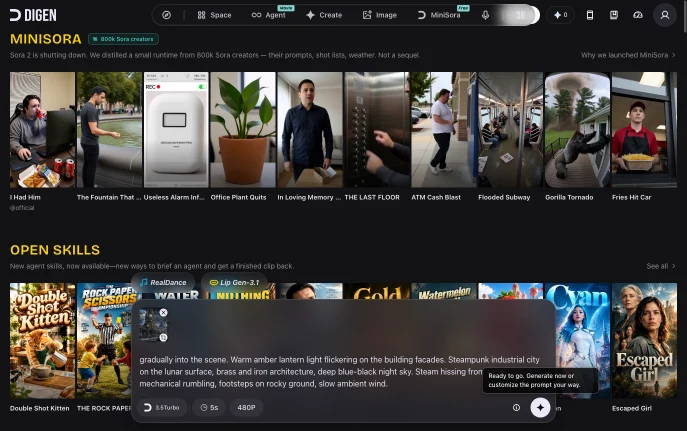
Digen AI website preview

What is Digen AI?

Digen AI is an online workspace for creating short AI-generated videos and images. It brings Digen’s Real Motion 3.5 series together with external tools such as Seedance 2.0 and Google Veo 3.1 Pro, allowing creators to compare different generation styles from one interface. The platform also includes guided agent skills that can turn a brief idea into a more complete video concept.

How to Use Digen AI

Visit digen.ai and enter a prompt in the composer, or upload an image and use the @ function to add a character or subject. Choose a model, video duration and output quality before starting the generation. The standard workspace may open with Real Motion 3.5 Turbo, a five-second duration and 480P resolution, while other settings depend on the selected plan and model.

For structured projects, open the Agent area and select a skill such as MiniSora, Movie, Drama, YouTuber or Music. These tools are designed for specific content types. Movie Maker, for example, can transform a short description into a cinematic clip with a beginning, visual action and finished shot.

Digen AI: key features

  • Real Motion 3.5 Digen’s in-house models can animate still images, create facial or lip movement and add motion to people, objects and scenes.
  • Seedance and Veo access Eligible paid accounts can use models including Seedance 2.0 and Veo 3.1 Pro alongside other image and video generators.
  • Prompt-based MiniSora Digen presents MiniSora as a free creative option for turning descriptions, shot ideas and visual directions into video output.
  • Enhancement utilities The toolkit includes image and video upscaling, frame-rate enhancement, lip synchronization, text to speech and tools for handling watermarks.
  • Higher-quality exports Selected plans support longer clips, 1080p output, watermark-free downloads and commercial usage options.

Why Choose Digen AI?

Digen AI is useful for creators who want to test several video models without moving between multiple websites. A concept can be generated with Real Motion 3.5, then recreated with Seedance 2.0 or Veo 3.1 Pro to compare movement, realism, pacing and image consistency. The shared credit system also makes it easier to manage different experiments from one account.

Use Cases and Applications

The platform can support short social videos, comedy clips, talking portraits, animated product images and cinematic concept scenes. A creator might use Real Motion 3.5 to bring a character photo to life, Seedance 2.0 for a more dynamic sequence or Veo 3.1 Pro for a polished visual treatment. Small businesses can also animate product photography, create short advertisements and upscale the final result for platforms such as TikTok, Instagram Reels and YouTube Shorts.

Product source: Digen AI official website. Check the provider for current plans, limits and availability.

FAQ

Digen AI questions and answers

Product context and practical checks for evaluating Digen AI.

What is Digen AI used for?

Digen AI turns prompts and photos into short videos with Real Motion 3.5, Seedance 2.0, Veo 3.1, and MiniSora agent skills. Ultra $4.99/mo.

How do I get started with Digen AI?

Visit digen.ai and enter a prompt in the composer, or upload an image and use the @ function to add a character or subject. Choose a model, video duration and output quality before starting the generation. The standard workspace may open with Real Motion 3.5 Turbo, a five-second duration and 480P resolution, while other settings depend on the selected plan and model.For structured projects, open the Agent area and select a skill such as MiniSora, Movie, Drama, YouTuber or Music. These tools are designed for specific content types. Movie Maker, for example, can transform a short description into a cinematic clip with a beginning, visual action and finished shot.

Which capabilities are described for Digen AI?

Real Motion 3.5 Digen’s in-house models can animate still images, create facial or lip movement and add motion to people, objects and scenes. Seedance and Veo access Eligible paid accounts can use models including Seedance 2.0 and Veo 3.1 Pro alongside other image and video generators. Prompt-based MiniSora Digen presents MiniSora as a free creative option for turning descriptions, shot ideas and visual directions into video output. Enhancement utilities The toolkit includes image and video upscaling, frame-rate enhancement, lip synchronization, text to speech and tools for handling watermarks. Higher-quality exports Selected plans support longer clips, 1080p output, watermark-free downloads and commercial usage options.

What projects can I evaluate Digen AI for?

The platform can support short social videos, comedy clips, talking portraits, animated product images and cinematic concept scenes. A creator might use Real Motion 3.5 to bring a character photo to life, Seedance 2.0 for a more dynamic sequence or Veo 3.1 Pro for a polished visual treatment. Small businesses can also animate product photography, create short advertisements and upscale the final result for platforms such as TikTok, Instagram Reels and YouTube Shorts.

How does Digen AI handle real motion 3.5?

Real Motion 3.5 Digen’s in-house models can animate still images, create facial or lip movement and add motion to people, objects and scenes.

How does Digen AI handle seedance and veo access?

Seedance and Veo access Eligible paid accounts can use models including Seedance 2.0 and Veo 3.1 Pro alongside other image and video generators.

What should I compare before choosing a Digen AI plan?

Check Digen AI’s current pricing page for included usage, renewal terms and any credit charges. Compare the cost of a usable result, including retries, rather than assuming that account registration includes free usage.

What inputs should I prepare for a Digen AI trial?

Compare text prompts, reference frames, source footage and audio support. Check duration, aspect ratio and whether the tool lets you keep a subject consistent between shots.

How can I check the quality of a Digen AI result?

Watch the entire clip for motion errors, distorted objects, changing identities, lip-sync problems and abrupt transitions. Inspect the downloaded file as well as the preview.

Where is the official Digen AI website?

The website linked from this profile is https://digen.ai. Use the provider’s own documentation, account area and support channels to confirm current product details.

Visit Digen AI