Table of contents
Crackerjack Resume Scanner: Instantly Customize Resumes for Job Applications
Crackerjack Resume Scanner: Instantly tailor your resume for any job application with ease. Stand out and boost your chances of landing the perfect role!
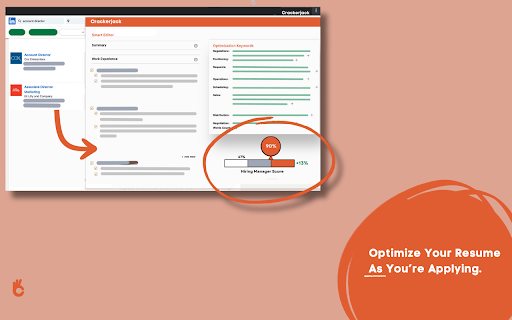
What is the Crackerjack Resume Scanner AI Chrome Extension?
The Crackerjack Resume Scanner is an advanced tool designed to help job seekers refine and optimize their resumes for specific job applications. It uses real-time analysis to match your resume with LinkedIn job postings, ensuring your resume includes the right keywords and formatting to increase your chances of passing Applicant Tracking Systems (ATS).
How to use Crackerjack Resume Scanner AI Chrome Extension?
1. Download and install the Crackerjack Resume Scanner from the Google Chrome Store.
2. Open a job listing on LinkedIn that interests you.
3. Activate the extension to analyze the job description and compare it with your resume.
4. Receive real-time suggestions to adjust your resume content and structure to align with the job requirements.
Core Features of Crackerjack Resume Scanner AI Chrome Extension
Real-Time Resume Customization
Keyword Optimization for Job-Specific Applications
ATS-Friendly Formatting
Key Benefits of Using Crackerjack Resume Scanner AI Chrome Extension
Optimizes your resume to align with job-specific requirements
Enhances the chances of passing ATS filters
Frequently Asked Questions (FAQ) about Crackerjack Resume Scanner - Chrome Extension
What does Crackerjack Resume Scanner do?
The extension helps tailor resumes to match job descriptions by optimizing keywords and formatting in real-time, particularly for job postings on LinkedIn.
How do I use Crackerjack Resume Scanner?
Simply install the extension, open a job posting on LinkedIn, and use the tool to scan and adjust your resume. You will get actionable suggestions to improve your resume for each job application.
How is Crackerjack Resume Scanner different from other resume optimization tools?
Unlike traditional resume tools, Crackerjack offers real-time scanning and keyword matching specifically for LinkedIn job listings, ensuring you meet the exact requirements listed by employers.