Text&ampWriting

Sesterce Cloud

Deploy AI in seconds with Sesterce Cloud’s sovereign European H100, H200 & A100 GPUs. Get GDPR-compliant bare metal access. Try now!

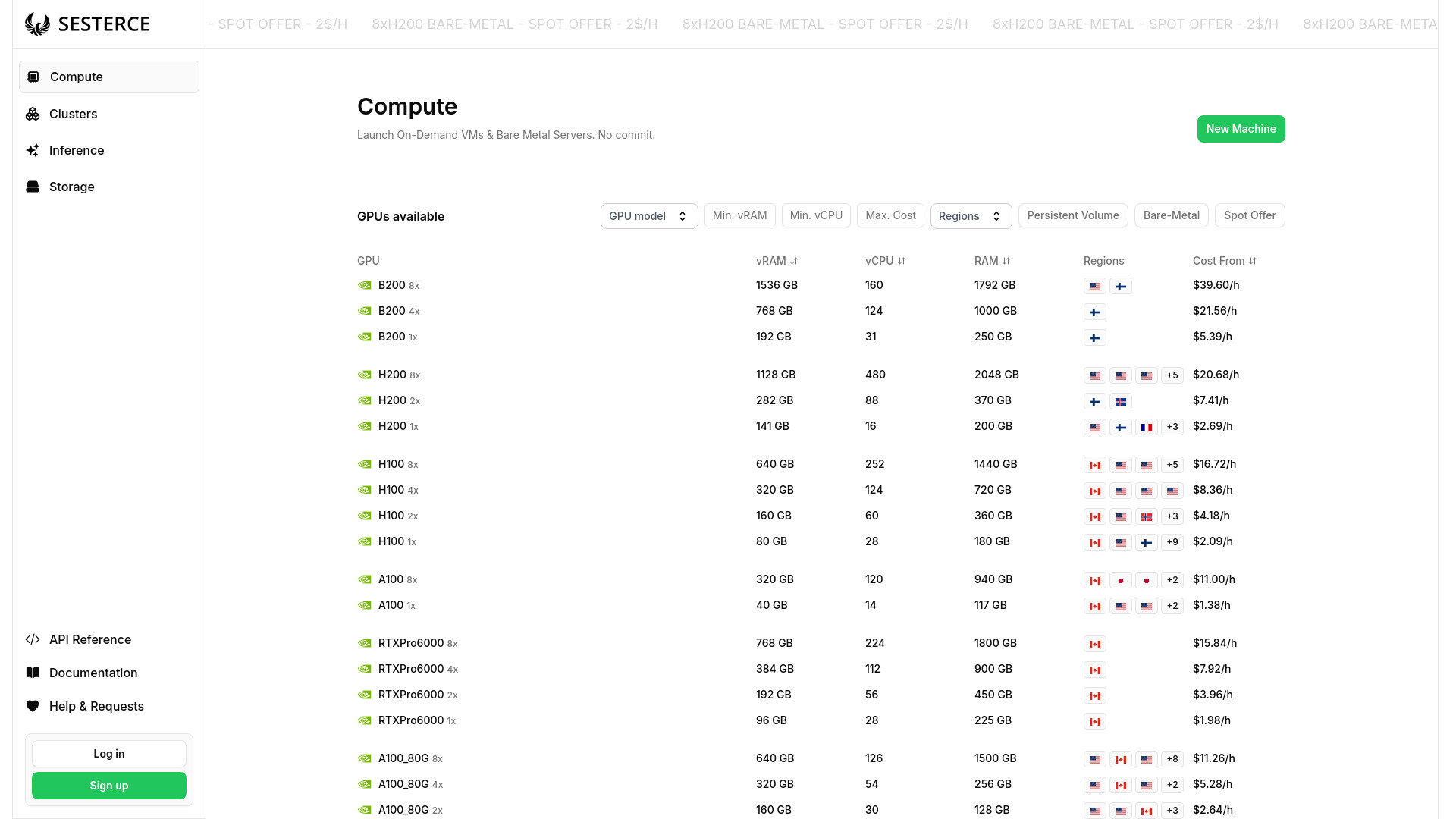
Sesterce Cloud website preview

What Is Sesterce Cloud?

Sesterce Cloud is a European GPU cloud platform designed for artificial intelligence, deep learning, and high-performance computing. It gives startups, enterprises, and research teams access to NVIDIA accelerators, including H100, H200, A100, and L40S models, with B200 options subject to availability. Its core offering combines bare metal GPU infrastructure with European hosting, helping organizations run demanding workloads while addressing data residency and GDPR requirements. Powered by Sesterce OS, the platform supports projects ranging from early model experiments to production AI services, with flexible resource allocation and a focus on energy-efficient computing.

How to Use Sesterce Cloud

Start by opening the Sesterce Cloud Console and choosing a GPU configuration that matches your workload. Consider GPU memory, processing requirements, and expected usage when comparing available hardware. On-demand resources suit experimentation and changing workloads, while reserved capacity can support longer projects with more predictable budgets. Preconfigured templates simplify the initial setup, and the platform’s API enables teams to automate provisioning within their existing development processes.

For applications requiring direct access to dedicated hardware, select a bare metal GPU configuration. Teams can manage workloads through Kubernetes or Slurm, depending on their preferred orchestration and scheduling approach. Console and command-line access support everyday administration, while monitoring tools help track resource consumption and performance. These capabilities allow developers to adjust their infrastructure as projects move from testing and model training to inference and ongoing production use.

Key Features of Sesterce Cloud

  • NVIDIA GPU Options: Choose from H100, H200, A100, and L40S accelerators, with B200 availability to confirm when planning deployments. The hardware supports language model development, generative AI, inference, and compute-intensive research.
  • European Data Hosting: Infrastructure located in Europe supports organizations with EU data residency requirements. This hosting model can form part of a broader GDPR compliance strategy for workloads involving personal or sensitive information.
  • On-Demand and Reserved Capacity: Match infrastructure spending to project needs through flexible usage or longer-term reservations. Teams can select a purchasing approach based on workload duration, capacity requirements, and budget predictability.
  • Workload Orchestration: Sesterce OS works with Kubernetes and Slurm to support container management, job scheduling, and shared computing environments. These tools help coordinate resources across different AI and research tasks.
  • Streamlined Provisioning: Launch resources through the Console, use templates to reduce setup work, or connect the API to automated workflows. Provisioning speed depends on the selected configuration and available capacity.
  • Energy-Efficient Infrastructure: Sesterce reports a power usage effectiveness, or PUE, of 1.1 for its infrastructure. This figure reflects data center energy efficiency, although total workload consumption also depends on hardware utilization and runtime.

Together, these features help teams balance computing performance, operational control, and infrastructure costs. Dedicated GPU access supports demanding workloads, while European hosting and familiar management tools make the platform relevant to organizations with specific governance and deployment requirements.

Why Choose Sesterce Cloud?

Sesterce Cloud brings European hosting and bare metal GPU computing into one platform for organizations developing and operating AI systems. Its appeal is particularly clear for teams that need powerful accelerators alongside control over where their data is processed. Startups can obtain compute capacity without purchasing their own GPU servers, while larger organizations can evaluate the service for workloads governed by internal security, procurement, and data protection policies.

The combination of API access, command-line tools, Kubernetes, and Slurm supports several ways of working. Developers can automate repeatable deployments, research teams can schedule computational jobs, and operations teams can monitor resource use. European infrastructure helps address data location requirements, but GDPR compliance also depends on contractual terms, security controls, and how each customer handles personal data. Organizations should assess those details alongside hardware specifications and capacity before deployment.

Use Cases and Applications

AI startups can use Sesterce Cloud to train, fine-tune, and serve large language models, generative applications, and multimodal systems. Enterprises and public institutions can assess its European infrastructure for projects that require regional data processing and dedicated computing resources. Universities and research laboratories can run deep learning experiments, scientific simulations, and other GPU-accelerated calculations. Across these applications, access to different accelerator configurations helps teams align computing resources with model size, memory needs, and project budgets, while bare metal deployment provides direct access to the underlying hardware.

Product source: Sesterce Cloud official website. Check the provider for current plans, limits and availability.

FAQ

Sesterce Cloud questions and answers

Product context and practical checks for evaluating Sesterce Cloud.

What is Sesterce Cloud used for?

Deploy AI in seconds with Sesterce Cloud’s sovereign European H100, H200 & A100 GPUs. Get GDPR-compliant bare metal access. Try now!

How do I get started with Sesterce Cloud?

Start by opening the Sesterce Cloud Console and choosing a GPU configuration that matches your workload. Consider GPU memory, processing requirements, and expected usage when comparing available hardware. On-demand resources suit experimentation and changing workloads, while reserved capacity can support longer projects with more predictable budgets. Preconfigured templates simplify the initial setup, and the platform’s API enables teams to automate provisioning within their existing development processes.For applications requiring direct access to dedicated hardware, select a bare metal GPU configuration. Teams can manage workloads through Kubernetes or Slurm, depending on their preferred orchestration and scheduling approach. Console and command-line access support everyday administration, while monitoring tools help track resource consumption and performance. These capabilities allow developers to adjust their infrastructure as projects move from testing and model training to inference and ongoing production use.

Which capabilities are described for Sesterce Cloud?

NVIDIA GPU Options: Choose from H100, H200, A100, and L40S accelerators, with B200 availability to confirm when planning deployments. The hardware supports language model development, generative AI, inference, and compute-intensive research. European Data Hosting: Infrastructure located in Europe supports organizations with EU data residency requirements. This hosting model can form part of a broader GDPR compliance strategy for workloads involving personal or sensitive information. On-Demand and Reserved Capacity: Match infrastructure spending to project needs through flexible usage or longer-term reservations. Teams can select a purchasing approach based on workload duration, capacity requirements, and budget predictability. Workload Orchestration: Sesterce OS works with Kubernetes and Slurm to support container management, job scheduling, and shared computing environments. These tools help coordinate resources across different AI and research tasks. Streamlined Provisioning: Launch resources through the Console, use templates to reduce setup work, or connect the API to automated workflows. Provisioning speed depends on the selected configuration and available capacity. Energy-Efficient Infrastructure: Sesterce reports a power usage effectiveness, or PUE, of 1.1 for its infrastructure. This figure reflects data center energy efficiency, although total workload consumption also depends on hardware utilization and runtime. Together, these features help teams balance computing performance, operational control, and infrastructure costs. Dedicated GPU access supports demanding workloads, while European hosting and familiar management tools make the platform relevant to organizations with specific governance and deployment requirements.

What projects can I evaluate Sesterce Cloud for?

AI startups can use Sesterce Cloud to train, fine-tune, and serve large language models, generative applications, and multimodal systems. Enterprises and public institutions can assess its European infrastructure for projects that require regional data processing and dedicated computing resources. Universities and research laboratories can run deep learning experiments, scientific simulations, and other GPU-accelerated calculations. Across these applications, access to different accelerator configurations helps teams align computing resources with model size, memory needs, and project budgets, while bare metal deployment provides direct access to the underlying hardware.

How does Sesterce Cloud handle nvidia gpu options?

NVIDIA GPU Options: Choose from H100, H200, A100, and L40S accelerators, with B200 availability to confirm when planning deployments. The hardware supports language model development, generative AI, inference, and compute-intensive research.

How does Sesterce Cloud handle european data hosting?

European Data Hosting: Infrastructure located in Europe supports organizations with EU data residency requirements. This hosting model can form part of a broader GDPR compliance strategy for workloads involving personal or sensitive information.

What should I compare before choosing a Sesterce Cloud plan?

Check Sesterce Cloud’s current pricing page for included usage, renewal terms and any credit charges. Compare the cost of a usable result, including retries, rather than assuming that account registration includes free usage.

What inputs should I prepare for a Sesterce Cloud trial?

Identify the files, text or account connections your task needs. Confirm that the product accepts those inputs and offers controls for reviewing its work.

How can I check the quality of a Sesterce Cloud result?

Test one representative task and inspect the result for accuracy and completeness. Record where manual corrections or extra tools are needed.

Where is the official Sesterce Cloud website?

The website linked from this profile is https://cloud.sesterce.com. Use the provider’s own documentation, account area and support channels to confirm current product details.

Visit Sesterce Cloud