AI Creative Writing

Chorus App

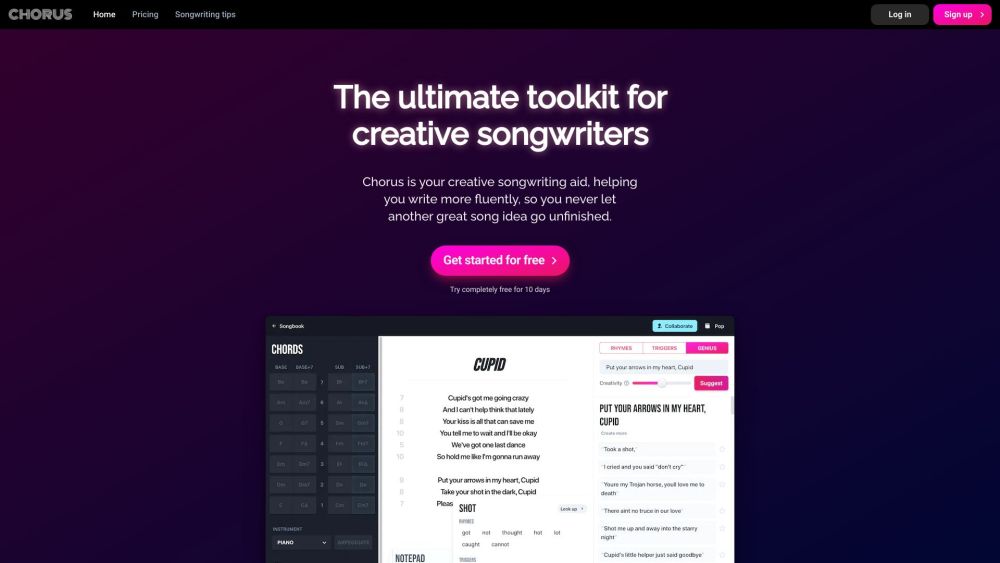
Chorus is a songwriting app and lyrics assistant designed to help creative songwriters improve their lyrics. It features a smart AI assistant that provides suggestions and ideas for lines, rhymes, triggers, and chords, making it easier to write songs more fluently and creatively. Developed by professional songwriters, Chorus is a comprehensive toolkit for any songwriter.

Chorus App website preview

Chorus Songwriting App and Lyrics Assistant Website screenshot

What is Chorus Songwriting App and Lyrics Assistant?

Chorus is a sophisticated songwriting app and lyrics assistant designed to enhance the creative process for songwriters. Equipped with an intelligent AI assistant, Chorus offers suggestions for lines, rhymes, triggers, and chords, enabling users to craft songs more efficiently and imaginatively. Created by experienced songwriters, Chorus serves as a versatile toolkit for any music creator.

How to Use Chorus Songwriting App and Lyrics Assistant?

Getting started with Chorus is simple. Sign up for a free trial and begin exploring its features. Input a line or word, and the AI assistant, Genius, will generate suggestions for the next lines, rhyming words, and trigger words tailored to your genre. Additionally, users can search for rhymes, experiment with chord progressions, and save their work in a personal songbook. Chorus is available on all devices, making it easy to write and collaborate in real-time.

Core Features of Chorus Songwriting App and Lyrics Assistant

Genius AI assistant

Rhyme search with genre-specific suggestions

Inspirational trigger words

Exploration of chord progressions

Real-time collaborative writing

Accessibility on all devices

Use Cases for Chorus Songwriting App and Lyrics Assistant

Enhancing creative and fluent writing

Generating ideas for lines and verses

Finding rhymes and triggers for specific genres

Experimenting with various chord progressions

Collaborating with other songwriters in real-time

Product source: Chorus App official website. Check the provider for current plans, limits and availability.

FAQ

Chorus App questions and answers

Product context and practical checks for evaluating Chorus App.

What is Chorus App used for?

Chorus is a songwriting app and lyrics assistant designed to help creative songwriters improve their lyrics. It features a smart AI assistant that provides suggestions and ideas for lines, rhymes, triggers, and chords, making it easier to write songs more fluently and creatively. Developed by professional songwriters, Chorus is a comprehensive toolkit for any songwriter.

How do I get started with Chorus App?

Getting started with Chorus is simple. Sign up for a free trial and begin exploring its features. Input a line or word, and the AI assistant, Genius, will generate suggestions for the next lines, rhyming words, and trigger words tailored to your genre. Additionally, users can search for rhymes, experiment with chord progressions, and save their work in a personal songbook. Chorus is available on all devices, making it easy to write and collaborate in real-time.

Which capabilities are described for Chorus App?

Genius AI assistantRhyme search with genre-specific suggestionsInspirational trigger wordsExploration of chord progressionsReal-time collaborative writingAccessibility on all devices

What projects can I evaluate Chorus App for?

Enhancing creative and fluent writingGenerating ideas for lines and versesFinding rhymes and triggers for specific genresExperimenting with various chord progressionsCollaborating with other songwriters in real-time Chorus Songwriting App and Lyrics Assistant Company Learn more about Chorus Songwriting App and Lyrics Assistant by visiting the about us page. Chorus Songwriting App and Lyrics Assistant Login Access Chorus Songwriting App and Lyrics Assistant via the login link: https://writewithchorus.com/login Chorus Songwriting App and Lyrics Assistant Sign Up Sign up for Chorus Songwriting App and Lyrics Assistant here: https://writewithchorus.com/register Chorus Songwriting App and Lyrics Assistant Pricing Check out the pricing for Chorus Songwriting App and Lyrics Assistant: https://writewithchorus.com/pricing Chorus Songwriting App and Lyrics Assistant on Facebook Follow Chorus Songwriting App and Lyrics Assistant on Facebook: https://facebook.com/writewithchorus Chorus Songwriting App and Lyrics Assistant on Twitter Stay updated with Chorus Songwriting App and Lyrics Assistant on Twitter: https://twitter.com/writewithchorus Chorus Songwriting App and Lyrics Assistant on Instagram Follow Chorus Songwriting App and Lyrics Assistant on Instagram: https://instagram.com/writewithchorus

What should I compare before choosing a Chorus App plan?

Check out the pricing for Chorus Songwriting App and Lyrics Assistant: https://writewithchorus.com/pricing Confirm current prices and allowances on the provider’s website before purchasing.

What inputs should I prepare for a Chorus App trial?

Look for text prompts, image references, masks or sketches as appropriate. Compare composition control, supported upload types and the ability to revise a selected area.

How can I check the quality of a Chorus App result?

Inspect text, hands, edges, reflections and repeated objects at full size. Check that important product or brand details survive editing.

Which export options should I check in Chorus App?

Compare pixel dimensions, transparency, file formats and any enlargement options. Confirm that the downloaded result works in your design or publishing software.

What is a practical way to test Chorus App against alternatives?

Prepare a brief with a subject, composition, lighting and required output size. Test a first generation and a targeted revision to see how much control you retain.

Where is the official Chorus App website?

The website linked from this profile is https://writewithchorus.com. Use the provider’s own documentation, account area and support channels to confirm current product details.

Visit Chorus App