Text&ampWriting

ChatVIA

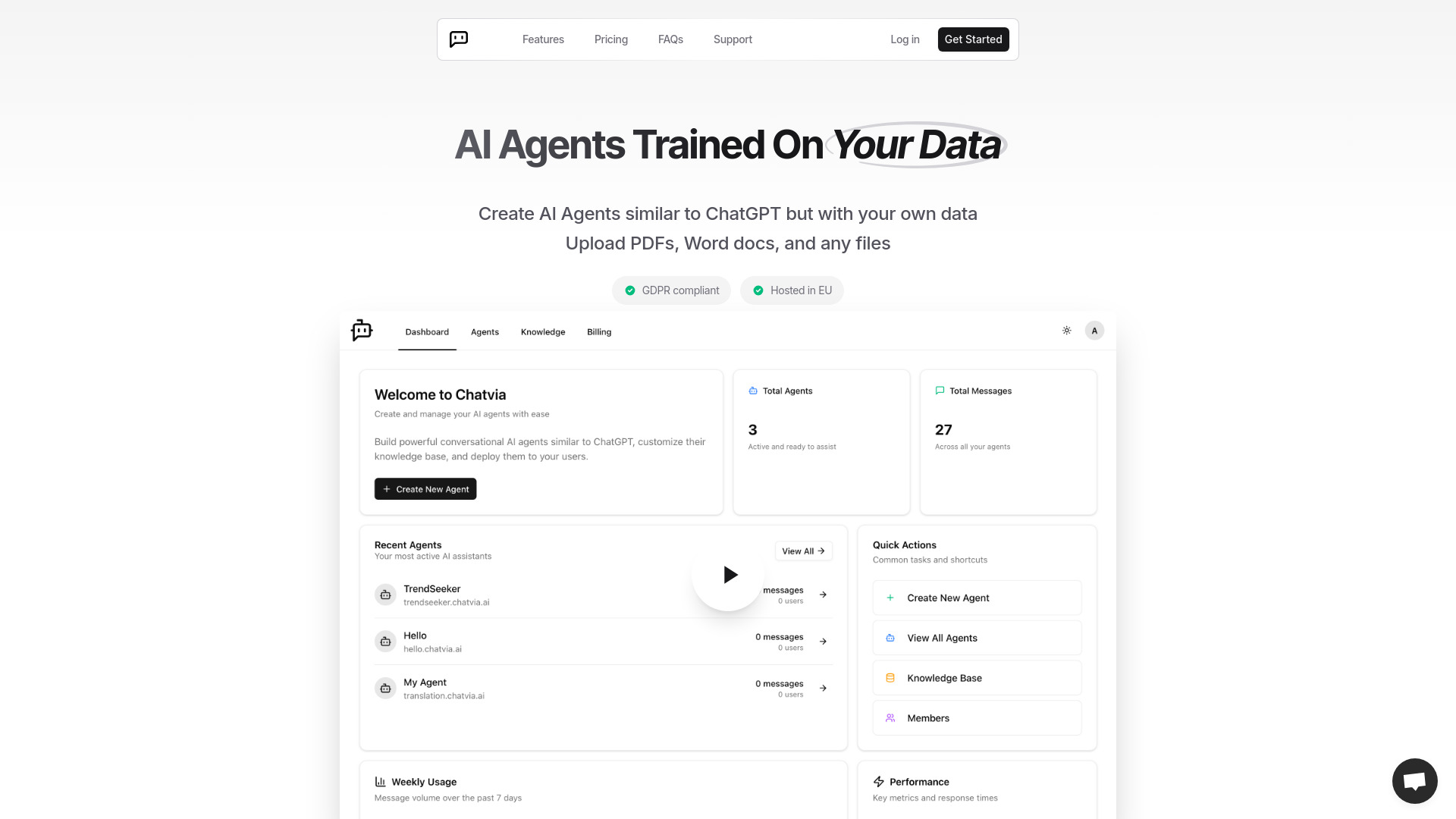
Turn PDFs, spreadsheets, and videos into custom AI agents with ChatVIA. Build intelligent chatbots with enterprise-grade security

ChatVIA website preview

What is ChatVIA?

ChatVIA is an AI agent platform that helps businesses turn their own content into conversational assistants. By connecting PDFs, spreadsheets, videos, and other files to an AI agent, users can make organizational knowledge easier to search and use. Instead of manually reviewing documents or navigating folders, employees and customers can ask questions in everyday language. ChatVIA supports applications such as customer service, internal knowledge sharing, research, and document analysis. Its selection of AI models, including GPT, Claude, and Gemini, gives users flexibility when building assistants for different tasks.

How to Use ChatVIA

Start by gathering the materials your assistant needs, such as product manuals, business reports, training videos, or spreadsheet data. Upload these files to ChatVIA, where document processing tools extract and organize their contents for retrieval. OCR and image parsing help make information in scanned pages, tables, and visual elements accessible. You can then create a Training Agent grounded in your uploaded materials or an Instruction Agent guided by specific rules, objectives, and response preferences.

Next, configure the agent for its intended audience and test it with representative questions. ChatVIA combines vector search, BM25 keyword retrieval, and knowledge graphs to help locate relevant information across your sources. Adjust the instructions and source materials as needed, then introduce the assistant into your team's workflow. Shared access and collaboration tools allow colleagues to contribute knowledge and use agents built around departmental or organization-wide needs.

Key Features of ChatVIA

  • Custom AI Agents Built from Your Files: Create assistants that draw on PDFs, Word documents, spreadsheets, images, and videos. ChatVIA organizes uploaded content into a searchable knowledge base, helping users find explanations and insights through natural language questions.
  • Choice of Multiple AI Models: Work with models from providers such as OpenAI, Anthropic, Google, Mistral AI, Cohere, and Meta. Model selection lets you evaluate different options for response quality, speed, and the requirements of a particular task.
  • Flexible Agent Configuration: Use Training Agents for questions grounded in source documents or Instruction Agents for tasks that require defined behaviors. The no-code interface helps users configure assistants without building a chatbot application from scratch.
  • Search Across Complex Content: A combination of semantic retrieval, keyword matching, and knowledge graphs helps agents find relevant material. Document parsing extends this capability to information contained in tables, scanned documents, and files with more complicated layouts.
  • Controlled Access to Business Knowledge: Security features described for the platform include encrypted storage, access controls, and data isolation. Team permissions help organizations manage who can access shared agents and the information used to support their responses.

Why Choose ChatVIA?

Business knowledge often sits across disconnected documents, spreadsheets, and recorded presentations. ChatVIA brings these materials into a conversational interface, giving people another way to find and understand information. An assistant configured around company content can respond with relevant terminology and context, making it useful for recurring questions about products, procedures, or internal resources. Access to several AI model families also gives teams room to compare approaches as their requirements change.

ChatVIA can support an individual building a focused document assistant or a team managing several knowledge areas. Separate agents can serve different departments, while shared resources help colleagues work from a common information base. Its combination of file processing, configurable behavior, and retrieval tools makes it suitable for organizations exploring practical uses of AI. Results depend on the quality and coverage of the source material, so reviewing documents and testing responses are valuable parts of deployment.

Use Cases and Applications

Customer service teams can build assistants around help articles, product documentation, and troubleshooting guides to answer recurring questions. Internal operations teams can make policies, onboarding materials, and process instructions easier for employees to access. Legal and compliance professionals can use document-focused agents to locate relevant passages in contracts or regulatory resources, with qualified staff reviewing interpretations. Researchers can organize papers, project notes, and reports into an assistant that helps them explore a defined collection of material.

For business analysis, ChatVIA can provide a conversational entry point to spreadsheet contents and reporting documents. Stakeholders can ask about figures, definitions, or findings and use the answers to guide further investigation. Educators can build study assistants from course readings and instructional videos, while training teams can make recorded learning materials easier to explore. Healthcare organizations considering similar knowledge tools should confirm privacy requirements, contractual safeguards, and suitability before uploading sensitive information.

Product source: ChatVIA official website. Check the provider for current plans, limits and availability.

FAQ

ChatVIA questions and answers

Product context and practical checks for evaluating ChatVIA.

What is ChatVIA used for?

Turn PDFs, spreadsheets, and videos into custom AI agents with ChatVIA. Build intelligent chatbots with enterprise-grade security

How do I get started with ChatVIA?

Start by gathering the materials your assistant needs, such as product manuals, business reports, training videos, or spreadsheet data. Upload these files to ChatVIA, where document processing tools extract and organize their contents for retrieval. OCR and image parsing help make information in scanned pages, tables, and visual elements accessible. You can then create a Training Agent grounded in your uploaded materials or an Instruction Agent guided by specific rules, objectives, and response preferences.Next, configure the agent for its intended audience and test it with representative questions. ChatVIA combines vector search, BM25 keyword retrieval, and knowledge graphs to help locate relevant information across your sources. Adjust the instructions and source materials as needed, then introduce the assistant into your team's workflow. Shared access and collaboration tools allow colleagues to contribute knowledge and use agents built around departmental or organization-wide needs.

Which capabilities are described for ChatVIA?

Custom AI Agents Built from Your Files: Create assistants that draw on PDFs, Word documents, spreadsheets, images, and videos. ChatVIA organizes uploaded content into a searchable knowledge base, helping users find explanations and insights through natural language questions. Choice of Multiple AI Models: Work with models from providers such as OpenAI, Anthropic, Google, Mistral AI, Cohere, and Meta. Model selection lets you evaluate different options for response quality, speed, and the requirements of a particular task. Flexible Agent Configuration: Use Training Agents for questions grounded in source documents or Instruction Agents for tasks that require defined behaviors. The no-code interface helps users configure assistants without building a chatbot application from scratch. Search Across Complex Content: A combination of semantic retrieval, keyword matching, and knowledge graphs helps agents find relevant material. Document parsing extends this capability to information contained in tables, scanned documents, and files with more complicated layouts. Controlled Access to Business Knowledge: Security features described for the platform include encrypted storage, access controls, and data isolation. Team permissions help organizations manage who can access shared agents and the information used to support their responses.

What projects can I evaluate ChatVIA for?

Customer service teams can build assistants around help articles, product documentation, and troubleshooting guides to answer recurring questions. Internal operations teams can make policies, onboarding materials, and process instructions easier for employees to access. Legal and compliance professionals can use document-focused agents to locate relevant passages in contracts or regulatory resources, with qualified staff reviewing interpretations. Researchers can organize papers, project notes, and reports into an assistant that helps them explore a defined collection of material.For business analysis, ChatVIA can provide a conversational entry point to spreadsheet contents and reporting documents. Stakeholders can ask about figures, definitions, or findings and use the answers to guide further investigation. Educators can build study assistants from course readings and instructional videos, while training teams can make recorded learning materials easier to explore. Healthcare organizations considering similar knowledge tools should confirm privacy requirements, contractual safeguards, and suitability before uploading sensitive information.

How does ChatVIA handle custom ai agents built from your files?

Custom AI Agents Built from Your Files: Create assistants that draw on PDFs, Word documents, spreadsheets, images, and videos. ChatVIA organizes uploaded content into a searchable knowledge base, helping users find explanations and insights through natural language questions.

How does ChatVIA handle choice of multiple ai models?

Choice of Multiple AI Models: Work with models from providers such as OpenAI, Anthropic, Google, Mistral AI, Cohere, and Meta. Model selection lets you evaluate different options for response quality, speed, and the requirements of a particular task.

What should I compare before choosing a ChatVIA plan?

Check ChatVIA’s current pricing page for included usage, renewal terms and any credit charges. Compare the cost of a usable result, including retries, rather than assuming that account registration includes free usage.

What inputs should I prepare for a ChatVIA trial?

Compare text prompts, reference frames, source footage and audio support. Check duration, aspect ratio and whether the tool lets you keep a subject consistent between shots.

How can I check the quality of a ChatVIA result?

Watch the entire clip for motion errors, distorted objects, changing identities, lip-sync problems and abrupt transitions. Inspect the downloaded file as well as the preview.

Where is the official ChatVIA website?

The website linked from this profile is https://chatvia.ai. Use the provider’s own documentation, account area and support channels to confirm current product details.

Visit ChatVIA