Large Language Models (LLMs)

**ChatHub

ChatHub is a browser extension for using multiple chatbots at once.

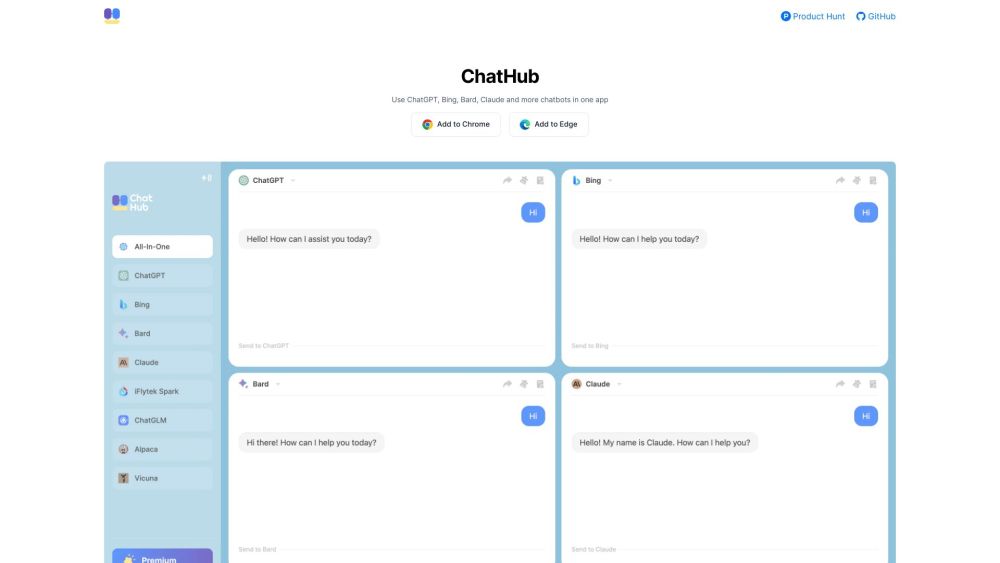
**ChatHub website preview

ChatHub Website screenshot

What is ChatHub?

ChatHub is a powerful browser extension that integrates multiple chatbot platforms into one seamless experience. Users can interact with a variety of chatbots like ChatGPT, Bing, Google Bard, Claude, and many others—all at once.

How to use ChatHub?

To get started with ChatHub, install the extension on any Chromium-based browser such as Chrome, Edge, or Brave. Once set up, activate it via a convenient keyboard shortcut, allowing you to chat with different bots side by side. All conversations are saved automatically and can be easily retrieved through the searchable chat history. You can personalize prompts and access a variety of user-generated prompts from the library. ChatHub also features rich text support, dark mode, and allows for importing/exporting conversations and prompts.

Key Features of ChatHub

Interact with multiple chatbots simultaneously

Easily compare results from various language models

Utilize GPT-4 through ChatGPT Plus or an OpenAI API key

Create custom prompts and learn from the community prompt library

Quick access with a browser-wide keyboard shortcut

Support for markdown, syntax-highlighted code blocks, and more

Save and search chat history automatically

Export/import both prompts and conversations

Switch between light and dark modes for a personalized experience

Enhance chatbot responses with real-time information from the web

Use Cases for ChatHub

Conduct research across multiple chatbots

Compare language models in real-time

Create and manage custom chatbot prompts

Product source: **ChatHub official website. Check the provider for current plans, limits and availability.

FAQ

**ChatHub questions and answers

Product context and practical checks for evaluating **ChatHub.

What is **ChatHub used for?

ChatHub is a browser extension for using multiple chatbots at once.

How do I get started with **ChatHub?

To get started with ChatHub, install the extension on any Chromium-based browser such as Chrome, Edge, or Brave. Once set up, activate it via a convenient keyboard shortcut, allowing you to chat with different bots side by side. All conversations are saved automatically and can be easily retrieved through the searchable chat history. You can personalize prompts and access a variety of user-generated prompts from the library. ChatHub also features rich text support, dark mode, and allows for importing/exporting conversations and prompts.

Which capabilities are described for **ChatHub?

Interact with multiple chatbots simultaneouslyEasily compare results from various language modelsUtilize GPT-4 through ChatGPT Plus or an OpenAI API keyCreate custom prompts and learn from the community prompt libraryQuick access with a browser-wide keyboard shortcutSupport for markdown, syntax-highlighted code blocks, and moreSave and search chat history automaticallyExport/import both prompts and conversationsSwitch between light and dark modes for a personalized experienceEnhance chatbot responses with real-time information from the web

What projects can I evaluate **ChatHub for?

Conduct research across multiple chatbotsCompare language models in real-timeCreate and manage custom chatbot prompts ChatHub Discord Join the ChatHub community on Discord here: https://discord.gg/sfxCcTjV98. For more information about Discord, click here(/discord/sfxcctjv98). ChatHub Customer Support For customer service inquiries, you can reach ChatHub support at: [email protected]. ChatHub Company Information The official name of the company behind ChatHub is ChatHub. Follow ChatHub on Twitter Stay updated by following ChatHub on Twitter: https://twitter.com/chathub_app ChatHub on Instagram Check out ChatHub on Instagram: https://www.instagram.com/chathub.gg ChatHub on GitHub Explore the open-source code for ChatHub on GitHub: https://github.com/chathub-dev/chathub

What should I compare before choosing a **ChatHub plan?

Check **ChatHub’s current pricing page for included usage, renewal terms and any credit charges. Compare the cost of a usable result, including retries, rather than assuming that account registration includes free usage.

What inputs should I prepare for a **ChatHub trial?

Identify the files, text or account connections your task needs. Confirm that the product accepts those inputs and offers controls for reviewing its work.

How can I check the quality of a **ChatHub result?

Test one representative task and inspect the result for accuracy and completeness. Record where manual corrections or extra tools are needed.

Which export options should I check in **ChatHub?

Check export formats, integrations and whether you can keep using your work outside the service. Test a real export before committing to a longer plan.

What is a practical way to test **ChatHub against alternatives?

Choose one task with a clear success condition. Keep the input consistent, record the time spent reviewing and compare the complete workflow cost.

Where is the official **ChatHub website?

The website linked from this profile is https://. Use the provider’s own documentation, account area and support channels to confirm current product details.

Visit **ChatHub