ChatGPT Search Extension: What is it?
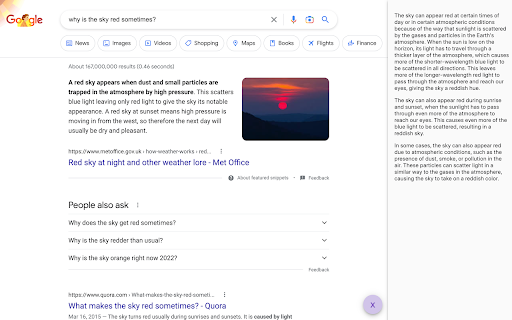
The ChatGPT Search Extension is a powerful browser tool that integrates OpenAI's ChatGPT with search platforms like Google and Stackoverflow. By doing this, it provides enriched, AI-enhanced results to help users find better, more accurate information directly within their search engine of choice.
How to Use ChatGPT Search Extension for Enhanced Search Results?
To begin using the extension, first install it on your browser. Keep a ChatGPT session open in a tab, then simply click on the 🤖 icon located in the sidebar of your browser to start sending queries. The extension will automatically combine your search results with AI-generated insights from ChatGPT.
Key Features of ChatGPT Search Extension
ChatGPT Integration
This extension seamlessly integrates with ChatGPT, providing advanced AI-generated answers alongside traditional search results. This allows users to benefit from the conversational and contextual capabilities of ChatGPT while performing regular searches.
Enhanced Search Results
With AI augmentation, users can enjoy more accurate and in-depth responses directly within the search interface. ChatGPT’s responses offer broader insights or clarifications that might not appear in standard search results, improving both speed and accuracy.
Use Cases of ChatGPT Search Extension
Boosting Search Precision
By combining ChatGPT's AI with traditional search engines, users can refine their searches and receive more accurate, contextually relevant information, reducing the time spent digging for the right answer.
AI-Generated Insights Directly in Search Results
Whether you're looking for technical solutions on Stackoverflow or general web searches, ChatGPT provides AI-generated explanations and suggestions that appear right alongside conventional search results.