Writing Assistants

ChatGPT - Chrome Extension

Enhance your browsing experience with ChatGPT - AI News & Article Analysis Tool. Get instant insights and analysis on news and articles with this powerful Chrome extension.

ChatGPT - Chrome Extension website preview

ChatGPT - Chrome Extension Website screenshot

Introducing ChatGPT - Chrome Extension: AI News & Article Analysis Tool

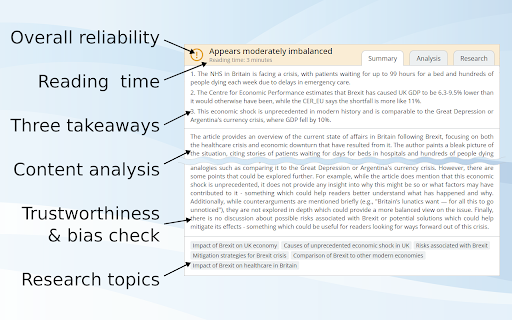
ChatGPT - Chrome Extension is an advanced tool designed to help users analyze news and articles with the power of AI. With its comprehensive range of features, this extension allows you to summarize, explain, check bias, and gain valuable insights from any text you encounter online.

How Does ChatGPT - Chrome Extension Work?

Using ChatGPT - Chrome Extension is simple and intuitive. By inputting the desired text, you can receive a summarized and explained version of the content. This efficient process enables you to quickly grasp the key points and understand complex information effortlessly.

Key Features of ChatGPT - Chrome Extension

Summarization

ChatGPT - Chrome Extension excels in providing concise and accurate summaries, allowing you to save time while still capturing the essence of the text.

Explanation

With its advanced AI capabilities, this extension offers in-depth explanations, breaking down complex concepts and making them more accessible.

Bias Checking

ChatGPT - Chrome Extension helps you identify potential biases in news articles and reports, allowing you to view information from different perspectives.

Insight Generation

By leveraging AI, this extension generates valuable insights, enabling you to gain a deeper understanding of the analyzed text.

Use Cases of ChatGPT - Chrome Extension

Summarizing News Articles

ChatGPT - Chrome Extension is perfect for quickly summarizing lengthy news articles, allowing you to stay informed without spending excessive time reading.

Analyzing Biases in Reports

With its bias-checking feature, this extension helps you evaluate the objectivity and potential biases present in reports, ensuring a more comprehensive understanding of the information.

Product source: ChatGPT - Chrome Extension official website. Check the provider for current plans, limits and availability.

FAQ

ChatGPT - Chrome Extension questions and answers

Product context and practical checks for evaluating ChatGPT - Chrome Extension.

What is ChatGPT - Chrome Extension used for?

Enhance your browsing experience with ChatGPT - AI News & Article Analysis Tool. Get instant insights and analysis on news and articles with this powerful Chrome extension.

How do I get started with ChatGPT - Chrome Extension?

Using ChatGPT - Chrome Extension is simple and intuitive. By inputting the desired text, you can receive a summarized and explained version of the content. This efficient process enables you to quickly grasp the key points and understand complex information effortlessly.

Which capabilities are described for ChatGPT - Chrome Extension?

SummarizationChatGPT - Chrome Extension excels in providing concise and accurate summaries, allowing you to save time while still capturing the essence of the text.ExplanationWith its advanced AI capabilities, this extension offers in-depth explanations, breaking down complex concepts and making them more accessible.Bias CheckingChatGPT - Chrome Extension helps you identify potential biases in news articles and reports, allowing you to view information from different perspectives.Insight GenerationBy leveraging AI, this extension generates valuable insights, enabling you to gain a deeper understanding of the analyzed text.

What projects can I evaluate ChatGPT - Chrome Extension for?

Summarizing News ArticlesChatGPT - Chrome Extension is perfect for quickly summarizing lengthy news articles, allowing you to stay informed without spending excessive time reading.Analyzing Biases in ReportsWith its bias-checking feature, this extension helps you evaluate the objectivity and potential biases present in reports, ensuring a more comprehensive understanding of the information.

What should I compare before choosing a ChatGPT - Chrome Extension plan?

Check ChatGPT - Chrome Extension’s current pricing page for included usage, renewal terms and any credit charges. Compare the cost of a usable result, including retries, rather than assuming that account registration includes free usage.

What inputs should I prepare for a ChatGPT - Chrome Extension trial?

Look for text prompts, image references, masks or sketches as appropriate. Compare composition control, supported upload types and the ability to revise a selected area.

How can I check the quality of a ChatGPT - Chrome Extension result?

Inspect text, hands, edges, reflections and repeated objects at full size. Check that important product or brand details survive editing.

Which export options should I check in ChatGPT - Chrome Extension?

Compare pixel dimensions, transparency, file formats and any enlargement options. Confirm that the downloaded result works in your design or publishing software.

What is a practical way to test ChatGPT - Chrome Extension against alternatives?

Prepare a brief with a subject, composition, lighting and required output size. Test a first generation and a targeted revision to see how much control you retain.

Where is the official ChatGPT - Chrome Extension website?

The website linked from this profile is https://chromewebstore.google.com/detail/full-picture-research-ana/dfnhlnnmcjnmlihpjbkdefpnfdpgedbn. Use the provider’s own documentation, account area and support channels to confirm current product details.

Visit ChatGPT - Chrome Extension