AI tool profile

Cerebrella

Sticky Notes, Whiteboard, Research, Visuals, Writing, and AI — All Under One Umbrella

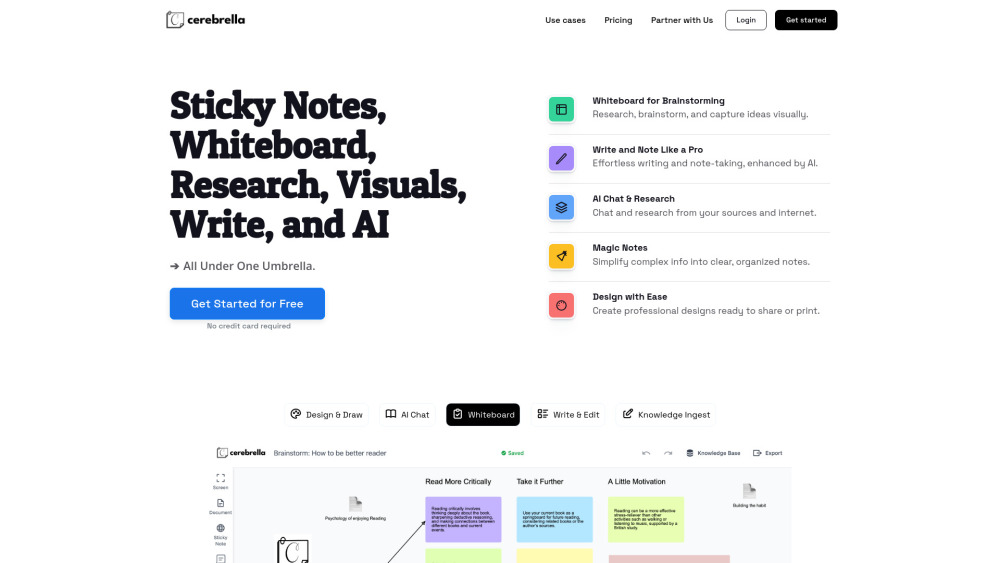
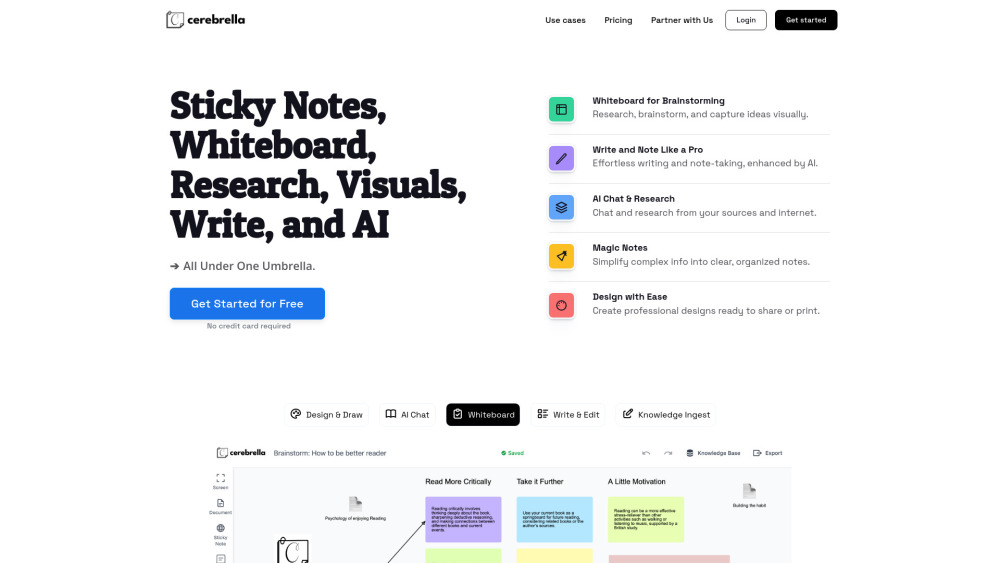
Cerebrella website preview

Cerebrella Website screenshot

What is Cerebrella?

Cerebrella is a versatile platform that integrates whiteboards, note-taking, research tools, design creation, and AI-powered writing — all under one roof. Whether you’re brainstorming ideas, organizing thoughts, chatting with AI for research, or creating professional visuals, Cerebrella makes everything seamless. It allows users to upload PDFs, documents, or links to build a knowledge base, generate actionable sticky notes, and create designs for sharing or printing. With Cerebrella, you can effortlessly plan, create, organize, and discover new ideas — all in one place.

How to use Cerebrella?

Getting started with Cerebrella is easy. Begin by creating a project, either using the "Create with AI" option or starting a blank project. Build your knowledge base by uploading documents or inserting links, and organize ideas on the whiteboard by adding sticky notes, drawing mind maps, and connecting thoughts visually. Use AI-powered writing tools to draft, summarize, or generate creative content and organize your notes into sections or lists. With the chat feature, you can ask AI questions directly from your knowledge sources and gain valuable insights. Complex information can be quickly converted into sticky notes using the Magic Notes feature. Design professional visuals, presentations, or reports, and export them with ease. Whether you’re brainstorming, planning, or creating, Cerebrella provides a unified space to manage everything efficiently.

Cerebrella's Core Features

Whiteboard for Brainstorming: Capture ideas and collaborate visually while researching and brainstorming.

Write and Note Like a Pro: Write and organize your thoughts seamlessly with the help of AI.

AI Chat & Research: Connect your knowledge sources, research, and chat with AI to unlock deeper insights.

Magic Notes: Break down complex ideas into clear, digestible notes in just a few clicks.

Design with Ease: Create professional designs ready to share or print.

Cerebrella's Use Cases

Students & Researchers: Organize research, take notes, and visualize ideas during projects or thesis writing.

Project Managers: Plan projects with whiteboards and sticky notes, and keep everything organized.

Content Creators & Writers: Use AI-powered writing to generate content ideas, notes, or summaries quickly.

Educators & Trainers: Create and design presentations, lessons, or training material easily.

Entrepreneurs & Designers: Brainstorm and visualize new business ideas, create designs, and build professional documents.

And Beyond: Cerebrella adapts to anyone enhancing productivity with AI.

Product source: Cerebrella official website. Check the provider for current plans, limits and availability.

FAQ

Cerebrella questions and answers

Product context and practical checks for evaluating Cerebrella.

What is Cerebrella used for?

Sticky Notes, Whiteboard, Research, Visuals, Writing, and AI — All Under One Umbrella

How do I get started with Cerebrella?

Getting started with Cerebrella is easy. Begin by creating a project, either using the "Create with AI" option or starting a blank project. Build your knowledge base by uploading documents or inserting links, and organize ideas on the whiteboard by adding sticky notes, drawing mind maps, and connecting thoughts visually. Use AI-powered writing tools to draft, summarize, or generate creative content and organize your notes into sections or lists. With the chat feature, you can ask AI questions directly from your knowledge sources and gain valuable insights. Complex information can be quickly converted into sticky notes using the Magic Notes feature. Design professional visuals, presentations, or reports, and export them with ease. Whether you’re brainstorming, planning, or creating, Cerebrella provides a unified space to manage everything efficiently.

Which capabilities are described for Cerebrella?

Whiteboard for Brainstorming: Capture ideas and collaborate visually while researching and brainstorming.Write and Note Like a Pro: Write and organize your thoughts seamlessly with the help of AI.AI Chat & Research: Connect your knowledge sources, research, and chat with AI to unlock deeper insights.Magic Notes: Break down complex ideas into clear, digestible notes in just a few clicks.Design with Ease: Create professional designs ready to share or print.

What projects can I evaluate Cerebrella for?

Students & Researchers: Organize research, take notes, and visualize ideas during projects or thesis writing.Project Managers: Plan projects with whiteboards and sticky notes, and keep everything organized.Content Creators & Writers: Use AI-powered writing to generate content ideas, notes, or summaries quickly.Educators & Trainers: Create and design presentations, lessons, or training material easily.Entrepreneurs & Designers: Brainstorm and visualize new business ideas, create designs, and build professional documents.And Beyond: Cerebrella adapts to anyone enhancing productivity with AI. Cerebrella Support Email & Customer service contact & Refund contact etc. More Contact, visit the contact us page(https://cerebrella.com/contact/) Cerebrella Company Cerebrella Company name: Cerebrella . Cerebrella Company address: . More about Cerebrella, Please visit the about us page(). Cerebrella Login Cerebrella Login Link: https://app.cerebrella.com/login Cerebrella Sign up Cerebrella Sign up Link: https://app.cerebrella.com/register Cerebrella Pricing Cerebrella Pricing Link: https://cerebrella.com/#pricing

What should I compare before choosing a Cerebrella plan?

Cerebrella Pricing Link: https://cerebrella.com/#pricing Confirm current prices and allowances on the provider’s website before purchasing.

What inputs should I prepare for a Cerebrella trial?

Compare support for source documents, style instructions, outlines and length limits. Check whether citations link to real material rather than merely looking like references.

How can I check the quality of a Cerebrella result?

Verify names, dates, quotations and factual claims against the original sources. Edit tone, remove repetition and make sure the text answers the intended reader’s question.

Which export options should I check in Cerebrella?

Check export to plain text, Markdown, documents or your publishing system. Formatting, headings and working links matter when moving a draft into production.

What is a practical way to test Cerebrella against alternatives?

Use a real brief and a short source document. Compare factual accuracy, structure and editing time rather than accepting the longest or most confident draft.

Where is the official Cerebrella website?

The website linked from this profile is https://cerebrella.com. Use the provider’s own documentation, account area and support channels to confirm current product details.

Visit Cerebrella