AI Interview Assistant

CareerAI

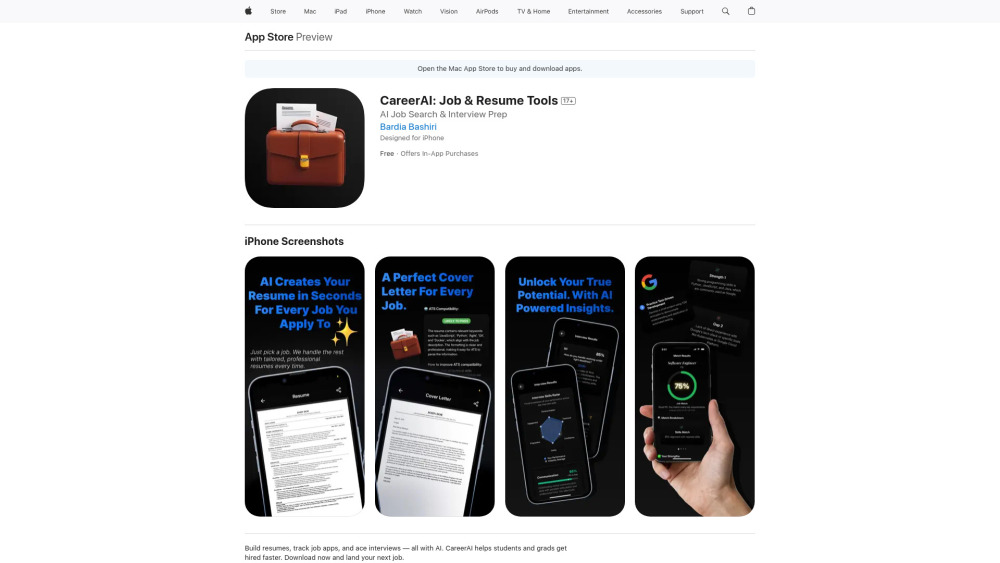
CareerAI: Your AI-powered mobile job search assistant—craft winning resumes, cover letters, ace interviews, and track applications—all in one app.

CareerAI website preview

CareerAI Website screenshot

Introducing CareerAI: Your AI-Powered Career Accelerator

CareerAI is more than a job-search app—it’s your intelligent career companion, built exclusively for Gen Z, college students, and professionals in their first five years. Designed as a native iOS application, it unifies four critical pillars of modern job hunting—resumes, cover letters, interviews, and application tracking—into one intuitive, AI-driven experience. With smart parsing, real-time optimization, and personalized coaching, CareerAI transforms overwhelming job-search workflows into confident, actionable steps. From generating ATS-optimized resumes in seconds to scoring how well your profile aligns with a role before you hit “submit,” every feature is engineered to reduce friction, increase relevance, and accelerate hiring outcomes.

How CareerAI Works—In Just Three Steps

Start by downloading the CareerAI app on your iPhone or compatible Apple device. First, input your background—or upload an existing resume—to power the AI Resume Builder, which crafts clean, keyword-rich, applicant-tracking-system-ready documents. Next, paste any job description to generate a compelling, role-specific cover letter in under 10 seconds. Then, jump into Interview Mode: choose from industry-specific question sets, speak aloud in a realistic simulation, and instantly receive AI feedback on clarity, confidence, technical alignment, and even nonverbal cues (via voice analysis). Meanwhile, the Job Tracker auto-syncs applications, reminds you of follow-up deadlines, and surfaces trends in your outreach—so you’re always in control. All core functionality requires an active subscription.

The Five Pillars of CareerAI

Smart Resume Builder — Optimized for Humans *and* Algorithms

Context-Aware Cover Letter Engine — No More Generic Openings

Interview Simulator + Performance Analytics — Practice That Pays Off

Unified Application Dashboard — See Every Step, From Apply to Offer

FitScan™ — Real-Time Match Scoring Between You and the Role

Who Benefits Most from CareerAI?

Undergraduate & graduate students launching internships or capstone placements

Recent grads navigating competitive entry-level markets

Career-changers building new professional narratives

Early-career professionals aiming for promotions or lateral moves

Product source: CareerAI official website. Check the provider for current plans, limits and availability.

FAQ

CareerAI questions and answers

Product context and practical checks for evaluating CareerAI.

What is CareerAI used for?

CareerAI: Your AI-powered mobile job search assistant—craft winning resumes, cover letters, ace interviews, and track applications—all in one app.

How do I get started with CareerAI?

Start by downloading the CareerAI app on your iPhone or compatible Apple device. First, input your background—or upload an existing resume—to power the AI Resume Builder, which crafts clean, keyword-rich, applicant-tracking-system-ready documents. Next, paste any job description to generate a compelling, role-specific cover letter in under 10 seconds. Then, jump into Interview Mode: choose from industry-specific question sets, speak aloud in a realistic simulation, and instantly receive AI feedback on clarity, confidence, technical alignment, and even nonverbal cues (via voice analysis). Meanwhile, the Job Tracker auto-syncs applications, reminds you of follow-up deadlines, and surfaces trends in your outreach—so you’re always in control. All core functionality requires an active subscription.

What should I compare before choosing a CareerAI plan?

Check CareerAI’s current pricing page for included usage, renewal terms and any credit charges. Compare the cost of a usable result, including retries, rather than assuming that account registration includes free usage.

What inputs should I prepare for a CareerAI trial?

Check supported documents, datasets and source access. Establish whether the product can inspect your actual material rather than answer from general knowledge.

How can I check the quality of a CareerAI result?

Follow citations to the original source, recalculate important numbers and check the date and scope of the evidence. Distinguish an explanation from a verified result.

Which export options should I check in CareerAI?

Look for usable citations, tables, downloadable data and reproducible steps. A clear answer should let another person inspect how the conclusion was reached.

What is a practical way to test CareerAI against alternatives?

Choose a question with known sources and a checkable result. Compare citation accuracy, omissions and reproducibility rather than response length.

What should I review before uploading material to CareerAI?

Read the provider’s rules on access, retention, deletion and use of uploaded material. Start with a non-confidential sample that you have permission to use.

How can I check whether CareerAI fits my existing workflow?

List the steps before and after using CareerAI, including preparation, review and export. Test that complete sequence and check whether handoffs require manual conversion or another paid service.

Where is the official CareerAI website?

The website linked from this profile is https://apps.apple.com/us/app/careerai-job-resume-tools/id6745417253. Use the provider’s own documentation, account area and support channels to confirm current product details.

Visit CareerAI