AI tool profile

BudgetPixel AI

BudgetPixel AI: 100+ free AI tools for images, video, music & more—300 monthly credits to start. No cost. No sign-up hassle. Create smarter, faster, freely.

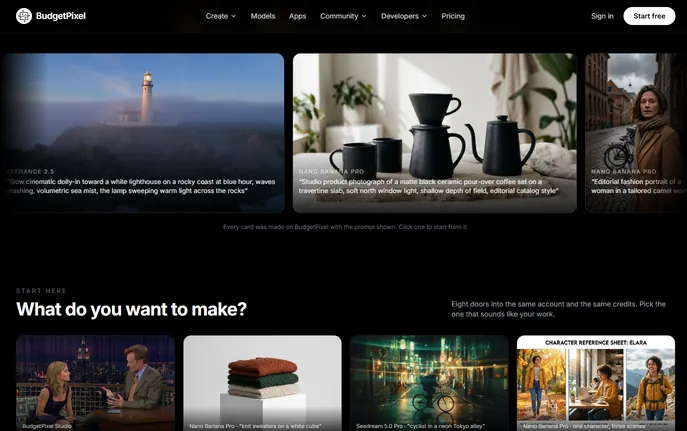
BudgetPixel AI website preview

What Is BudgetPixel AI?

BudgetPixel AI is a unified, budget-conscious creative engine—designed for makers who demand power without premium price tags. It consolidates over 100 specialized AI models into one intuitive platform: from photorealistic image generators like GPT Image 2.5 and Seedream 5, to cinematic video engines such as Kling 3 and Veo 3.1, plus audio-first tools like Nano Banana Pro (for vocal synthesis) and Wan 3 (for adaptive music scoring). Unlike fragmented AI suites, BudgetPixel AI unifies pricing, previews, and performance under a single credit ledger—so every experiment, iteration, and export draws from the same transparent balance. Best of all? Every new user starts with **300 free credits per month**, no credit card required—enough to generate dozens of high-fidelity assets while learning the system’s full scope.

How to Use BudgetPixel AI

Getting started takes seconds: sign in, pick your modality (image, video, music, voice, or sound), then describe your vision—or upload a sketch, photo, or audio clip as a reference. Before hitting “Generate,” you’ll see exactly how many credits each model consumes, enabling smart trade-offs between speed, fidelity, and style. Preview outputs side-by-side in the Model Arena, refine prompts with natural-language suggestions, and iterate rapidly. Once generated, assets land directly in your editable Design Canvas—where you can relight scenes, remove backgrounds, apply motion paths, or layer generated elements with uploaded assets. For advanced workflows, chain image-to-video sequences, lock character consistency across frames using tagged personas, or auto-generate captions and thumbnails for cross-platform Shorts.

Pro tip: Leverage community-voted model rankings to match your goal—whether it’s logo precision, lip-sync accuracy, or ambient track duration—and use the credit estimator to forecast usage before launching large batches.

Key Features of BudgetPixel AI

  • Smart Image Generation: Produce studio-grade visuals—from e-commerce mockups and editorial illustrations to stylized logos and AI-augmented photography—using best-in-class models calibrated for resolution, prompt adherence, and aesthetic control.
  • Cinematic Video Tools: Go beyond static clips: generate dynamic text-to-video scenes with adjustable camera motion, precise lip synchronization, frame-level motion brushes, built-in VFX, and a non-linear timeline editor for seamless compositing.
  • End-to-End Audio Suite: Compose original songs with AI vocals, generate royalty-free background scores at exact durations, produce custom SFX libraries, and create multilingual voiceovers with emotional tone control—all within one workflow.
  • Canvas-First Editing: Edit generations natively—erase objects with semantic understanding, upscale to 4K while preserving texture, reframe compositions intelligently, retain alpha layers for design handoff, and export print-ready PDFs or web-optimized PNGs/MP4s.

With one shared credit pool and real-time cost visibility per model, BudgetPixel AI turns budgeting into part of the creative process—not an afterthought.

Why Choose BudgetPixel AI?

Because creativity shouldn’t be gated by subscription sprawl. BudgetPixel AI replaces the need for five separate tools with one cohesive, credit-efficient studio—ideal for indie developers building app assets, marketing teams scaling social campaigns, or educators producing multimedia lessons. Its architecture supports continuity (e.g., consistent avatar generation across image/video/audio), community validation (via live model ratings), and rapid iteration (with low-friction prompt refinement). And with new models added monthly—each stress-tested and benchmarked for cost-per-quality—the platform grows smarter *and* more affordable over time.

For teams and power users, paid tiers unlock production-grade capabilities: a production-ready REST API, MCP integration for Claude-powered agents and Cursor-based automation, and native plugins for ComfyUI, WordPress, Figma, and more—all drawing from your plan’s unified credit balance. As a top-ranked tool on aitop-tools.com, BudgetPixel AI stands out for its rare combination of breadth, transparency, and accessibility.

Use Cases and Applications

From concept to client delivery: generate photorealistic product shots for Shopify stores; turn blog posts into engaging TikTok/Instagram Reels with auto-synced voiceover and B-roll; prototype brand identities with logo variants, color palettes, and campaign banners; compose custom jingles for podcasts; or edit raw footage with AI-powered stabilization and captioning. Designers combine uploaded photos, AI-generated textures, and canvas layers to build responsive landing pages or pitch decks in minutes. Whether you're repurposing long-form YouTube videos into platform-optimized Shorts—or building a consistent visual universe for a web series—BudgetPixel AI delivers the flexibility, fidelity, and financial predictability creators actually need.

Product source: BudgetPixel AI official website. Check the provider for current plans, limits and availability.

FAQ

BudgetPixel AI questions and answers

Product context and practical checks for evaluating BudgetPixel AI.

What is BudgetPixel AI used for?

BudgetPixel AI: 100+ free AI tools for images, video, music & more—300 monthly credits to start. No cost. No sign-up hassle. Create smarter, faster, freely.

How do I get started with BudgetPixel AI?

Getting started takes seconds: sign in, pick your modality (image, video, music, voice, or sound), then describe your vision—or upload a sketch, photo, or audio clip as a reference. Before hitting “Generate,” you’ll see exactly how many credits each model consumes, enabling smart trade-offs between speed, fidelity, and style. Preview outputs side-by-side in the Model Arena, refine prompts with natural-language suggestions, and iterate rapidly. Once generated, assets land directly in your editable Design Canvas—where you can relight scenes, remove backgrounds, apply motion paths, or layer generated elements with uploaded assets. For advanced workflows, chain image-to-video sequences, lock character consistency across frames using tagged personas, or auto-generate captions and thumbnails for cross-platform Shorts.Pro tip: Leverage community-voted model rankings to match your goal—whether it’s logo precision, lip-sync accuracy, or ambient track duration—and use the credit estimator to forecast usage before launching large batches.

Which capabilities are described for BudgetPixel AI?

Smart Image Generation: Produce studio-grade visuals—from e-commerce mockups and editorial illustrations to stylized logos and AI-augmented photography—using best-in-class models calibrated for resolution, prompt adherence, and aesthetic control. Cinematic Video Tools: Go beyond static clips: generate dynamic text-to-video scenes with adjustable camera motion, precise lip synchronization, frame-level motion brushes, built-in VFX, and a non-linear timeline editor for seamless compositing. End-to-End Audio Suite: Compose original songs with AI vocals, generate royalty-free background scores at exact durations, produce custom SFX libraries, and create multilingual voiceovers with emotional tone control—all within one workflow. Canvas-First Editing: Edit generations natively—erase objects with semantic understanding, upscale to 4K while preserving texture, reframe compositions intelligently, retain alpha layers for design handoff, and export print-ready PDFs or web-optimized PNGs/MP4s. With one shared credit pool and real-time cost visibility per model, BudgetPixel AI turns budgeting into part of the creative process—not an afterthought.

What projects can I evaluate BudgetPixel AI for?

From concept to client delivery: generate photorealistic product shots for Shopify stores; turn blog posts into engaging TikTok/Instagram Reels with auto-synced voiceover and B-roll; prototype brand identities with logo variants, color palettes, and campaign banners; compose custom jingles for podcasts; or edit raw footage with AI-powered stabilization and captioning. Designers combine uploaded photos, AI-generated textures, and canvas layers to build responsive landing pages or pitch decks in minutes. Whether you're repurposing long-form YouTube videos into platform-optimized Shorts—or building a consistent visual universe for a web series—BudgetPixel AI delivers the flexibility, fidelity, and financial predictability creators actually need.

How does BudgetPixel AI handle smart image generation?

Smart Image Generation: Produce studio-grade visuals—from e-commerce mockups and editorial illustrations to stylized logos and AI-augmented photography—using best-in-class models calibrated for resolution, prompt adherence, and aesthetic control.

How does BudgetPixel AI handle cinematic video tools?

Cinematic Video Tools: Go beyond static clips: generate dynamic text-to-video scenes with adjustable camera motion, precise lip synchronization, frame-level motion brushes, built-in VFX, and a non-linear timeline editor for seamless compositing.

What should I compare before choosing a BudgetPixel AI plan?

Check BudgetPixel AI’s current pricing page for included usage, renewal terms and any credit charges. Compare the cost of a usable result, including retries, rather than assuming that account registration includes free usage.

What inputs should I prepare for a BudgetPixel AI trial?

Compare text prompts, reference frames, source footage and audio support. Check duration, aspect ratio and whether the tool lets you keep a subject consistent between shots.

How can I check the quality of a BudgetPixel AI result?

Watch the entire clip for motion errors, distorted objects, changing identities, lip-sync problems and abrupt transitions. Inspect the downloaded file as well as the preview.

Where is the official BudgetPixel AI website?

The website linked from this profile is https://budgetpixel.com. Use the provider’s own documentation, account area and support channels to confirm current product details.

Visit BudgetPixel AI