Summarizer

Briefly - Chrome Extension

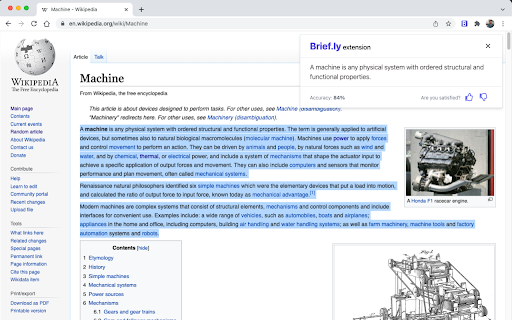
Briefly - Chrome Extension: Summarize texts on websites efficiently. Save time and get the gist of any article with this must-have tool.

Briefly - Chrome Extension website preview

Briefly - Chrome Extension Website screenshot

Introducing Briefly ai Chrome Extension: Efficiently Summarize Texts on Websites

Are you tired of reading lengthy articles and blog posts? Do you need a quick and efficient way to summarize text on websites? Look no further than Briefly ai Chrome Extension - the ultimate tool for text summarization. With this powerful extension, you can save time and get concise summaries of any web content.

How to Use Briefly ai Chrome Extension?

Using Briefly ai Chrome Extension is incredibly simple. Just install the extension and click on the summarization icon that appears on your browser toolbar. In an instant, you'll receive a well-crafted summary that captures the essence of the text. Say goodbye to tedious reading and hello to efficient summarization!

Efficient Text Summarization at Your Fingertips

Briefly ai Chrome Extension boasts a range of core features designed to enhance your summarization experience. Let's take a closer look:

Text Summarization

With Briefly ai Chrome Extension, you can easily condense lengthy texts into concise summaries. Whether you're conducting research or simply looking to skim through an article, this feature saves you valuable time and effort.

GPT-3 AI Algorithm

Powered by the state-of-the-art GPT-3 AI algorithm, Briefly ai Chrome Extension ensures accurate and comprehensive summaries. The algorithm understands the context, identifies key points, and delivers high-quality summaries that capture the essence of the text.

Use Cases of Briefly ai Chrome Extension

Briefly ai Chrome Extension serves a variety of purposes, making it an indispensable tool for different scenarios. Here are some of its use cases:

Quickly Summarizing Articles for Research

When conducting research, time is of the essence. Briefly ai Chrome Extension allows you to swiftly extract the main points from lengthy articles, enabling you to gather information efficiently and make informed decisions.

Condensing Lengthy Blog Posts for Easy Reading

Love reading blog posts but find them too long? Briefly ai Chrome Extension simplifies the reading experience by generating concise summaries of lengthy blog posts. You can easily skim through the essential content and save time without missing out on valuable information.

Product source: Briefly - Chrome Extension official website. Check the provider for current plans, limits and availability.

FAQ

Briefly - Chrome Extension questions and answers

Product context and practical checks for evaluating Briefly - Chrome Extension.

What is Briefly - Chrome Extension used for?

Briefly - Chrome Extension: Summarize texts on websites efficiently. Save time and get the gist of any article with this must-have tool.

How do I get started with Briefly - Chrome Extension?

Using Briefly ai Chrome Extension is incredibly simple. Just install the extension and click on the summarization icon that appears on your browser toolbar. In an instant, you'll receive a well-crafted summary that captures the essence of the text. Say goodbye to tedious reading and hello to efficient summarization!

What projects can I evaluate Briefly - Chrome Extension for?

Briefly ai Chrome Extension serves a variety of purposes, making it an indispensable tool for different scenarios. Here are some of its use cases: Quickly Summarizing Articles for Research When conducting research, time is of the essence. Briefly ai Chrome Extension allows you to swiftly extract the main points from lengthy articles, enabling you to gather information efficiently and make informed decisions. Condensing Lengthy Blog Posts for Easy Reading Love reading blog posts but find them too long? Briefly ai Chrome Extension simplifies the reading experience by generating concise summaries of lengthy blog posts. You can easily skim through the essential content and save time without missing out on valuable information.

What should I compare before choosing a Briefly - Chrome Extension plan?

Check Briefly - Chrome Extension’s current pricing page for included usage, renewal terms and any credit charges. Compare the cost of a usable result, including retries, rather than assuming that account registration includes free usage.

What inputs should I prepare for a Briefly - Chrome Extension trial?

Look for text prompts, image references, masks or sketches as appropriate. Compare composition control, supported upload types and the ability to revise a selected area.

How can I check the quality of a Briefly - Chrome Extension result?

Inspect text, hands, edges, reflections and repeated objects at full size. Check that important product or brand details survive editing.

Which export options should I check in Briefly - Chrome Extension?

Compare pixel dimensions, transparency, file formats and any enlargement options. Confirm that the downloaded result works in your design or publishing software.

What is a practical way to test Briefly - Chrome Extension against alternatives?

Prepare a brief with a subject, composition, lighting and required output size. Test a first generation and a targeted revision to see how much control you retain.

What should I review before uploading material to Briefly - Chrome Extension?

Read the provider’s rules on access, retention, deletion and use of uploaded material. Start with a non-confidential sample that you have permission to use.

Where is the official Briefly - Chrome Extension website?

The website linked from this profile is https://chromewebstore.google.com/detail/briefly/koceodkdlldkaoenidaolomgcjnaoolf. Use the provider’s own documentation, account area and support channels to confirm current product details.

Visit Briefly - Chrome Extension