Other

Bitchat

Bitchat: Jack Dorsey’s decentralized offline messaging app—no internet needed. Uses Bluetooth mesh for secure, peer-to-peer chats anywhere.

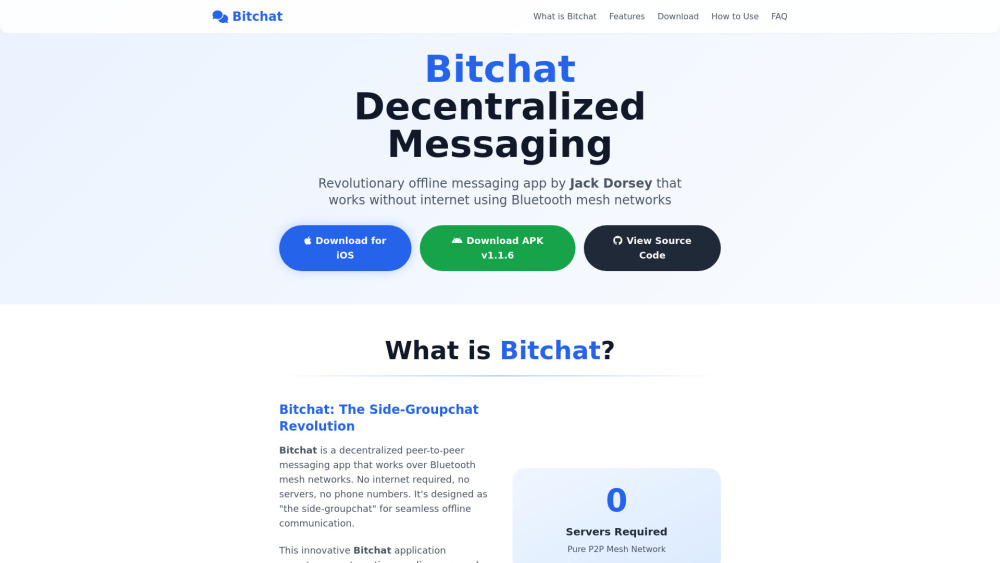
Bitchat website preview

Bitchat Website screenshot

Introducing Bitchat: Decentralized Offline Messaging via Bluetooth Mesh

Bitchat redefines resilient communication by eliminating dependence on infrastructure. Built as a permissionless, serverless messaging protocol, it leverages Bluetooth Low Energy (BLE) mesh networking to enable real-time, multi-hop conversations—entirely offline. Conceived as “the side-groupchat” for the post-internet era, Bitchat requires no accounts, no phone numbers, and no internet connection. Instead, devices discover each other autonomously, form ad-hoc mesh topologies, and relay messages across up to seven hops—making it uniquely suited for remote deployments, disaster response, civil coordination, and privacy-first environments.

Getting Started with Bitchat

Installation is streamlined: download the official iOS app (iOS 16.0+) or Android APK (v1.1.6), or build from source using the public GitHub repository. On first launch, choose a nickname—no registration required—and Bitchat immediately begins scanning for nearby peers via BLE advertising. Join public channels with IRC-style commands like /j #rescue, list active channels with /channels, or initiate private chats using /m @friend Hello. Channel admins can set passwords (/pass secret), assign moderators, and even transfer ownership—all without central coordination. Messages propagate intelligently through the mesh, respecting TTL limits and avoiding loops via cryptographic message IDs and bloom-filter deduplication.

Bluetooth LE Mesh Architecture (Automatic peer discovery, TTL-limited multi-hop routing, adaptive topology management)

End-to-End Cryptographic Assurance (X25519 key exchange, AES-256-GCM encryption for messages and channels, Ed25519 signatures, forward secrecy, cover traffic obfuscation)

IRC-Native Interaction Layer (Channel topics, password protection, role-based permissions, inline mentions, command-driven moderation)

Intelligent Store-and-Forward (Ephemeral by default; optional persistent caching with automatic redelivery upon peer reconnection)

Zero-Identity Design (No identifiers beyond public keys; no metadata collection; no persistent storage unless explicitly enabled)

Cross-Platform Native Implementation (iOS, macOS, Android—with consistent protocol behavior and interoperability)

LZ4 Message Compression (Dynamically applied to reduce BLE packet overhead by 30–70%, preserving bandwidth and latency)

Adaptive Power Intelligence (Five-tier battery profile: Performance → Balanced → Power Saver → Ultra-Low → Deep Sleep, with configurable scan intervals and duty cycling)

One-Tap Emergency Privacy (Triple-tap the logo to trigger instant, cryptographically verified data wipe)

Public Domain & Open Protocol (No copyright restrictions; fully auditable; designed for integration, extension, and hardware portability)

Where Bitchat Makes a Difference

Connecting communities in geographically isolated or infrastructure-poor regions

Maintaining critical comms during natural disasters, blackouts, or telecom failures

Enabling secure, untraceable coordination under surveillance or censorship regimes

Providing reliable, low-footprint group chat for field teams, festivals, campuses, and emergency responders

Product source: Bitchat official website. Check the provider for current plans, limits and availability.

FAQ

Bitchat questions and answers

Product context and practical checks for evaluating Bitchat.

What is Bitchat used for?

Bitchat: Jack Dorsey’s decentralized offline messaging app—no internet needed. Uses Bluetooth mesh for secure, peer-to-peer chats anywhere.

How do I get started with Bitchat?

Installation is streamlined: download the official iOS app (iOS 16.0+) or Android APK (v1.1.6), or build from source using the public GitHub repository. On first launch, choose a nickname—no registration required—and Bitchat immediately begins scanning for nearby peers via BLE advertising. Join public channels with IRC-style commands like /j #rescue, list active channels with /channels, or initiate private chats using /m @friend Hello. Channel admins can set passwords (/pass secret), assign moderators, and even transfer ownership—all without central coordination. Messages propagate intelligently through the mesh, respecting TTL limits and avoiding loops via cryptographic message IDs and bloom-filter deduplication. Bluetooth LE Mesh Architecture (Automatic peer discovery, TTL-limited multi-hop routing, adaptive topology management)End-to-End Cryptographic Assurance (X25519 key exchange, AES-256-GCM encryption for messages and channels, Ed25519 signatures, forward secrecy, cover traffic obfuscation)IRC-Native Interaction Layer (Channel topics, password protection, role-based permissions, inline mentions, command-driven moderation)Intelligent Store-and-Forward (Ephemeral by default; optional persistent caching with automatic redelivery upon peer reconnection)Zero-Identity Design (No identifiers beyond public keys; no metadata collection; no persistent storage unless explicitly enabled)Cross-Platform Native Implementation (iOS, macOS, Android—with consistent protocol behavior and interoperability)LZ4 Message Compression (Dynamically applied to reduce BLE packet overhead by 30–70%, preserving bandwidth and latency)Adaptive Power Intelligence (Five-tier battery profile: Performance → Balanced → Power Saver → Ultra-Low → Deep Sleep, with configurable scan intervals and duty cycling)One-Tap Emergency Privacy (Triple-tap the logo to trigger instant, cryptographically verified data wipe)Public Domain & Open Protocol (No copyright restrictions; fully auditable; designed for integration, extension, and hardware portability)

What should I compare before choosing a Bitchat plan?

Check Bitchat’s current pricing page for included usage, renewal terms and any credit charges. Compare the cost of a usable result, including retries, rather than assuming that account registration includes free usage.

What inputs should I prepare for a Bitchat trial?

Identify the files, text or account connections your task needs. Confirm that the product accepts those inputs and offers controls for reviewing its work.

How can I check the quality of a Bitchat result?

Test one representative task and inspect the result for accuracy and completeness. Record where manual corrections or extra tools are needed.

Which export options should I check in Bitchat?

Check export formats, integrations and whether you can keep using your work outside the service. Test a real export before committing to a longer plan.

What is a practical way to test Bitchat against alternatives?

Choose one task with a clear success condition. Keep the input consistent, record the time spent reviewing and compare the complete workflow cost.

What should I review before uploading material to Bitchat?

Read the provider’s rules on access, retention, deletion and use of uploaded material. Start with a non-confidential sample that you have permission to use.

How can I check whether Bitchat fits my existing workflow?

List the steps before and after using Bitchat, including preparation, review and export. Test that complete sequence and check whether handoffs require manual conversion or another paid service.

Where is the official Bitchat website?

The website linked from this profile is https://bitchats.app. Use the provider’s own documentation, account area and support channels to confirm current product details.

Visit Bitchat