Research Tool

BioSeek Reader - Chrome Extension

BioSeek Reader - Chrome Extension: Instantly explore and analyze web content with ease. Boost your productivity and discover insights in a single click!

BioSeek Reader - Chrome Extension website preview

BioSeek Reader - Chrome Extension Website screenshot

What is BioSeek Reader - Chrome Extension?

The BioSeek Reader Chrome extension is an AI-powered tool designed to instantly analyze and transform biological terms within unstructured web content into dynamic, clickable items for faster and easier exploration.

How to Use BioSeek Reader - Chrome Extension?

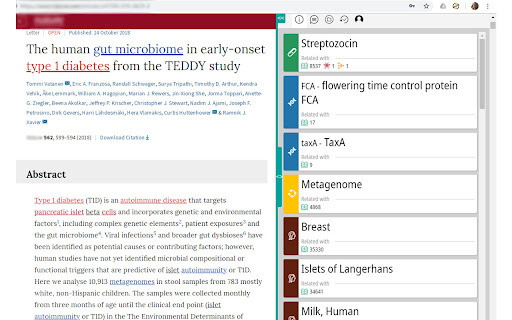
After installing the extension on your Google Chrome™ browser, BioSeek Reader will automatically detect biological terms in the text you're viewing, transforming them into interactive cards, allowing for immediate access to related data without leaving the page.

Core Features of BioSeek Reader - Chrome Extension

Advanced Semantic Analysis

Identifies synonyms, aliases, and related biological entities for comprehensive term recognition.

Organized Groupings of Related Entities

Biological terms are grouped into clickable clusters, offering users a streamlined exploration of interconnected entities.

Over 60 Million Biological Terms Recognized

Supports a vast repository of biological terms, enhancing research and exploration efficiency.

Use Cases for BioSeek Reader - Chrome Extension

Exploration of Biological Literature

Ideal for investigating genes, diseases, drugs, and pathways within scientific articles.

Seamless Navigation Across Research Data

Allows researchers to explore complex biological connections effortlessly without manual searches.

Product source: BioSeek Reader - Chrome Extension official website. Check the provider for current plans, limits and availability.

FAQ

BioSeek Reader - Chrome Extension questions and answers

Product context and practical checks for evaluating BioSeek Reader - Chrome Extension.

What is BioSeek Reader - Chrome Extension used for?

BioSeek Reader - Chrome Extension: Instantly explore and analyze web content with ease. Boost your productivity and discover insights in a single click!

How do I get started with BioSeek Reader - Chrome Extension?

After installing the extension on your Google Chrome™ browser, BioSeek Reader will automatically detect biological terms in the text you're viewing, transforming them into interactive cards, allowing for immediate access to related data without leaving the page.

Which capabilities are described for BioSeek Reader - Chrome Extension?

Advanced Semantic Analysis Identifies synonyms, aliases, and related biological entities for comprehensive term recognition. Organized Groupings of Related Entities Biological terms are grouped into clickable clusters, offering users a streamlined exploration of interconnected entities. Over 60 Million Biological Terms Recognized Supports a vast repository of biological terms, enhancing research and exploration efficiency.

What projects can I evaluate BioSeek Reader - Chrome Extension for?

Exploration of Biological Literature Ideal for investigating genes, diseases, drugs, and pathways within scientific articles. Seamless Navigation Across Research Data Allows researchers to explore complex biological connections effortlessly without manual searches.

What should I compare before choosing a BioSeek Reader - Chrome Extension plan?

Check BioSeek Reader - Chrome Extension’s current pricing page for included usage, renewal terms and any credit charges. Compare the cost of a usable result, including retries, rather than assuming that account registration includes free usage.

What inputs should I prepare for a BioSeek Reader - Chrome Extension trial?

Compare support for source documents, style instructions, outlines and length limits. Check whether citations link to real material rather than merely looking like references.

How can I check the quality of a BioSeek Reader - Chrome Extension result?

Verify names, dates, quotations and factual claims against the original sources. Edit tone, remove repetition and make sure the text answers the intended reader’s question.

Which export options should I check in BioSeek Reader - Chrome Extension?

Check export to plain text, Markdown, documents or your publishing system. Formatting, headings and working links matter when moving a draft into production.

What is a practical way to test BioSeek Reader - Chrome Extension against alternatives?

Use a real brief and a short source document. Compare factual accuracy, structure and editing time rather than accepting the longest or most confident draft.

Where is the official BioSeek Reader - Chrome Extension website?

The website linked from this profile is https://chromewebstore.google.com/detail/bioseek-reader/mkfaibcieogbhcneiohnhggglkdmncmo. Use the provider’s own documentation, account area and support channels to confirm current product details.

Visit BioSeek Reader - Chrome Extension