AI Content Generator

BiblePics

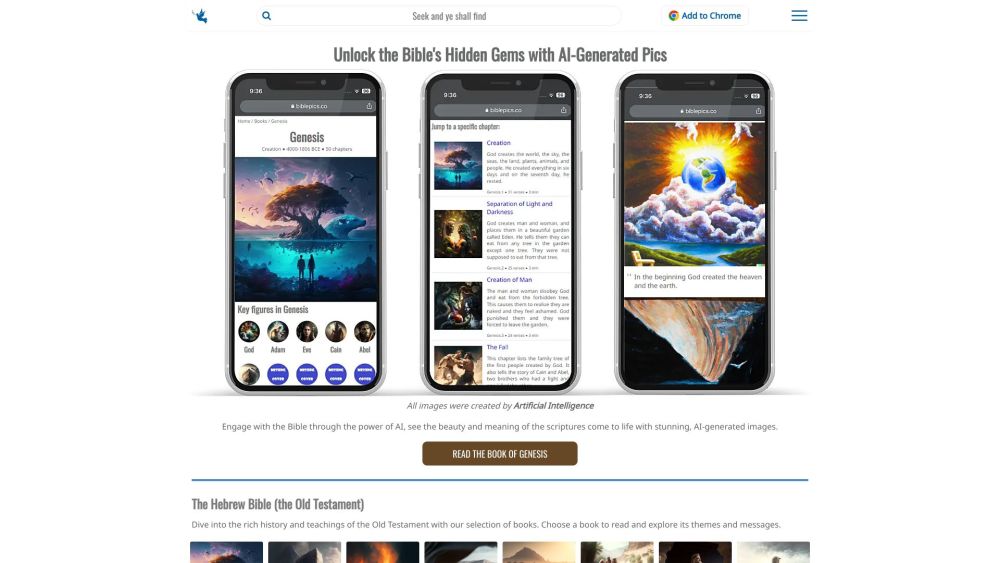
Experience the Bible like never before with BiblePics: AI-generated images bring new perspectives and visual representations to the sacred text.

BiblePics website preview

BiblePics Website screenshot

Discover BiblePics

BiblePics is a groundbreaking platform that offers a visually immersive way to explore the Bible through AI-generated images. Leveraging advanced artificial intelligence, these images bring new perspectives and interpretations to the sacred text, allowing users to experience the Bible like never before.

How to Navigate BiblePics

Using BiblePics is simple and user-friendly. You can browse various galleries or search for specific Bible passages. Explore the Old and New Testaments, learn about biblical figures, and even have interactive chats with them for insight and wisdom. Additionally, discover churches and synagogues worldwide, delving into their architecture and history.

Key Features of BiblePics

BiblePics offers several unique features:

  • AI-Generated Images: View stunning, AI-created images that bring the Bible to life.
  • Interactive Chat: Converse with biblical characters for guidance and deeper understanding.
  • Church and Synagogue Finder: Explore places of worship from around the globe.
  • Book Collection: Own a limited edition book filled with AI-generated Bible illustrations.

Use Cases for BiblePics

BiblePics is perfect for those who want to:

  • Enhance their biblical knowledge through visual aids.
  • Gain new perspectives on biblical stories and events.
  • Engage in interactive dialogues with biblical characters.
  • Explore and appreciate the architecture and history of global places of worship.

Product source: BiblePics official website. Check the provider for current plans, limits and availability.

FAQ

BiblePics questions and answers

Product context and practical checks for evaluating BiblePics.

What is BiblePics used for?

Experience the Bible like never before with BiblePics: AI-generated images bring new perspectives and visual representations to the sacred text.

How do I get started with BiblePics?

Using BiblePics is simple and user-friendly. You can browse various galleries or search for specific Bible passages. Explore the Old and New Testaments, learn about biblical figures, and even have interactive chats with them for insight and wisdom. Additionally, discover churches and synagogues worldwide, delving into their architecture and history.

Which capabilities are described for BiblePics?

BiblePics offers several unique features: AI-Generated Images: View stunning, AI-created images that bring the Bible to life. Interactive Chat: Converse with biblical characters for guidance and deeper understanding. Church and Synagogue Finder: Explore places of worship from around the globe. Book Collection: Own a limited edition book filled with AI-generated Bible illustrations.

What projects can I evaluate BiblePics for?

BiblePics is perfect for those who want to: Enhance their biblical knowledge through visual aids. Gain new perspectives on biblical stories and events. Engage in interactive dialogues with biblical characters. Explore and appreciate the architecture and history of global places of worship. BiblePics on Social Media Reddit: https://www.reddit.com/r/AIVerseoftheDay/ Facebook: https://www.facebook.com/profile.php?id=100090565697419 YouTube: https://www.youtube.com/@biblepics TikTok: https://www.tiktok.com/@biblepics_co Twitter: https://twitter.com/biblepicsco/ Instagram: https://www.instagram.com/biblepics.co/ Pinterest: https://www.pinterest.com/biblepics/

What should I compare before choosing a BiblePics plan?

Check BiblePics’s current pricing page for included usage, renewal terms and any credit charges. Compare the cost of a usable result, including retries, rather than assuming that account registration includes free usage.

What inputs should I prepare for a BiblePics trial?

Look for text prompts, image references, masks or sketches as appropriate. Compare composition control, supported upload types and the ability to revise a selected area.

How can I check the quality of a BiblePics result?

Inspect text, hands, edges, reflections and repeated objects at full size. Check that important product or brand details survive editing.

Which export options should I check in BiblePics?

Compare pixel dimensions, transparency, file formats and any enlargement options. Confirm that the downloaded result works in your design or publishing software.

What is a practical way to test BiblePics against alternatives?

Prepare a brief with a subject, composition, lighting and required output size. Test a first generation and a targeted revision to see how much control you retain.

Where is the official BiblePics website?

The website linked from this profile is https://biblepics.co. Use the provider’s own documentation, account area and support channels to confirm current product details.

Visit BiblePics