AI Builder

Batch / Bulk processing for ChatGPT AI

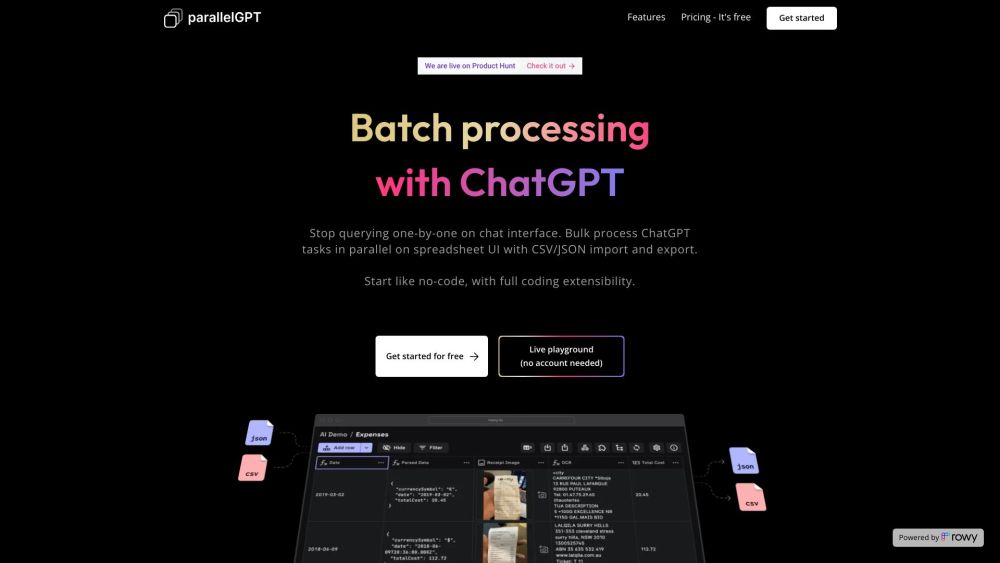
Batch / Bulk processing for ChatGPT AI is a tool that allows users to import prompts in bulk from CSV or JSON files and process chatGPT queries in batch in parallel on a spreadsheet UI. It provides a collaborative environment for teams to collaborate and tweak prompts in low code.

Batch / Bulk processing for ChatGPT AI website preview

Batch / Bulk processing for ChatGPT AI Website screenshot

What is Batch / Bulk Processing for ChatGPT AI?

Batch / Bulk Processing for ChatGPT AI is an innovative tool designed to allow users to import multiple prompts from CSV or JSON files and process these prompts simultaneously within a spreadsheet interface. This tool facilitates teamwork by offering a collaborative platform where team members can fine-tune prompts with minimal coding required.

How to Use Batch / Bulk Processing for ChatGPT AI?

To effectively utilize Batch / Bulk Processing for ChatGPT AI, follow these steps: 1. Upload prompts using CSV or JSON files. 2. Batch process ChatGPT queries within the spreadsheet interface. 3. Work collaboratively with your team to refine and improve prompts with low code adjustments. 4. Export the processed data as CSV or JSON files. 5. Optionally, implement cloud functions and secure your data using Google Cloud Project and Google Secret Manager. 6. Invite team members with specific access controls to collaborate efficiently. 7. Experience streamlined and productive workflows for ChatGPT task processing.

Core Features of Batch / Bulk Processing for ChatGPT AI

The primary features of Batch / Bulk Processing for ChatGPT AI include: - Bulk importing of prompts from CSV or JSON files - Parallel processing of ChatGPT queries within a spreadsheet UI - Team collaboration capabilities - Low-code environment for prompt and logic modifications - Template cloning and sharing - Secure data management using Google Cloud Project and Google Secret Manager - Role-based access control for team collaboration

Use Cases for Batch / Bulk Processing for ChatGPT AI

Batch / Bulk Processing for ChatGPT AI is versatile and can be used in various scenarios, such as: - Efficiently handling large volumes of ChatGPT queries - Team collaboration on chat data processing and analysis - Enhancing ChatGPT performance through prompt and logic modifications - Deploying complex workflows with cloud functions - Ensuring data security and compliance with privacy regulations - Developing custom ChatGPT workflows in a low-code environment

Product source: Batch / Bulk processing for ChatGPT AI official website. Check the provider for current plans, limits and availability.

FAQ

Batch / Bulk processing for ChatGPT AI questions and answers

Product context and practical checks for evaluating Batch / Bulk processing for ChatGPT AI.

What is Batch / Bulk processing for ChatGPT AI used for?

Batch / Bulk processing for ChatGPT AI is a tool that allows users to import prompts in bulk from CSV or JSON files and process chatGPT queries in batch in parallel on a spreadsheet UI. It provides a collaborative environment for teams to collaborate and tweak prompts in low code.

How do I get started with Batch / Bulk processing for ChatGPT AI?

To effectively utilize Batch / Bulk Processing for ChatGPT AI, follow these steps: 1. Upload prompts using CSV or JSON files. 2. Batch process ChatGPT queries within the spreadsheet interface. 3. Work collaboratively with your team to refine and improve prompts with low code adjustments. 4. Export the processed data as CSV or JSON files. 5. Optionally, implement cloud functions and secure your data using Google Cloud Project and Google Secret Manager. 6. Invite team members with specific access controls to collaborate efficiently. 7. Experience streamlined and productive workflows for ChatGPT task processing.

Which capabilities are described for Batch / Bulk processing for ChatGPT AI?

The primary features of Batch / Bulk Processing for ChatGPT AI include: - Bulk importing of prompts from CSV or JSON files - Parallel processing of ChatGPT queries within a spreadsheet UI - Team collaboration capabilities - Low-code environment for prompt and logic modifications - Template cloning and sharing - Secure data management using Google Cloud Project and Google Secret Manager - Role-based access control for team collaboration

What projects can I evaluate Batch / Bulk processing for ChatGPT AI for?

Batch / Bulk Processing for ChatGPT AI is versatile and can be used in various scenarios, such as: - Efficiently handling large volumes of ChatGPT queries - Team collaboration on chat data processing and analysis - Enhancing ChatGPT performance through prompt and logic modifications - Deploying complex workflows with cloud functions - Ensuring data security and compliance with privacy regulations - Developing custom ChatGPT workflows in a low-code environment Batch / Bulk Processing for ChatGPT AI Company Batch / Bulk Processing for ChatGPT AI is developed by BuildShip. Batch / Bulk Processing for ChatGPT AI Pricing For pricing details, visit: https://www.parallelgpt.ai/#features Batch / Bulk Processing for ChatGPT AI YouTube Check out our YouTube channel: https://buildship.com/youtube Batch / Bulk Processing for ChatGPT AI Twitter Follow us on Twitter: https://twitter.com/buildshipapp

What should I compare before choosing a Batch / Bulk processing for ChatGPT AI plan?

For pricing details, visit: https://www.parallelgpt.ai/#features Confirm current prices and allowances on the provider’s website before purchasing.

What inputs should I prepare for a Batch / Bulk processing for ChatGPT AI trial?

Compare repository access, context limits, supported languages and tool permissions. Check whether the assistant can read relevant files and run your existing checks.

How can I check the quality of a Batch / Bulk processing for ChatGPT AI result?

Review the diff, run tests and inspect error handling and dependency changes. Generated code should meet the same review standard as a human contribution.

Which export options should I check in Batch / Bulk processing for ChatGPT AI?

Prefer changes you can inspect and keep in version control. Check whether code, tests and configuration can be exported without depending on a hosted preview.

What is a practical way to test Batch / Bulk processing for ChatGPT AI against alternatives?

Choose a small reproducible bug with an existing failing check. Measure whether the tool fixes the cause, preserves behavior and produces a reviewable change.

Where is the official Batch / Bulk processing for ChatGPT AI website?

The website linked from this profile is https://www.promptdodo.com. Use the provider’s own documentation, account area and support channels to confirm current product details.

Visit Batch / Bulk processing for ChatGPT AI