Table of contents
Arcadium: AI-Powered 3D House Design for Floor Plans & Interiors
Arcadium: AI-powered 3D house design tool—create stunning floor plans & interior visuals in seconds. No design skills needed. Try it free!
Directory : AI Landscape Generator, AI 3D Model Generator, AI Interior Design, AI Floor Plan Generator, AI Room Planner, AI Kitchen Design
Introducing Arcadium: Where AI Meets Architecture
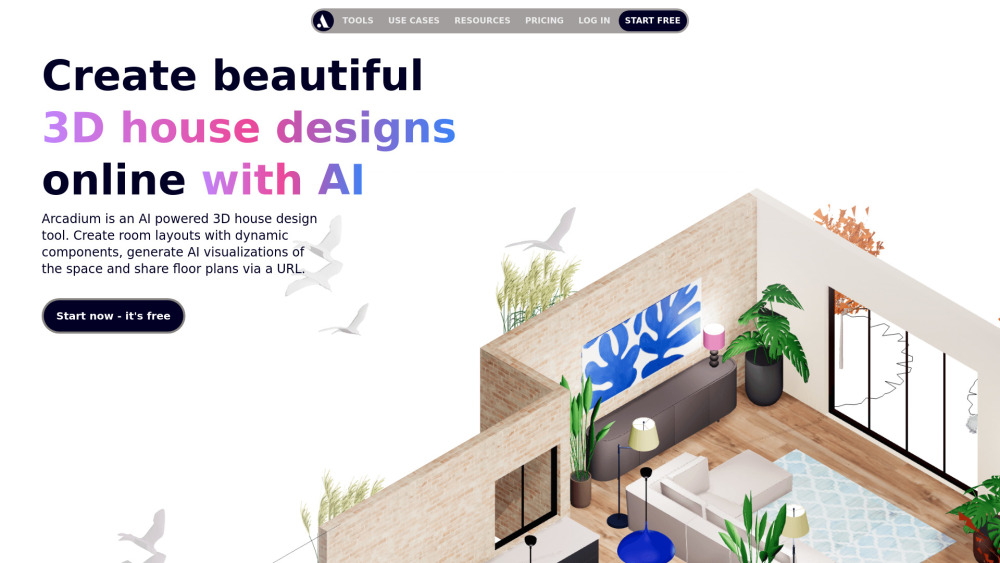
Arcadium redefines home design with intelligent, browser-based 3D creation. It’s not just another floor plan generator — it’s an end-to-end AI architecture assistant that transforms rough sketches or room dimensions into photorealistic, navigable 3D spaces in minutes. Whether you're visualizing a dream kitchen, planning a full-home renovation, or presenting spatial concepts to clients, Arcadium delivers precision modeling, smart styling, and real-time collaboration — all without downloads, subscriptions, or design expertise.
Getting Started with Arcadium — In Under 60 Seconds
Launch Arcadium in any modern browser, sign up (it’s free), and begin designing immediately. Start by sketching walls with intuitive click-and-drag controls — doors and windows auto-insert and align perfectly. Then, bring your space to life: apply wall finishes, flooring textures, and lighting schemes with one click. Populate rooms using Arcadium’s curated library of scale-accurate 3D furniture — rotate, resize, and reposition items with pixel-perfect control. Switch seamlessly between top-down blueprints, interactive 3D walkthroughs, isometric previews, and immersive first-person mode. Adjust ambient light, add spotlights, and fine-tune color temperature to test how natural and artificial light interact. Every element — from staircases to sliding glass doors — is parametric: change one dimension, and the entire system updates intelligently. Export measurements, annotate layouts, and share live, editable links instantly.
Why Designers & Homeowners Choose Arcadium
Drag-and-drop 3D home modeling — no CAD experience required
AI-powered rendering engine: generate photorealistic scenes, hand-drawn sketches, watercolor impressions, or minimalist wireframes with a single prompt
One-click sharing: publish 2D floor plans, elevation drawings, and 3D models as view-only or collaborative URLs
Six dynamic viewing modes: plan view, section cuts, orthographic projections, isometric renderings, virtual walkthroughs, and VR-ready first-person navigation
Over 5,000+ vetted, real-world-scale 3D assets — including modular kitchens, smart appliances, ergonomic office furniture, and custom millwork
Smart parametric objects: adjust stair rise/run, window mullion spacing, or door swing direction — and watch geometry update automatically
Precision tools: grid snapping, alignment guides, fractional inch/metric inputs, and angle-constrained rotation for technical accuracy
Advanced lighting simulation: place point, linear, and area lights; control intensity (lumens), CCT (Kelvin), and falloff — then preview shadows and reflections
Real-time cloud collaboration: invite stakeholders, leave time-stamped comments on specific objects, and host guided virtual tours with synced navigation
Real-World Applications — Designed for Every Stage of the Journey
Residential 3D house modeling (single-family, townhomes, ADUs)
Zoning-compliant floor plan drafting for permits and submissions
Interior design ideation and client mood board development
Kitchen workflow optimization — appliance zoning, cabinet ergonomics, traffic path analysis
Whole-home spatial planning — from open-concept living to multi-level circulation
Room-specific redesigns: bedrooms, bathrooms, home offices, gyms, and media rooms
Exterior + landscape integration: patio layouts, garden access points, and façade visualization
Feng Shui and biophilic design implementation — with spatial energy mapping and natural material libraries
Commercial office planning: workstation density, ADA compliance checks, acoustic zoning
DIY renovation prep — visualize drywall removal, plumbing reroutes, and electrical placements before breaking ground
Architectural presentation decks: export high-res renders, annotated PDFs, and embeddable 3D viewers for proposals
Remote contractor coordination: share exact dimensions, material specs, and lighting plans via link
Frequently Asked Questions — Answered Clearly
-
What’s the best free online floor plan creator for beginners?
-
Can I create building-compliant plans without hiring an architect?
-
How do I convert my existing home measurements into a digital floor plan?
-
How many lumens do I really need per room — and can Arcadium help me test it?
-
Is Arcadium truly free — or are there hidden limits?
-
What makes Arcadium’s kitchen design tools different from generic floor planners?
-
Support & Contact Information
Have questions? Our support team responds within 2 business hours. Reach us directly at https://osrd6v6dgck.typeform.com/to/uRkeYmYe.
-
About Arcadium
Arcadium is a product of Arcadium, a design-tech startup focused on democratizing spatial intelligence. We believe great design shouldn’t require years of training — just curiosity, clarity, and the right AI partner.
Company address: Remote-first team headquartered in Portland, OR, USA. Learn our story: About Arcadium.
-
Log In to Your Account
Access your projects anytime: https://arcadium3d.com/login
-
Create Your Free Account
Start designing in seconds: https://arcadium3d.com/register
-
Pricing & Plans
Explore upgrade options — including Pro features for teams and professionals: https://arcadium3d.com/pricing
-
Watch Tutorials & Tips
Step-by-step guides, pro workflows, and AI prompt examples: https://www.youtube.com/@ArcadiumVideos
-
Follow for Daily Design Inspiration
Quick tips, before/after transformations, and trending layouts: https://www.tiktok.com/@arcadium3d
-
Connect With Our Team
Industry insights, job openings, and partnership opportunities: https://www.linkedin.com/company/arcadium-3d
FAQ from Arcadium
What is Arcadium?
Arcadium is a next-generation AI architecture platform that merges generative design with precision 3D modeling. It empowers homeowners, designers, contractors, and educators to draft, visualize, iterate, and share residential and commercial spaces — all within a secure, cloud-native interface. No plugins. No learning curve. Just intelligent, instant spatial creation.
How do I get started with Arcadium?
Sign up → choose a template or start blank → draw walls (with automatic corner detection) → insert doors/windows → style surfaces → drop furniture → adjust lighting → switch views → share. That’s it. Most users complete their first polished floor plan in under 10 minutes — even on mobile.
What’s the best free floor plan creator for beginners?
Arcadium stands out because it combines zero-cost access with professional-grade output. Unlike legacy tools requiring installation or complex licensing, Arcadium runs entirely in-browser and uses AI to simplify decisions — like suggesting optimal furniture arrangements or auto-generating compliant stair configurations. It’s trusted by over 120,000 DIY renovators and interior stylists worldwide.
Do I need an architect to draw house plans?
For conceptual exploration, layout testing, or visual communication — absolutely not. Arcadium helps you validate spatial ideas before investing in formal architectural services. For final construction documents, local code review, or engineering sign-off, licensed professionals remain essential. But Arcadium dramatically reduces revisions, miscommunication, and costly site changes by making intent crystal clear — early and often.
How do I draw my own floor plans?
Enter your room dimensions (or use Arcadium’s built-in measuring tool on uploaded floor photos), then trace walls with drag handles. Add openings with context-aware placement — doors snap to wall centers, windows respect sill heights. Use the “Auto-Layout” AI feature to suggest functional room zones based on square footage and use case (e.g., “home office with storage” or “open-plan kitchen-dining”).
How do I calculate how many lights I need?
Forget rule-of-thumb math. Arcadium lets you place realistic light fixtures — recessed cans, pendant lamps, LED strips — and instantly see lux levels, shadow patterns, and glare hotspots across your 3D model. Adjust wattage, beam angle, and mounting height to achieve balanced, task-appropriate illumination — verified visually, not theoretically.
Is Arcadium free to use?
Yes — the Free Plan includes unlimited projects, full access to the furniture library, AI rendering in 4 styles, URL sharing, and all core modeling tools. Premium tiers unlock advanced features like BIM export, custom material uploads, team workspaces, and priority support — but you’ll ship stunning designs long before upgrading.
How can I create kitchen layout plans online?
Arcadium’s kitchen module includes pre-configured base cabinets, wall units, islands, countertops (with edge profiles), and integrated appliances — all sized to industry standards. Drag to arrange, then use “Workflow Mode” to simulate cooking paths, check clearance zones, and toggle between U-, L-, and galley configurations. AI even suggests appliance pairings based on your layout and lifestyle preferences.
Interior DesignAI design3D modelingcollaboration toolFloor plan creatoronline design toolroom layoutOffice design3D house designArchitecture softwareHome design softwareVirtual walkthroughFree design softwareKitchen design toolLandscape design softwareBedroom design toolFeng shui designAI visualizationParametric designCloud-based design