AI Photo &amp Image Generator

Anime AI

Transform selfies into manga, create video edits, and more with Anime AI! Unleash creativity with powerful AI tools for photo and video transformations.

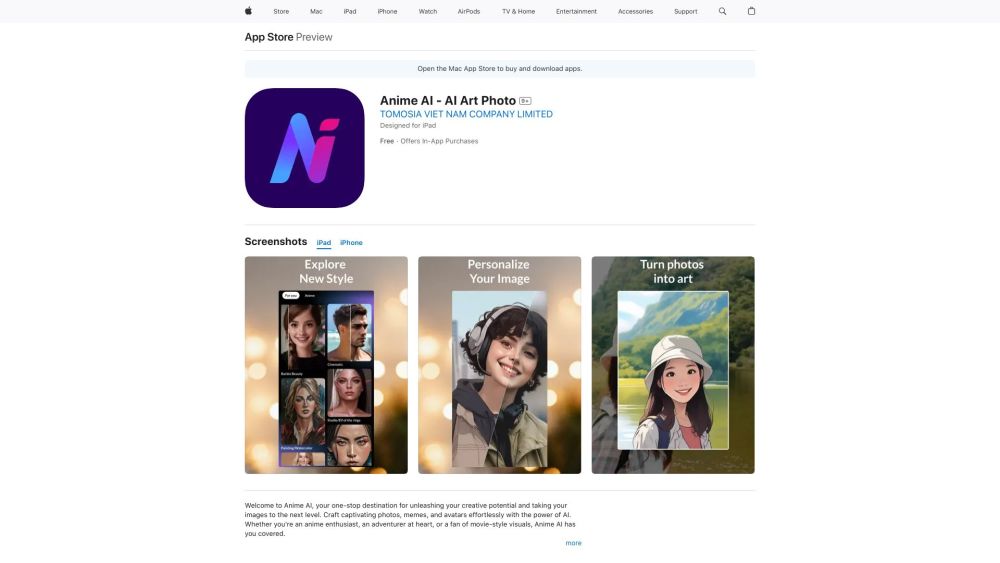
Anime AI website preview

Anime AI Website screenshot

What is Anime AI?

Anime AI is your ultimate hub for transforming your digital images and videos with the help of advanced artificial intelligence. This platform empowers you to convert selfies into stunning anime characters, reminiscent of your favorite manga or cartoon series. Embark on a thrilling adventure by turning yourself into characters from various fantasy worlds. Anime AI also provides tools for AI-driven video editing, collage creation, graphic designing, and unique photo editing features, ensuring you have full control over your creative projects.

How to Use Anime AI?

Getting started with Anime AI is straightforward. Download the app from the App Store and install it on your iPhone, iPad, or iPod touch. Open the app, select the desired transformation feature, and either snap a selfie or choose an existing photo or video from your gallery. The AI will then work its magic, transforming you into an anime character or creating captivating visuals. Use the collage maker and graphic design tools to craft eye-catching social media posts, flyers, posters, and memes. Explore the unique photo editing capabilities to refine and personalize your images.

Anime AI's Core Features

Anime Transformation: Turn yourself into an anime character

Fantasy Adventure: Become characters from fantasy and adventure genres

AI Video Transformation: Transform videos into charming animations

Collage and Graphic Design Tools: Create professional-quality designs

Unique Photo Editing: Apply filters, resize, crop, and enhance photos

Complete Control: Customize tonality, color, and other editing parameters

Anime AI's Use Cases

Transforming selfies into anime characters

Creating visually engaging fantasy and adventure themes

Turning videos into enchanting animations

Designing social media posts, flyers, posters, and memes

Enhancing and customizing photos with unique editing features

Product source: Anime AI official website. Check the provider for current plans, limits and availability.

FAQ

Anime AI questions and answers

Product context and practical checks for evaluating Anime AI.

What is Anime AI used for?

Transform selfies into manga, create video edits, and more with Anime AI! Unleash creativity with powerful AI tools for photo and video transformations.

How do I get started with Anime AI?

Getting started with Anime AI is straightforward. Download the app from the App Store and install it on your iPhone, iPad, or iPod touch. Open the app, select the desired transformation feature, and either snap a selfie or choose an existing photo or video from your gallery. The AI will then work its magic, transforming you into an anime character or creating captivating visuals. Use the collage maker and graphic design tools to craft eye-catching social media posts, flyers, posters, and memes. Explore the unique photo editing capabilities to refine and personalize your images.

Which capabilities are described for Anime AI?

Anime Transformation: Turn yourself into an anime characterFantasy Adventure: Become characters from fantasy and adventure genresAI Video Transformation: Transform videos into charming animationsCollage and Graphic Design Tools: Create professional-quality designsUnique Photo Editing: Apply filters, resize, crop, and enhance photosComplete Control: Customize tonality, color, and other editing parameters

What projects can I evaluate Anime AI for?

Transforming selfies into anime charactersCreating visually engaging fantasy and adventure themesTurning videos into enchanting animationsDesigning social media posts, flyers, posters, and memesEnhancing and customizing photos with unique editing features

What should I compare before choosing a Anime AI plan?

Check Anime AI’s current pricing page for included usage, renewal terms and any credit charges. Compare the cost of a usable result, including retries, rather than assuming that account registration includes free usage.

What inputs should I prepare for a Anime AI trial?

Compare text prompts, reference frames, source footage and audio support. Check duration, aspect ratio and whether the tool lets you keep a subject consistent between shots.

How can I check the quality of a Anime AI result?

Watch the entire clip for motion errors, distorted objects, changing identities, lip-sync problems and abrupt transitions. Inspect the downloaded file as well as the preview.

Which export options should I check in Anime AI?

Check export resolution, frame rate, aspect ratio, audio tracks and watermark rules. A good preview is not a substitute for an export that fits your publishing channel.

What is a practical way to test Anime AI against alternatives?

Use a short shot with one subject and one camera movement. Keep the prompt and duration constant, then compare usable seconds and the number of regenerations.

Where is the official Anime AI website?

The website linked from this profile is https://apps.apple.com/us/app/anime-ai-ai-art-photo/id6469041322. Use the provider’s own documentation, account area and support channels to confirm current product details.

Visit Anime AI