AI Content Generator

Albus

Discover endless insights with Albus: AI app merging Google & Pinterest features, powered by ChatGPT. Explore topics from diverse angles effortlessly!

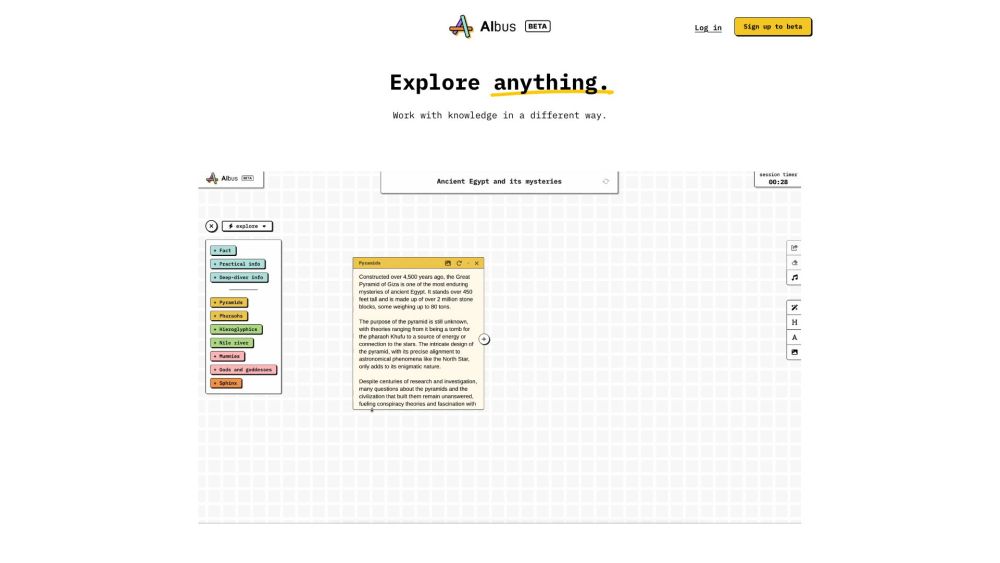
Albus website preview

Albus Website screenshot

What is Albus?

Albus is an innovative AI application designed to explore any topic from multiple angles. Powered by ChatGPT, it integrates functionalities similar to Google and Pinterest, enabling comprehensive exploration and organization of information.

How to use Albus?

Using Albus is straightforward. Enter a title or topic of interest, and Albus will generate an idea board tailored for you. This board allows you to explore, mix, edit, and present content seamlessly. You can incorporate notes, find relevant images, and manage your content while presenting. The interface is user-friendly, facilitating easy discovery and organization of information.

Albus's Core Features

Key features of Albus include: 1. Topic Exploration: Delve into any subject with insights from various perspectives. 2. Idea Board: Organize and present your content by adding notes and pertinent images. 3. Content Sharing: Effortlessly share and present your idea boards while maintaining content control.

Albus's Use Cases

Albus is versatile and can be utilized for: 1. Research: Investigate different facets of a topic to collect valuable information. 2. Presentation: Create visually appealing content presentations. 3. Idea Generation: Stimulate new ideas by examining diverse perspectives on a subject.

Product source: Albus official website. Check the provider for current plans, limits and availability.

FAQ

Albus questions and answers

Product context and practical checks for evaluating Albus.

What is Albus used for?

Discover endless insights with Albus: AI app merging Google & Pinterest features, powered by ChatGPT. Explore topics from diverse angles effortlessly!

How do I get started with Albus?

Using Albus is straightforward. Enter a title or topic of interest, and Albus will generate an idea board tailored for you. This board allows you to explore, mix, edit, and present content seamlessly. You can incorporate notes, find relevant images, and manage your content while presenting. The interface is user-friendly, facilitating easy discovery and organization of information.

Which capabilities are described for Albus?

Key features of Albus include: 1. Topic Exploration: Delve into any subject with insights from various perspectives. 2. Idea Board: Organize and present your content by adding notes and pertinent images. 3. Content Sharing: Effortlessly share and present your idea boards while maintaining content control.

What projects can I evaluate Albus for?

Albus is versatile and can be utilized for: 1. Research: Investigate different facets of a topic to collect valuable information. 2. Presentation: Create visually appealing content presentations. 3. Idea Generation: Stimulate new ideas by examining diverse perspectives on a subject. Albus Support Email & Customer Service Contact & Refund Contact For customer support, contact Albus at: [email protected]. For more information, visit the contact us page Albus Company Company Name: Albus Technologies Limited. Address: 23 King Street, Cambridge, England, CB1 1AH. Albus Login Login here: https://studio.albus.org/login Albus Sign up Sign up here: https://studio.albus.org/register Albus Pricing Find pricing details at: https://albus.org/#pricing Albus YouTube Visit our YouTube channel: https://www.youtube.com/@AlbusBoard Albus LinkedIn Connect with us on LinkedIn: http://linkedin.com/company/albus-ai-technologies Albus Twitter Follow us on Twitter: https://twitter.com/albusdotorg

What should I compare before choosing a Albus plan?

Find pricing details at: https://albus.org/#pricing Confirm current prices and allowances on the provider’s website before purchasing.

What inputs should I prepare for a Albus trial?

Identify the files, text or account connections your task needs. Confirm that the product accepts those inputs and offers controls for reviewing its work.

How can I check the quality of a Albus result?

Test one representative task and inspect the result for accuracy and completeness. Record where manual corrections or extra tools are needed.

Which export options should I check in Albus?

Check export formats, integrations and whether you can keep using your work outside the service. Test a real export before committing to a longer plan.

What is a practical way to test Albus against alternatives?

Choose one task with a clear success condition. Keep the input consistent, record the time spent reviewing and compare the complete workflow cost.

Where is the official Albus website?

The website linked from this profile is https://albus.org. Use the provider’s own documentation, account area and support channels to confirm current product details.

Visit Albus