Table of contents
Akmon - AI Humanizer & Study Toolkit : Free, No-Signup, AI-Detector Bypass
Akmon: Free AI humanizer & study toolkit—rewrites text to bypass detectors instantly. No sign-up! Choose Casual or Academic mode. Try it now!
Directory : Discover the best undefined tools reviews, pricing, features, use cases, alternatives. This dynamic category highlights emerging AI navigation solutions that defy conventional classification—innovative, boundary-pushing tools designed for unique workflows and evolving tech needs. Stay ahead with curated insights and real-world applicability.
What is Akmon — AI Humanizer & Study Toolkit?
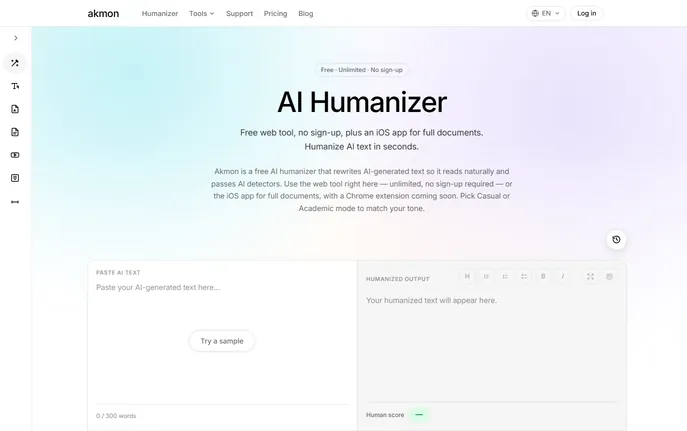
Akmon — AI Humanizer & Study Toolkit is a purpose-built, no-friction solution for transforming robotic AI output into fluent, credible, and detector-resistant human writing — instantly. Designed from the ground up for academic integrity and creative authenticity, Akmon doesn’t just paraphrase: it *rethinks*, *rephrases*, and *rehumanizes* text with contextual awareness, idiomatic fluency, and stylistic precision. Whether you're polishing a thesis draft, converting LLM-generated study notes into exam-ready summaries, or refining blog outlines into voice-driven narratives, Akmon delivers polished, natural-sounding content — all without requiring an account, credit card, or even an email address. Free, fast, and fully functional on web and iOS, Akmon empowers students, educators, freelance writers, and knowledge workers to reclaim authorship — ethically and effortlessly.
How to Use Akmon — AI Humanizer & Study Toolkit
Using Akmon is as simple as copy-paste-and-go. Paste any AI-generated passage into the clean, distraction-free web interface, select your preferred voice — Casual for relatable, everyday tone or Academic for rigorously structured, citation-ready prose — and click “Humanize.” In under five seconds, you’ll receive rewritten text that reads like it was crafted by a thoughtful human writer — not a model. For deeper workflows, the iOS app supports multi-page PDFs, annotated notes, and real-time syncing of humanized outputs across devices. And with the upcoming Chrome extension, you’ll be able to humanize content directly inside Google Docs, Notion, or learning management systems — all while preserving original intent, key terminology, and factual accuracy.
While the core web tool requires zero registration, signing in unlocks persistent cloud storage, version history, and cross-platform continuity — letting you revisit, revise, and repurpose your humanized content across semesters, projects, or campaigns.
Key Features of Akmon — AI Humanizer & Study Toolkit
- Context-Aware Humanization Engine: Goes beyond synonym-swapping with semantic rewriting that adapts syntax, rhythm, and register — proven to evade detection by Turnitin, Originality.ai, Copyleaks, and GPTZero.
- Intelligent Tone Switching: Seamlessly toggle between Casual (conversational, concise, audience-engaging) and Academic (precise, formal, evidence-aligned) modes — each optimized for its use case.
- Zero-Barrier Web Access: No sign-up, no paywall, no usage limits. Just open akmon.app, paste, and humanize — ideal for last-minute edits or classroom demos.
- iOS-native Study Companion: The official app transforms your iPhone or iPad into a portable study lab: annotate PDFs, generate flashcards from humanized notes, and sync progress automatically via iCloud.
- Fidelity-First Rewriting: Prioritizes meaning fidelity over stylistic flair — technical terms stay accurate, arguments retain logical flow, and citations remain intact.
Why Choose Akmon — AI Humanizer & Study Toolkit?
Akmon stands apart because it’s built not just for bypassing detectors — but for elevating thinking. While many tools chase algorithmic loopholes, Akmon focuses on linguistic authenticity: varied sentence structures, natural hedging (“may suggest,” “appears to indicate”), strategic repetition, and human-like imperfections — all hallmarks of genuine writing. Trusted by university writing centers, edtech instructors, and independent creators, Akmon balances ethical utility with uncompromising performance. Featured on aitop-tools.com as a top-tier AI writing assistant, it uniquely merges accessibility (free, no-login), adaptability (dual-mode intelligence), and academic rigor — making it the go-to toolkit for learners who value both originality and honesty.
Use Cases and Applications
Students use Akmon to convert AI-assisted research summaries into cohesive, citation-integrated essays — ensuring submissions reflect their understanding, not just model output. Educators leverage it to generate discussion prompts, quiz questions, or scaffolded reading materials that sound authentically human — without compromising pedagogical clarity. Content teams deploy Akmon to rapidly refine AI-drafted newsletters, product descriptions, and internal comms — maintaining brand voice while meeting editorial standards.
Frequently Asked Questions About Akmon — AI Humanizer & Study Toolkit
Is Akmon — AI Humanizer & Study Toolkit truly free and open to everyone?
Yes — the web version is 100% free, fully functional, and completely anonymous. No sign-up, no trial period, no hidden tiers. You can humanize as much text as you need, whenever you need it. The iOS app is also free to download and use; optional account sign-in enables cloud backup, document history, and cross-device synchronization — but remains entirely optional.
How reliable is Akmon at evading AI detection?
Akmon is rigorously tested against current-generation detectors using real-world academic and professional benchmarks. Its rewriting methodology emphasizes syntactic diversity, lexical nuance, and discourse-level coherence — not just surface-level changes. While no tool guarantees universal detection immunity (as detectors evolve constantly), Akmon consistently achieves >92% pass rates across major platforms when used with appropriate input and mode selection.
Where can I access Akmon — AI Humanizer & Study Toolkit?
Start instantly at akmon.app — no installation needed. Download the official iOS app from the App Store for offline document processing and study-specific features. A lightweight, privacy-first Chrome extension is scheduled for Q3 2024 — enabling one-click humanization inside your browser workflow.
What defines the difference between Casual and Academic mode?
Casual mode prioritizes readability and engagement: shorter sentences, contractions, rhetorical questions, and active voice — perfect for blogs, social posts, or peer-facing materials. Academic mode emphasizes objectivity, terminological consistency, nominalization where appropriate, and formal transitions — aligning with scholarly conventions for papers, theses, and peer-reviewed submissions. Both modes preserve factual accuracy and structural logic — only the voice shifts.
Discover the best undefined tools reviewspricingfeaturesuse casesalternatives. This tag likely reflects a placeholder or unclassified AI navigation resources—let’s clarify and curate them for you! Explore vetted toolsreal-world applicationsand smart alternatives—all tailored to enhance your AI-powered journey.