Text&ampWriting

AI Virtual Staging

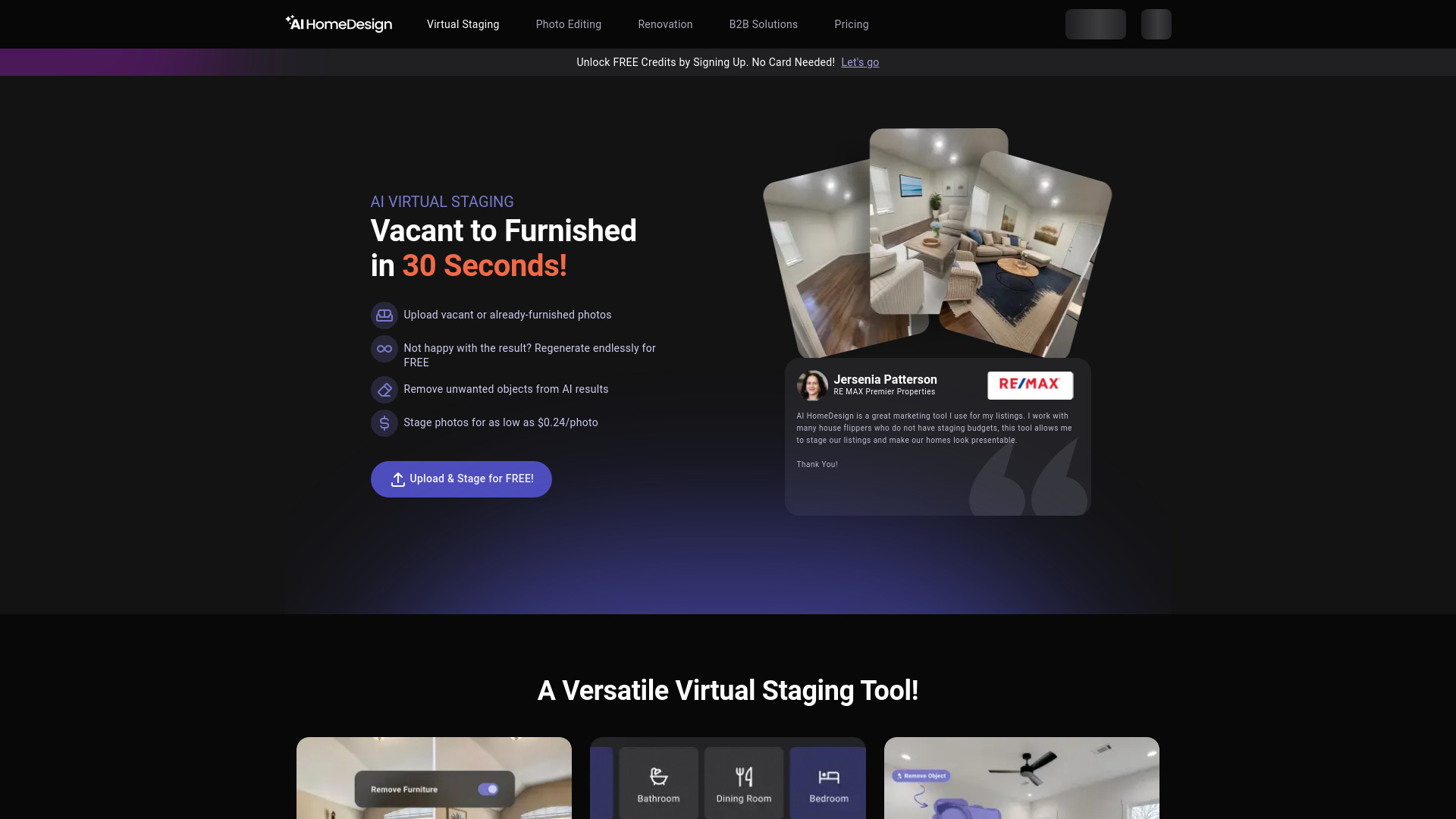
AI Virtual Staging transforms property photos into pro-staged listings in 30 sec! 7 styles, vacant or furnished rooms—try free credits today!

AI Virtual Staging website preview

What is AI Virtual Staging?

AI Virtual Staging is a next-generation real estate imaging tool that leverages advanced generative AI to transform raw property photos into stunning, professionally staged visuals—in just 30 seconds. Designed for speed without compromise, it empowers agents, photographers, and FSBO sellers to digitally furnish vacant rooms or completely refresh occupied spaces with lifelike furniture, lighting, textures, and spatial awareness. Choose from seven curated interior design styles—Modern, Traditional, Contemporary, Farmhouse, Scandinavian, Hampton, and Prime—to align staging with neighborhood aesthetics, buyer psychographics, and property architecture. The AI doesn’t just “place” objects—it interprets room geometry, natural light direction, ceiling height, window placement, and flooring materials to generate compositions that feel authentically lived-in and visually cohesive.

How to Use AI Virtual Staging

Getting started takes less than a minute: sign up and instantly receive free staging credits to explore the platform risk-free. Upload high-quality photos of any interior space, select your preferred style from the seven available themes, and click “Stage.” For empty rooms, the AI intelligently populates them with proportionally scaled, context-aware furnishings. For occupied homes, activate the one-click “Furniture Erase & Restage” mode—no masking or manual editing required—to remove personal items, dated decor, or clutter before applying a fresh, market-optimized look. Each generation delivers three unique layout variations in under 30 seconds, all at no extra cost. You can specify room type across eight categories—living rooms, primary bedrooms, guest rooms, dining areas, kitchens, nurseries, basements, and bathrooms—to ensure stylistically appropriate, functionally accurate staging. Export crisp, MLS-ready images in high resolution, optimized for Zillow, Realtor.com, social ads, and printed marketing materials.

Key Features of AI Virtual Staging

  • 30-Second Photorealistic Rendering: Achieve studio-grade staging quality in under half a minute—complete with dynamic shadows, realistic material reflections, depth-aware perspective, and ambient lighting that matches your original photo’s exposure and tone.
  • 7 Distinct Design Styles: Tailor every listing to its ideal audience with purpose-built aesthetics—from the clean minimalism of Scandinavian to the coastal elegance of Hampton, the warm authenticity of Farmhouse, and the premium sophistication of Prime.
  • Smart Furniture Removal + Seamless Restaging: Effortlessly eliminate distracting or outdated elements while preserving architectural details, then restage with on-trend pieces calibrated for scale, color harmony, and buyer appeal.
  • Room-Intelligent Placement Engine: The AI recognizes over 200 spatial cues—including door swing paths, walkway clearance, sightlines, and furniture ergonomics—to avoid visual collisions, floating objects, or implausible arrangements.
  • Free Credits + Transparent Pricing: Launch with complimentary credits, then scale affordably from $0.24/image—with unlimited free regenerations, zero-cost furniture removal, and no hidden fees for layout variations or style swaps.

These capabilities translate into measurable ROI: cut staging turnaround from days to seconds, slash physical staging budgets by up to 95%, and test multiple aesthetic directions per listing—without re-shooting, re-hiring, or renegotiating vendor contracts.

Why Choose AI Virtual Staging?

In an industry where first impressions are made in under 3 seconds online, AI Virtual Staging delivers unmatched speed, consistency, and creative control. Unlike generic AI image tools, it’s built exclusively for real estate—trained on millions of professionally staged interiors and fine-tuned for MLS compliance, platform acceptance, and buyer psychology. Whether you’re a solo agent juggling five listings or a brokerage managing 500+ properties annually, the platform scales effortlessly—maintaining brand-aligned quality across every image. No design degree needed. No software downloads. No learning curve. Just drag, select, stage, and deploy—while staying fully compliant with Zillow’s updated virtual staging guidelines and MLS photo standards. Discover why top-performing teams rely on AI Virtual Staging as their secret weapon for faster offers and higher list-to-sale ratios—learn more at aitop-tools.com.

Use Cases and Applications

Real estate agents use AI Virtual Staging to turn photo shoots into instant marketing assets—staging listings before the photographer even leaves the property. Professional photographers bundle virtual staging as a premium add-on service, increasing per-listing revenue and client retention. FSBO sellers gain competitive parity with agent-backed listings, using photorealistic staging to command attention—and pricing—on crowded portals. Property managers and iBuyers leverage bulk staging automation to standardize presentation across portfolios, while developers preview design concepts for model units or pre-construction renderings. From luxury condos to starter homes, AI Virtual Staging adapts to every price point, market segment, and architectural style—turning visual storytelling into a scalable, repeatable advantage.

Product source: AI Virtual Staging official website. Check the provider for current plans, limits and availability.

FAQ

AI Virtual Staging questions and answers

Product context and practical checks for evaluating AI Virtual Staging.

What is AI Virtual Staging used for?

AI Virtual Staging transforms property photos into pro-staged listings in 30 sec! 7 styles, vacant or furnished rooms—try free credits today!

How do I get started with AI Virtual Staging?

Getting started takes less than a minute: sign up and instantly receive free staging credits to explore the platform risk-free. Upload high-quality photos of any interior space, select your preferred style from the seven available themes, and click “Stage.” For empty rooms, the AI intelligently populates them with proportionally scaled, context-aware furnishings. For occupied homes, activate the one-click “Furniture Erase & Restage” mode—no masking or manual editing required—to remove personal items, dated decor, or clutter before applying a fresh, market-optimized look. Each generation delivers three unique layout variations in under 30 seconds, all at no extra cost. You can specify room type across eight categories—living rooms, primary bedrooms, guest rooms, dining areas, kitchens, nurseries, basements, and bathrooms—to ensure stylistically appropriate, functionally accurate staging. Export crisp, MLS-ready images in high resolution, optimized for Zillow, Realtor.com, social ads, and printed marketing materials.

Which capabilities are described for AI Virtual Staging?

30-Second Photorealistic Rendering: Achieve studio-grade staging quality in under half a minute—complete with dynamic shadows, realistic material reflections, depth-aware perspective, and ambient lighting that matches your original photo’s exposure and tone. 7 Distinct Design Styles: Tailor every listing to its ideal audience with purpose-built aesthetics—from the clean minimalism of Scandinavian to the coastal elegance of Hampton, the warm authenticity of Farmhouse, and the premium sophistication of Prime. Smart Furniture Removal + Seamless Restaging: Effortlessly eliminate distracting or outdated elements while preserving architectural details, then restage with on-trend pieces calibrated for scale, color harmony, and buyer appeal. Room-Intelligent Placement Engine: The AI recognizes over 200 spatial cues—including door swing paths, walkway clearance, sightlines, and furniture ergonomics—to avoid visual collisions, floating objects, or implausible arrangements. Free Credits + Transparent Pricing: Launch with complimentary credits, then scale affordably from $0.24/image—with unlimited free regenerations, zero-cost furniture removal, and no hidden fees for layout variations or style swaps. These capabilities translate into measurable ROI: cut staging turnaround from days to seconds, slash physical staging budgets by up to 95%, and test multiple aesthetic directions per listing—without re-shooting, re-hiring, or renegotiating vendor contracts.

What projects can I evaluate AI Virtual Staging for?

Real estate agents use AI Virtual Staging to turn photo shoots into instant marketing assets—staging listings before the photographer even leaves the property. Professional photographers bundle virtual staging as a premium add-on service, increasing per-listing revenue and client retention. FSBO sellers gain competitive parity with agent-backed listings, using photorealistic staging to command attention—and pricing—on crowded portals. Property managers and iBuyers leverage bulk staging automation to standardize presentation across portfolios, while developers preview design concepts for model units or pre-construction renderings. From luxury condos to starter homes, AI Virtual Staging adapts to every price point, market segment, and architectural style—turning visual storytelling into a scalable, repeatable advantage.

How does AI Virtual Staging handle 30-second photorealistic rendering?

30-Second Photorealistic Rendering: Achieve studio-grade staging quality in under half a minute—complete with dynamic shadows, realistic material reflections, depth-aware perspective, and ambient lighting that matches your original photo’s exposure and tone.

How does AI Virtual Staging handle 7 distinct design styles?

7 Distinct Design Styles: Tailor every listing to its ideal audience with purpose-built aesthetics—from the clean minimalism of Scandinavian to the coastal elegance of Hampton, the warm authenticity of Farmhouse, and the premium sophistication of Prime.

What should I compare before choosing a AI Virtual Staging plan?

Check AI Virtual Staging’s current pricing page for included usage, renewal terms and any credit charges. Compare the cost of a usable result, including retries, rather than assuming that account registration includes free usage.

What inputs should I prepare for a AI Virtual Staging trial?

Look for text prompts, image references, masks or sketches as appropriate. Compare composition control, supported upload types and the ability to revise a selected area.

How can I check the quality of a AI Virtual Staging result?

Inspect text, hands, edges, reflections and repeated objects at full size. Check that important product or brand details survive editing.

Where is the official AI Virtual Staging website?

The website linked from this profile is https://aihomedesign.com/virtual-staging. Use the provider’s own documentation, account area and support channels to confirm current product details.

Visit AI Virtual Staging