Writing Assistants

AI Email Writer - Chrome Extension

Boost productivity with AI Email Writer - Chrome Extension! Effortlessly compose emails and search efficiently with this powerful AI-powered tool.

AI Email Writer - Chrome Extension website preview

AI Email Writer - Chrome Extension Website screenshot

Introducing AI Email Writer - Chrome Extension: AI-powered Email Writing & Search

Experience the power of AI with the AI Email Writer Chrome extension. This innovative tool revolutionizes the way you write emails, offering a range of intelligent features to enhance your productivity and efficiency.

Enhance Your Email Writing with AI Email Writer

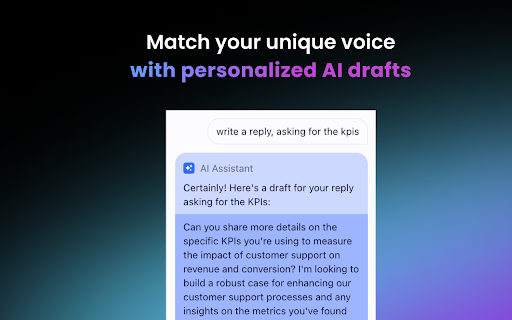
AI Email Writer is designed to help you generate emails in your distinctive tone effortlessly. Simply input your message and let the AI compose your email for you. With a variety of writing styles to choose from, you can customize the tone to suit your preferences and needs.

But AI Email Writer goes beyond just writing emails. It also offers quick summaries, allowing you to get a snapshot of important information without having to read through lengthy threads. This time-saving feature ensures that you stay informed and stay on top of your communications.

Effortlessly Search through Your Email History

Say goodbye to endless scrolling and searching. AI Email Writer utilizes AI-powered search capabilities to help you find specific emails swiftly. Whether you're looking for an important conversation or a specific piece of information, this powerful search feature delivers results in an instant.

Unleash the Power of AI Email Writer

Unique Voice Email Generation

AI Email Writer enables you to craft personalized business emails with a unique voice that reflects your brand and personality. Stand out from the crowd and make a lasting impression with every email you send.

Instant Email Summaries

Keep track of important information effortlessly with AI Email Writer's instant email summaries. Stay organized and never miss a crucial detail again.

AI-Powered Email Archive Search

Efficiently navigate through your email history with AI Email Writer's AI-powered search. Find the emails you need, when you need them, without wasting precious time.

Maximize Your Email Efficiency with AI Email Writer

Crafting Personalized Business Emails

AI Email Writer is the ideal tool for crafting personalized business emails that make an impact. Impress clients, partners, and colleagues with well-crafted messages that reflect your professionalism and expertise.

Quickly Locating Important Emails

With AI Email Writer, you can quickly locate important emails, saving you valuable time and effort. No more sifting through countless messages – find what you need with ease.

Product source: AI Email Writer - Chrome Extension official website. Check the provider for current plans, limits and availability.

FAQ

AI Email Writer - Chrome Extension questions and answers

Product context and practical checks for evaluating AI Email Writer - Chrome Extension.

What is AI Email Writer - Chrome Extension used for?

Boost productivity with AI Email Writer - Chrome Extension! Effortlessly compose emails and search efficiently with this powerful AI-powered tool.

How do I get started with AI Email Writer - Chrome Extension?

Open the official AI Email Writer - Chrome Extension website and identify the workflow that matches your task. Use a real brief and a short source document. Compare factual accuracy, structure and editing time rather than accepting the longest or most confident draft.

What should I compare before choosing a AI Email Writer - Chrome Extension plan?

Check AI Email Writer - Chrome Extension’s current pricing page for included usage, renewal terms and any credit charges. Compare the cost of a usable result, including retries, rather than assuming that account registration includes free usage.

What inputs should I prepare for a AI Email Writer - Chrome Extension trial?

Compare support for source documents, style instructions, outlines and length limits. Check whether citations link to real material rather than merely looking like references.

How can I check the quality of a AI Email Writer - Chrome Extension result?

Verify names, dates, quotations and factual claims against the original sources. Edit tone, remove repetition and make sure the text answers the intended reader’s question.

Which export options should I check in AI Email Writer - Chrome Extension?

Check export to plain text, Markdown, documents or your publishing system. Formatting, headings and working links matter when moving a draft into production.

What is a practical way to test AI Email Writer - Chrome Extension against alternatives?

Use a real brief and a short source document. Compare factual accuracy, structure and editing time rather than accepting the longest or most confident draft.

What should I review before uploading material to AI Email Writer - Chrome Extension?

Read the provider’s rules on access, retention, deletion and use of uploaded material. Start with a non-confidential sample that you have permission to use.

How can I check whether AI Email Writer - Chrome Extension fits my existing workflow?

List the steps before and after using AI Email Writer - Chrome Extension, including preparation, review and export. Test that complete sequence and check whether handoffs require manual conversion or another paid service.

Where is the official AI Email Writer - Chrome Extension website?

The website linked from this profile is https://chromewebstore.google.com/detail/shortwave-ai-instant-summ/fmmkfakcddnbcmkemfejebjijefmjnig. Use the provider’s own documentation, account area and support channels to confirm current product details.

Visit AI Email Writer - Chrome Extension