Other

AI Assistant - ChatGPT & Gemini

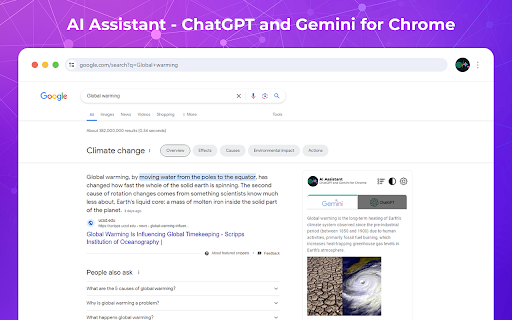
AI Assistant - ChatGPT & Gemini for Chrome: Revolutionize your search with AI-driven insights, smarter results, and personalized browsing—transform how you explore online!

AI Assistant - ChatGPT & Gemini website preview

AI Assistant - ChatGPT and Gemini for Chrome - Chrome Extension Website screenshot

AI Assistant - ChatGPT & Gemini: Redefining Search with AI-Powered Insights

The AI Assistant - ChatGPT & Gemini Chrome extension is an innovative tool that integrates cutting-edge AI technologies into your search experience. By offering real-time, AI-driven insights, this extension transforms the way users interact with search engines, delivering more relevant and context-aware results for a variety of inquiries.

How to Utilize AI Assistant - ChatGPT & Gemini for Chrome

To get started, simply download the AI Assistant - ChatGPT & Gemini extension from the Chrome Web Store. Once installed, enable the extension, and you'll immediately experience a more powerful, AI-enhanced search process while using your favorite search engines.

Core Features of AI Assistant - ChatGPT & Gemini for Chrome

AI-Driven Search Optimization

Seamless Compatibility with Multiple Search Engines

Engaging and Continuous AI-Powered Dialogue

Dark Mode for Comfortable Browsing

Customizable Search Results Layout for Tailored Insights

Use Cases for AI Assistant - ChatGPT & Gemini for Chrome

Efficient Research Support for Academics and Enthusiasts

Professional Insights for Business and Industry Experts

Enhanced Learning Resources for Students and Educators

Real-Time Updates on Technology Trends for Tech Enthusiasts

Deeper Exploration of the Web for Curious Minds

Product source: AI Assistant - ChatGPT & Gemini official website. Check the provider for current plans, limits and availability.

FAQ

AI Assistant - ChatGPT & Gemini questions and answers

Product context and practical checks for evaluating AI Assistant - ChatGPT & Gemini.

What is AI Assistant - ChatGPT & Gemini used for?

AI Assistant - ChatGPT & Gemini for Chrome: Revolutionize your search with AI-driven insights, smarter results, and personalized browsing—transform how you explore online!

How do I get started with AI Assistant - ChatGPT & Gemini?

To get started, simply download the AI Assistant - ChatGPT & Gemini extension from the Chrome Web Store. Once installed, enable the extension, and you'll immediately experience a more powerful, AI-enhanced search process while using your favorite search engines.

Which capabilities are described for AI Assistant - ChatGPT & Gemini?

AI-Driven Search OptimizationSeamless Compatibility with Multiple Search EnginesEngaging and Continuous AI-Powered DialogueDark Mode for Comfortable BrowsingCustomizable Search Results Layout for Tailored Insights

What projects can I evaluate AI Assistant - ChatGPT & Gemini for?

Efficient Research Support for Academics and EnthusiastsProfessional Insights for Business and Industry ExpertsEnhanced Learning Resources for Students and EducatorsReal-Time Updates on Technology Trends for Tech EnthusiastsDeeper Exploration of the Web for Curious Minds

What should I compare before choosing a AI Assistant - ChatGPT & Gemini plan?

Check AI Assistant - ChatGPT & Gemini’s current pricing page for included usage, renewal terms and any credit charges. Compare the cost of a usable result, including retries, rather than assuming that account registration includes free usage.

What inputs should I prepare for a AI Assistant - ChatGPT & Gemini trial?

Look for text prompts, image references, masks or sketches as appropriate. Compare composition control, supported upload types and the ability to revise a selected area.

How can I check the quality of a AI Assistant - ChatGPT & Gemini result?

Inspect text, hands, edges, reflections and repeated objects at full size. Check that important product or brand details survive editing.

Which export options should I check in AI Assistant - ChatGPT & Gemini?

Compare pixel dimensions, transparency, file formats and any enlargement options. Confirm that the downloaded result works in your design or publishing software.

What is a practical way to test AI Assistant - ChatGPT & Gemini against alternatives?

Prepare a brief with a subject, composition, lighting and required output size. Test a first generation and a targeted revision to see how much control you retain.

Where is the official AI Assistant - ChatGPT & Gemini website?

The website linked from this profile is https://chromewebstore.google.com/detail/ai-assistant-chatgpt-and/bibjgkidgpfbblifamdlkdlhgihmfohh. Use the provider’s own documentation, account area and support channels to confirm current product details.

Visit AI Assistant - ChatGPT & Gemini