AI tool profile

AI Architectures

Generate architectural designs in 30 seconds—AI-powered, one-click rendering, floor plans & pro workflows with style library.

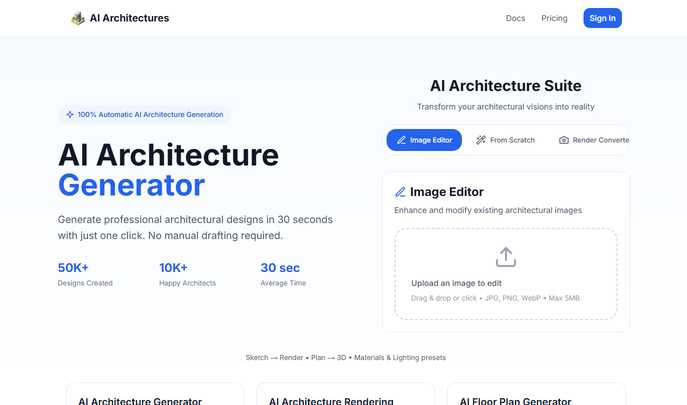
AI Architectures website preview

AI Architectures - Professional AI Architecture Generator

Introducing AI Architectures: The Future of Smart Design

AI Architectures is a cutting-edge, AI-driven platform engineered for architects, designers, and developers who want to turn concepts into polished, professional-grade architectural deliverables in seconds. Whether you're conceptualizing a new build or refining an existing layout, our intelligent system delivers complete architectural designs, high-fidelity visualizations, and precise floor plans—all generated in under 30 seconds with a single click.

How It Works: Simple, Fast, Powerful

  1. Select Your Workflow – Choose from specialized AI modules: generate full designs, convert sketches into renders, or create detailed floor plans tailored to your project scope.
  2. Input Your Vision – Upload hand-drawn sketches, rough drafts, or input design parameters directly. Our AI interprets your intent with precision and context-aware intelligence.
  3. Generate Instantly – With one click, receive fully rendered architectural visuals, dimensioned floor plans, and style-consistent outputs—ready for presentation or further development.

Premium Features That Redefine Efficiency

  • Smart Design Generator: Turn brief descriptions or concept sketches into comprehensive architectural proposals using advanced generative AI trained on global design standards.
  • Photoreal Rendering Engine: Produce stunning interior, exterior, and landscape visualizations with customizable lighting, materials, and camera angles powered by optimized rendering presets.
  • Intelligent Floor Planner: Automatically generate room layouts with accurate dimensions, labels, and spatial logic, exportable as PDF or DXF for integration into CAD workflows.
  • AI-Powered Image Enhancement: Refine and edit JPG, PNG, or WebP images with smart tools that upscale resolution, adjust lighting, and enhance architectural details.
  • Sketch-to-Render Converter: Transform hand-drawn ideas into photorealistic presentations while maintaining consistent perspective, scale, and environmental context.
  • Style Intelligence Library: Access curated design templates and prompt-guided workflows across styles like Contemporary, Scandinavian, Industrial, and Mediterranean for instant aesthetic alignment.

Why Architects Are Switching to AI Architectures

  • Studio-Quality Output: Deliver client-ready designs and visualizations that meet professional presentation standards every time.
  • Unmatched Speed: Go from idea to final output in seconds—ideal for design iterations, pitch decks, and rapid feasibility studies.
  • Automated Compliance: Built-in regulatory checks ensure all generated designs align with local building codes and accessibility standards.
  • Flexible Export Options: Download results in multiple formats including high-res images, PDFs, and DXF files for seamless use across software platforms.

Product source: AI Architectures official website. Check the provider for current plans, limits and availability.

FAQ

AI Architectures questions and answers

Product context and practical checks for evaluating AI Architectures.

What is AI Architectures used for?

Generate architectural designs in 30 seconds—AI-powered, one-click rendering, floor plans & pro workflows with style library.

How do I get started with AI Architectures?

Select Your Workflow – Choose from specialized AI modules: generate full designs, convert sketches into renders, or create detailed floor plans tailored to your project scope. Input Your Vision – Upload hand-drawn sketches, rough drafts, or input design parameters directly. Our AI interprets your intent with precision and context-aware intelligence. Generate Instantly – With one click, receive fully rendered architectural visuals, dimensioned floor plans, and style-consistent outputs—ready for presentation or further development.

Which capabilities are described for AI Architectures?

Smart Design Generator: Turn brief descriptions or concept sketches into comprehensive architectural proposals using advanced generative AI trained on global design standards. Photoreal Rendering Engine: Produce stunning interior, exterior, and landscape visualizations with customizable lighting, materials, and camera angles powered by optimized rendering presets. Intelligent Floor Planner: Automatically generate room layouts with accurate dimensions, labels, and spatial logic, exportable as PDF or DXF for integration into CAD workflows. AI-Powered Image Enhancement: Refine and edit JPG, PNG, or WebP images with smart tools that upscale resolution, adjust lighting, and enhance architectural details. Sketch-to-Render Converter: Transform hand-drawn ideas into photorealistic presentations while maintaining consistent perspective, scale, and environmental context. Style Intelligence Library: Access curated design templates and prompt-guided workflows across styles like Contemporary, Scandinavian, Industrial, and Mediterranean for instant aesthetic alignment.

How does AI Architectures handle select your workflow?

Select Your Workflow – Choose from specialized AI modules: generate full designs, convert sketches into renders, or create detailed floor plans tailored to your project scope.

How does AI Architectures handle input your vision?

Input Your Vision – Upload hand-drawn sketches, rough drafts, or input design parameters directly. Our AI interprets your intent with precision and context-aware intelligence.

What should I compare before choosing a AI Architectures plan?

Check AI Architectures’s current pricing page for included usage, renewal terms and any credit charges. Compare the cost of a usable result, including retries, rather than assuming that account registration includes free usage.

What inputs should I prepare for a AI Architectures trial?

Look for text prompts, image references, masks or sketches as appropriate. Compare composition control, supported upload types and the ability to revise a selected area.

How can I check the quality of a AI Architectures result?

Inspect text, hands, edges, reflections and repeated objects at full size. Check that important product or brand details survive editing.

Which export options should I check in AI Architectures?

Compare pixel dimensions, transparency, file formats and any enlargement options. Confirm that the downloaded result works in your design or publishing software.

Where is the official AI Architectures website?

The website linked from this profile is https://ai-architectures.com/. Use the provider’s own documentation, account area and support channels to confirm current product details.

Visit AI Architectures