Writing Assistants

AE-02 Audience Engager

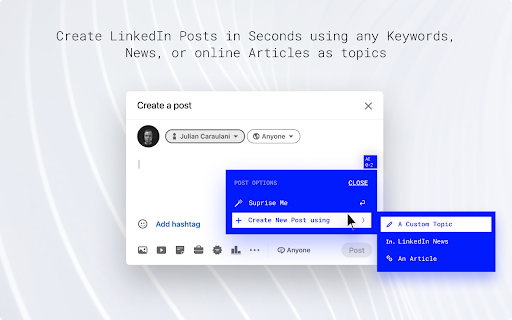
Supercharge your LinkedIn presence with AE-02 Audience Engager, the ultimate AI sidekick. Boost your reach and engagement effortlessly.

AE-02 Audience Engager website preview

AE-02 Audience Engager - Chrome Extension Website screenshot

Unlock the Power of AI with AE-02 Audience Engager

Supercharge your LinkedIn presence and engage your audience like never before with AE-02 Audience Engager, an AI-powered chrome extension designed to optimize your online presence on the professional networking platform.

Effortless LinkedIn Post Creation Made Possible

With AE-02 Audience Engager, creating captivating LinkedIn posts is a breeze. Simply input keywords, news, or articles, and let our AI-powered sidekick generate engaging posts for you in no time. Say goodbye to the hassle of brainstorming and hello to effortless content creation.

Discover the Core Features of AE-02 Audience Engager

Quick Post Creation

Unleash More Perspectives

Daily Content Ideas at Your Fingertips

Transform Articles Into Engaging Posts

Unlock the Full Potential of AE-02 Audience Engager

Create Engaging LinkedIn Posts Effortlessly

Never Run Out of Fresh Post Ideas

Product source: AE-02 Audience Engager official website. Check the provider for current plans, limits and availability.

FAQ

AE-02 Audience Engager questions and answers

Product context and practical checks for evaluating AE-02 Audience Engager.

What is AE-02 Audience Engager used for?

Supercharge your LinkedIn presence with AE-02 Audience Engager, the ultimate AI sidekick. Boost your reach and engagement effortlessly.

How do I get started with AE-02 Audience Engager?

Open the official AE-02 Audience Engager website and identify the workflow that matches your task. Choose one task with a clear success condition. Keep the input consistent, record the time spent reviewing and compare the complete workflow cost.

Which capabilities are described for AE-02 Audience Engager?

Quick Post CreationUnleash More PerspectivesDaily Content Ideas at Your FingertipsTransform Articles Into Engaging Posts

What should I compare before choosing a AE-02 Audience Engager plan?

Check AE-02 Audience Engager’s current pricing page for included usage, renewal terms and any credit charges. Compare the cost of a usable result, including retries, rather than assuming that account registration includes free usage.

What inputs should I prepare for a AE-02 Audience Engager trial?

Identify the files, text or account connections your task needs. Confirm that the product accepts those inputs and offers controls for reviewing its work.

How can I check the quality of a AE-02 Audience Engager result?

Test one representative task and inspect the result for accuracy and completeness. Record where manual corrections or extra tools are needed.

Which export options should I check in AE-02 Audience Engager?

Check export formats, integrations and whether you can keep using your work outside the service. Test a real export before committing to a longer plan.

What is a practical way to test AE-02 Audience Engager against alternatives?

Choose one task with a clear success condition. Keep the input consistent, record the time spent reviewing and compare the complete workflow cost.

What should I review before uploading material to AE-02 Audience Engager?

Read the provider’s rules on access, retention, deletion and use of uploaded material. Start with a non-confidential sample that you have permission to use.

Where is the official AE-02 Audience Engager website?

The website linked from this profile is https://chromewebstore.google.com/detail/sales-stack-audience-enga/jgiapobaigghdocinfndjifhkcnmbcan. Use the provider’s own documentation, account area and support channels to confirm current product details.

Visit AE-02 Audience Engager