Copywriting

Acrolinx - Chrome Extension

Boost your content strategy with Acrolinx - Chrome Extension. This AI platform ensures strategy-aligned content creation, elevating your online presence.

Acrolinx - Chrome Extension website preview

Acrolinx - Chrome Extension Website screenshot

Acrolinx - Chrome Extension: AI Content Platform: Strategy-aligned Content

Discover the power of Acrolinx's AI-powered platform, the ultimate solution for eliminating content chaos and delivering strategy-aligned content at scale. With the Acrolinx Chrome Extension, you can revolutionize your content creation process and ensure alignment with company guidelines and audience preferences.

Unlocking the Potential of Acrolinx AI Chrome Extension

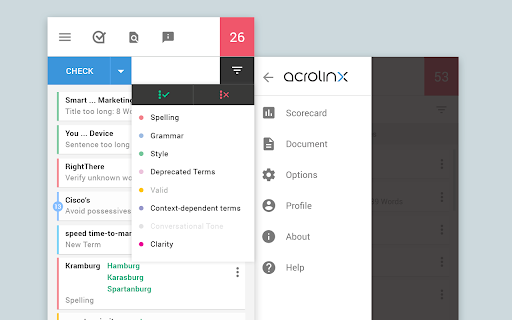
Utilize the Acrolinx Sidebar, a user-friendly interface that guides content creation and streamlines the editorial process. By automating tedious tasks and providing real-time feedback, Acrolinx empowers content creators to focus on producing high-quality, relevant content that resonates with their target audience.

Core Features of Acrolinx AI Chrome Extension

Alignment with Company Guidelines

Ensure consistency and adherence to your company's guidelines effortlessly. Acrolinx AI Chrome Extension analyzes your content against pre-defined rules, style guides, and tone of voice, ensuring every piece of content aligns with your brand's messaging.

Automation of Editorial Processes

Say goodbye to manual editing and proofreading. Acrolinx AI Chrome Extension automates editorial processes, saving time and resources while maintaining content quality and consistency. Focus on creating exceptional content, and let Acrolinx take care of the rest.

Performance Analysis of Content Operation

Track the performance of your content operation with Acrolinx AI Chrome Extension's comprehensive analytics. Gain valuable insights into content quality, relevance, and engagement, enabling data-driven decision-making and continuous improvement.

Unlock New Use Cases with Acrolinx AI Chrome Extension

Improving Content Quality and Relevance

Elevate your content game by leveraging Acrolinx AI Chrome Extension. Enhance the quality and relevance of your content to engage your audience, drive conversions, and establish your brand as an industry thought leader.

Enhancing Communication Efficiency

Streamline communication within your team with the help of Acrolinx AI Chrome Extension. Ensure consistent messaging and a unified brand voice across all channels, improving collaboration and efficiency in content creation.

Product source: Acrolinx - Chrome Extension official website. Check the provider for current plans, limits and availability.

FAQ

Acrolinx - Chrome Extension questions and answers

Product context and practical checks for evaluating Acrolinx - Chrome Extension.

What is Acrolinx - Chrome Extension used for?

Boost your content strategy with Acrolinx - Chrome Extension. This AI platform ensures strategy-aligned content creation, elevating your online presence.

How do I get started with Acrolinx - Chrome Extension?

Open the official Acrolinx - Chrome Extension website and identify the workflow that matches your task. Use a real brief and a short source document. Compare factual accuracy, structure and editing time rather than accepting the longest or most confident draft.

Which capabilities are described for Acrolinx - Chrome Extension?

Alignment with Company GuidelinesEnsure consistency and adherence to your company's guidelines effortlessly. Acrolinx AI Chrome Extension analyzes your content against pre-defined rules, style guides, and tone of voice, ensuring every piece of content aligns with your brand's messaging.Automation of Editorial ProcessesSay goodbye to manual editing and proofreading. Acrolinx AI Chrome Extension automates editorial processes, saving time and resources while maintaining content quality and consistency. Focus on creating exceptional content, and let Acrolinx take care of the rest.Performance Analysis of Content OperationTrack the performance of your content operation with Acrolinx AI Chrome Extension's comprehensive analytics. Gain valuable insights into content quality, relevance, and engagement, enabling data-driven decision-making and continuous improvement.

What projects can I evaluate Acrolinx - Chrome Extension for?

Improving Content Quality and RelevanceElevate your content game by leveraging Acrolinx AI Chrome Extension. Enhance the quality and relevance of your content to engage your audience, drive conversions, and establish your brand as an industry thought leader.Enhancing Communication EfficiencyStreamline communication within your team with the help of Acrolinx AI Chrome Extension. Ensure consistent messaging and a unified brand voice across all channels, improving collaboration and efficiency in content creation.

What should I compare before choosing a Acrolinx - Chrome Extension plan?

Check Acrolinx - Chrome Extension’s current pricing page for included usage, renewal terms and any credit charges. Compare the cost of a usable result, including retries, rather than assuming that account registration includes free usage.

What inputs should I prepare for a Acrolinx - Chrome Extension trial?

Compare support for source documents, style instructions, outlines and length limits. Check whether citations link to real material rather than merely looking like references.

How can I check the quality of a Acrolinx - Chrome Extension result?

Verify names, dates, quotations and factual claims against the original sources. Edit tone, remove repetition and make sure the text answers the intended reader’s question.

Which export options should I check in Acrolinx - Chrome Extension?

Check export to plain text, Markdown, documents or your publishing system. Formatting, headings and working links matter when moving a draft into production.

What is a practical way to test Acrolinx - Chrome Extension against alternatives?

Use a real brief and a short source document. Compare factual accuracy, structure and editing time rather than accepting the longest or most confident draft.

Where is the official Acrolinx - Chrome Extension website?

The website linked from this profile is https://chromewebstore.google.com/detail/acrolinx-for-chrome/pgenbnkcpmebbcoeeekefkmblmblppbj. Use the provider’s own documentation, account area and support channels to confirm current product details.

Visit Acrolinx - Chrome Extension