AI Voice Assistants

11.ai

11.ai: Build & customize smart AI voice assistants—integrated with your apps, tools, and workflows. Voice-powered productivity, redefined.

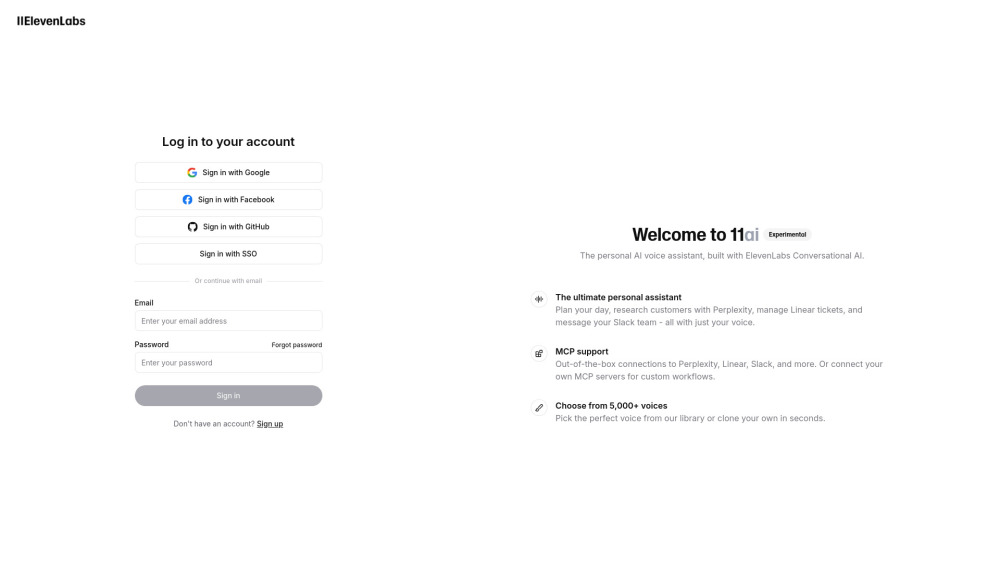
11.ai website preview

11.ai Website screenshot

Introducing 11.ai: Your Voice, Your Assistant, Your Workflow

11.ai redefines personal productivity by empowering users to design intelligent, voice-driven AI assistants—fully tailored to their personality, profession, and digital ecosystem. Built on ElevenLabs’ state-of-the-art conversational AI engine, each assistant combines expressive, human-like speech with deep app interoperability—transforming how individuals and teams plan, collaborate, research, and execute tasks across platforms.

Getting Started with 11.ai

Launching your custom AI voice assistant takes minutes: create an account, select—or clone—your preferred voice from a curated library of 5,000+ options, assign a distinctive name and persona, then seamlessly connect it to your most-used tools. Whether you're syncing with Slack for real-time team updates, querying Perplexity for competitive insights, or automating Linear ticket triage, 11.ai adapts to *your* workflow—not the other way around.

Why Teams & Individuals Choose 11.ai

Truly Personalized Voice Assistants

Name, tone, and speaking style—all fully configurable

Native integrations with top-tier productivity apps (Slack, Linear, Perplexity)

Extensible architecture supporting custom MCP servers and API-based workflows

Powered by ElevenLabs’ ultra-realistic, low-latency conversational AI

One-click voice cloning—capture your vocal identity in under 60 seconds

Real-World Applications

Orchestrating daily priorities with adaptive scheduling

Conducting rapid customer intelligence using Perplexity’s real-time web search

Automating sprint planning and bug tracking via Linear sync

Broadcasting announcements or escalating issues directly in Slack

Building bespoke automation stacks—from CRM triggers to internal knowledge retrieval

Product source: 11.ai official website. Check the provider for current plans, limits and availability.

FAQ

11.ai questions and answers

Product context and practical checks for evaluating 11.ai.

What is 11.ai used for?

11.ai: Build & customize smart AI voice assistants—integrated with your apps, tools, and workflows. Voice-powered productivity, redefined.

How do I get started with 11.ai?

Launching your custom AI voice assistant takes minutes: create an account, select—or clone—your preferred voice from a curated library of 5,000+ options, assign a distinctive name and persona, then seamlessly connect it to your most-used tools. Whether you're syncing with Slack for real-time team updates, querying Perplexity for competitive insights, or automating Linear ticket triage, 11.ai adapts to *your* workflow—not the other way around.

What projects can I evaluate 11.ai for?

Orchestrating daily priorities with adaptive schedulingConducting rapid customer intelligence using Perplexity’s real-time web searchAutomating sprint planning and bug tracking via Linear syncBroadcasting announcements or escalating issues directly in SlackBuilding bespoke automation stacks—from CRM triggers to internal knowledge retrieval

What should I compare before choosing a 11.ai plan?

Check 11.ai’s current pricing page for included usage, renewal terms and any credit charges. Compare the cost of a usable result, including retries, rather than assuming that account registration includes free usage.

What inputs should I prepare for a 11.ai trial?

Look for text prompts, image references, masks or sketches as appropriate. Compare composition control, supported upload types and the ability to revise a selected area.

How can I check the quality of a 11.ai result?

Inspect text, hands, edges, reflections and repeated objects at full size. Check that important product or brand details survive editing.

Which export options should I check in 11.ai?

Compare pixel dimensions, transparency, file formats and any enlargement options. Confirm that the downloaded result works in your design or publishing software.

What is a practical way to test 11.ai against alternatives?

Prepare a brief with a subject, composition, lighting and required output size. Test a first generation and a targeted revision to see how much control you retain.

What should I review before uploading material to 11.ai?

Read the provider’s rules on access, retention, deletion and use of uploaded material. Start with a non-confidential sample that you have permission to use.

Where is the official 11.ai website?

The website linked from this profile is https://11.ai. Use the provider’s own documentation, account area and support channels to confirm current product details.

Visit 11.ai