AI Product Description Generator

Zolak

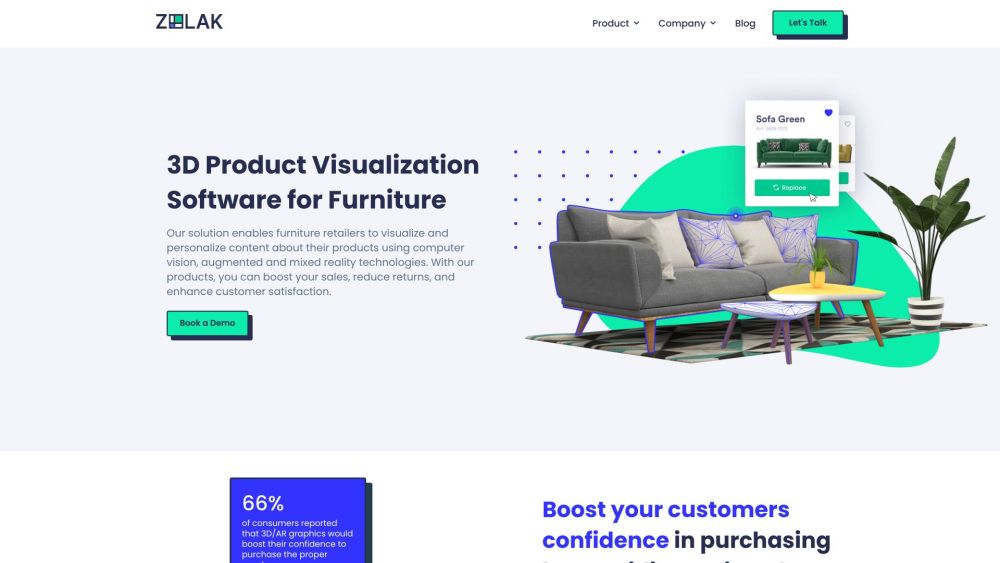
Zolak is an innovative 3D product visualization software for furniture retailers. It utilizes computer vision and AI technologies to enhance the shopping experience for customers by allowing them to visualize and personalize furniture products.

Zolak website preview

Zolak Website screenshot

Understanding Zolak

Zolak is a cutting-edge 3D product visualization tool specifically designed for furniture retailers. By leveraging advanced computer vision and AI technologies, it enhances customer shopping experiences by enabling them to visualize and customize furniture products effortlessly.

Using Zolak

Integrating Zolak into an online store allows furniture retailers to offer interactive showrooms and immersive virtual reality experiences. Customers can use Zolak Vision to visualize how new furniture will look in their space, considering aspects like perspective, scale, and lighting.

Key Features of Zolak

Zolak offers: 3D product visualization, augmented and mixed reality technologies, computer vision, personalized digital experiences, virtual showrooms, interactive showrooms for retail websites, furniture try-on solutions, customizable product options, photorealistic visuals, accurate sizing and scaling, an intuitive interface, accelerated content creation, bridging online and offline shopping, and increased engagement and retention.

Applications of Zolak

Furniture retailers can utilize Zolak to: increase sales and customer confidence, reduce returns, enhance the overall shopping experience, offer self-service tools, provide personalized digital interactions, improve conversion rates, raise average cart values, decrease return rates, boost customer loyalty, and save on interior design costs by creating digital spaces.

Product source: Zolak official website. Check the provider for current plans, limits and availability.

FAQ

Zolak questions and answers

Product context and practical checks for evaluating Zolak.

What is Zolak used for?

Zolak is an innovative 3D product visualization software for furniture retailers. It utilizes computer vision and AI technologies to enhance the shopping experience for customers by allowing them to visualize and personalize furniture products.

How do I get started with Zolak?

Open the official Zolak website and identify the workflow that matches your task. Prepare a brief with a subject, composition, lighting and required output size. Test a first generation and a targeted revision to see how much control you retain.

Which capabilities are described for Zolak?

Zolak offers: 3D product visualization, augmented and mixed reality technologies, computer vision, personalized digital experiences, virtual showrooms, interactive showrooms for retail websites, furniture try-on solutions, customizable product options, photorealistic visuals, accurate sizing and scaling, an intuitive interface, accelerated content creation, bridging online and offline shopping, and increased engagement and retention.

What projects can I evaluate Zolak for?

Furniture retailers can utilize Zolak to: increase sales and customer confidence, reduce returns, enhance the overall shopping experience, offer self-service tools, provide personalized digital interactions, improve conversion rates, raise average cart values, decrease return rates, boost customer loyalty, and save on interior design costs by creating digital spaces. Customer Support & Contact Information For support and inquiries, visit the contact us page. About Zolak Company: Zolak Tech Learn more about Zolak by visiting the about us page. Follow Zolak on LinkedIn Connect with us on LinkedIn: Zolak Tech LinkedIn

What should I compare before choosing a Zolak plan?

Check Zolak’s current pricing page for included usage, renewal terms and any credit charges. Compare the cost of a usable result, including retries, rather than assuming that account registration includes free usage.

What inputs should I prepare for a Zolak trial?

Look for text prompts, image references, masks or sketches as appropriate. Compare composition control, supported upload types and the ability to revise a selected area.

How can I check the quality of a Zolak result?

Inspect text, hands, edges, reflections and repeated objects at full size. Check that important product or brand details survive editing.

Which export options should I check in Zolak?

Compare pixel dimensions, transparency, file formats and any enlargement options. Confirm that the downloaded result works in your design or publishing software.

What is a practical way to test Zolak against alternatives?

Prepare a brief with a subject, composition, lighting and required output size. Test a first generation and a targeted revision to see how much control you retain.

Where is the official Zolak website?

The website linked from this profile is https://zolak.tech. Use the provider’s own documentation, account area and support channels to confirm current product details.

Visit Zolak