Summarizer

YouTube Summary - Chrome Extension

Revolutionize YouTube viewing with YouTube Summary - a Chrome extension that efficiently summarizes videos for a time-saving experience. Discover more in less time!

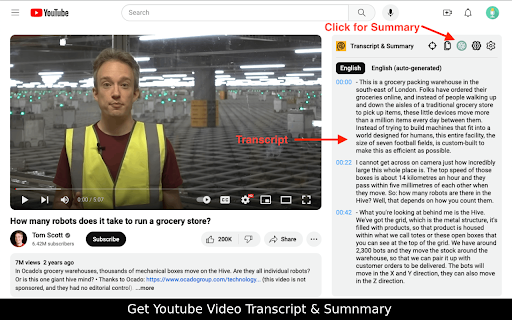
YouTube Summary - Chrome Extension website preview

YouTube Summary - Chrome Extension Website screenshot

Introducing the YouTube Summary - Chrome Extension: Efficient Video Summarizer

Experience the power of YouTube Summary, a remarkable Chrome Extension that allows you to efficiently summarize YouTube videos using cutting-edge AI technologies like ChatGPT, Gemini, or Claude AI.

How to Utilize the YouTube Summary - Chrome Extension

1. Install the extension effortlessly. 2. Open any YouTube video of your choice. 3. With a simple click on the YouTube Summary icon, witness instant summarization like never before.

Discover the Core Features of YouTube Summary - Chrome Extension

Effortlessly Summarize YouTube Videos

Interactive Summaries with Timestamps

Access Transcripts with Ease

Unleash the Potential of YouTube Summary - Chrome Extension in Various Use Cases

Save Precious Time by Skipping Lengthy Videos

Enhance Learning with Quick and Engaging Summaries

Ideal Companion for Educational Research

Product source: YouTube Summary - Chrome Extension official website. Check the provider for current plans, limits and availability.

FAQ

YouTube Summary - Chrome Extension questions and answers

Product context and practical checks for evaluating YouTube Summary - Chrome Extension.

What is YouTube Summary - Chrome Extension used for?

Revolutionize YouTube viewing with YouTube Summary - a Chrome extension that efficiently summarizes videos for a time-saving experience. Discover more in less time!

How do I get started with YouTube Summary - Chrome Extension?

1. Install the extension effortlessly. 2. Open any YouTube video of your choice. 3. With a simple click on the YouTube Summary icon, witness instant summarization like never before.

Which capabilities are described for YouTube Summary - Chrome Extension?

Effortlessly Summarize YouTube VideosInteractive Summaries with TimestampsAccess Transcripts with Ease

What projects can I evaluate YouTube Summary - Chrome Extension for?

Save Precious Time by Skipping Lengthy VideosEnhance Learning with Quick and Engaging SummariesIdeal Companion for Educational Research

What should I compare before choosing a YouTube Summary - Chrome Extension plan?

Check YouTube Summary - Chrome Extension’s current pricing page for included usage, renewal terms and any credit charges. Compare the cost of a usable result, including retries, rather than assuming that account registration includes free usage.

What inputs should I prepare for a YouTube Summary - Chrome Extension trial?

Compare text prompts, reference frames, source footage and audio support. Check duration, aspect ratio and whether the tool lets you keep a subject consistent between shots.

How can I check the quality of a YouTube Summary - Chrome Extension result?

Watch the entire clip for motion errors, distorted objects, changing identities, lip-sync problems and abrupt transitions. Inspect the downloaded file as well as the preview.

Which export options should I check in YouTube Summary - Chrome Extension?

Check export resolution, frame rate, aspect ratio, audio tracks and watermark rules. A good preview is not a substitute for an export that fits your publishing channel.

What is a practical way to test YouTube Summary - Chrome Extension against alternatives?

Use a short shot with one subject and one camera movement. Keep the prompt and duration constant, then compare usable seconds and the number of regenerations.

Where is the official YouTube Summary - Chrome Extension website?

The website linked from this profile is https://chromewebstore.google.com/detail/youtube-summary-with-chat/leidjgpcaiceoeebkdjfcaeboidcjiea. Use the provider’s own documentation, account area and support channels to confirm current product details.

Visit YouTube Summary - Chrome Extension