AI SEO Assistant

WebScraper - Chrome Extension

WebScraper Chrome Extension: AI-powered tool for effortless data extraction. Scrape websites in seconds with precision and ease. Boost productivity instantly!

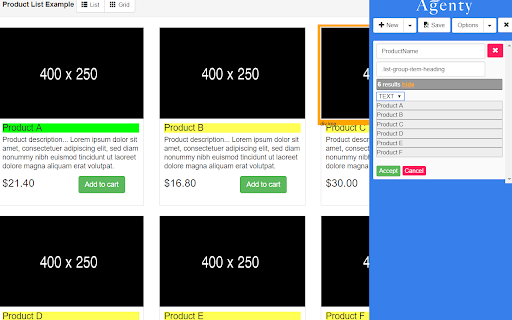
WebScraper - Chrome Extension website preview

WebScraper - Chrome Extension Website screenshot

What is the WebScraper AI Chrome Extension?

The WebScraper Chrome extension is an advanced tool designed to help users extract data from websites effortlessly using AI. This extension offers a user-friendly, point-and-click method for scraping various types of online data.

How to use the WebScraper AI Chrome Extension?

Using the WebScraper extension is easy. Start by installing the extension in Chrome, then select the data you want to scrape by simply pointing and clicking on the elements. Once you've configured your selection, the AI-powered scraper will handle the rest.

Key Features of the WebScraper AI Chrome Extension

AI-driven data extraction

User-friendly point-and-click system

Support for custom data selectors

Common Use Cases for the WebScraper AI Chrome Extension

Extracting product information from e-commerce platforms

Gathering contact data from business directories

Product source: WebScraper - Chrome Extension official website. Check the provider for current plans, limits and availability.

FAQ

WebScraper - Chrome Extension questions and answers

Product context and practical checks for evaluating WebScraper - Chrome Extension.

What is WebScraper - Chrome Extension used for?

WebScraper Chrome Extension: AI-powered tool for effortless data extraction. Scrape websites in seconds with precision and ease. Boost productivity instantly!

How do I get started with WebScraper - Chrome Extension?

Using the WebScraper extension is easy. Start by installing the extension in Chrome, then select the data you want to scrape by simply pointing and clicking on the elements. Once you've configured your selection, the AI-powered scraper will handle the rest.

Which capabilities are described for WebScraper - Chrome Extension?

AI-driven data extractionUser-friendly point-and-click systemSupport for custom data selectors

What projects can I evaluate WebScraper - Chrome Extension for?

Extracting product information from e-commerce platformsGathering contact data from business directories

What should I compare before choosing a WebScraper - Chrome Extension plan?

Check WebScraper - Chrome Extension’s current pricing page for included usage, renewal terms and any credit charges. Compare the cost of a usable result, including retries, rather than assuming that account registration includes free usage.

What inputs should I prepare for a WebScraper - Chrome Extension trial?

Check supported documents, datasets and source access. Establish whether the product can inspect your actual material rather than answer from general knowledge.

How can I check the quality of a WebScraper - Chrome Extension result?

Follow citations to the original source, recalculate important numbers and check the date and scope of the evidence. Distinguish an explanation from a verified result.

Which export options should I check in WebScraper - Chrome Extension?

Look for usable citations, tables, downloadable data and reproducible steps. A clear answer should let another person inspect how the conclusion was reached.

What is a practical way to test WebScraper - Chrome Extension against alternatives?

Choose a question with known sources and a checkable result. Compare citation accuracy, omissions and reproducibility rather than response length.

Where is the official WebScraper - Chrome Extension website?

The website linked from this profile is https://chromewebstore.google.com/detail/agenty-advanced-web-scrap/gpolcofcjjiooogejfbaamdgmgfehgff. Use the provider’s own documentation, account area and support channels to confirm current product details.

Visit WebScraper - Chrome Extension