Web3

Web3 Security Plugin

Secure your Web3 experience with the AI-powered Web3 Security Plugin for Chrome. Instantly analyze risks and stay protected while browsing decentralized platforms.

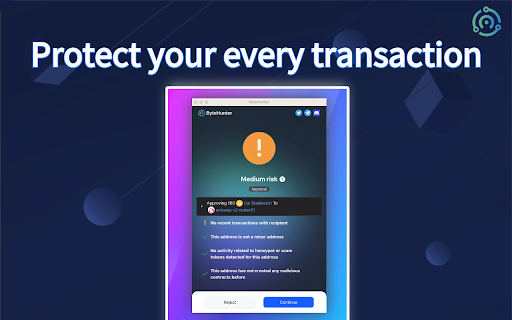
Web3 Security Plugin website preview

Web3 Security Plugin - Chrome Extension Website screenshot

Introducing the Web3 Security Plugin: AI-Powered Chrome Extension for Risk Analysis

The Web3 Security Plugin is the first AI-driven Chrome extension designed to offer comprehensive risk analysis for Web3 environments. It supports ETH (Mainnet, TestNet), BSC, and Polygon networks, providing a suite of over 20 powerful security features to safeguard your cryptocurrency assets from online threats.

How to Install and Use the Web3 Security Plugin

To get started, download and install the Web3 Security Plugin from the Chrome Web Store. Once installed, simply activate the plugin within your Web3 environment. The AI-powered engine will immediately begin monitoring transactions, contracts, and addresses to enhance the security of your crypto activities.

Key Features of the Web3 Security Plugin

Phishing Site Detection

AI technology monitors website patterns to flag phishing attempts before they can compromise your assets.

Malicious Plugin Detection

The plugin scans and identifies dangerous browser extensions that could harm your Web3 activities.

Risk Assessment of Transfer Addresses

Automatically evaluates the risk level of transfer addresses to prevent fraudulent transactions.

Interactive Contract Risk Analysis

Identifies potential threats in smart contracts before you interact with them, safeguarding your investments.

Malicious Signature Detection

Helps identify risky or unauthorized signatures in your Web3 transactions.

Transaction Behavior Risk Identification

Analyzes transaction patterns to detect irregularities or suspicious behavior.

AI-Based Semantic Signature Interpretation

Uses AI to decode and interpret signature contents, offering a clear understanding of transaction risks.

Wallet Risk Monitoring

Constantly monitors the health and security of your wallet, alerting you to potential vulnerabilities.

Visualized Transaction Flow Analysis

Provides a clear, graphical view of your transaction flow, allowing you to trace and verify asset movements.

Comprehensive Asset Tracking Reports

Generates detailed reports on your assets, ensuring that you have complete visibility into their security status.

Practical Use Cases of the Web3 Security Plugin

Phishing and Malicious Plugin Detection

Automatically detect and block phishing websites and malicious browser extensions to keep your online activities secure.

Risk Identification for Contracts and Addresses

Evaluate the security of interactive contracts and transfer addresses to reduce exposure to Web3 scams.

Product source: Web3 Security Plugin official website. Check the provider for current plans, limits and availability.

FAQ

Web3 Security Plugin questions and answers

Product context and practical checks for evaluating Web3 Security Plugin.

What is Web3 Security Plugin used for?

Secure your Web3 experience with the AI-powered Web3 Security Plugin for Chrome. Instantly analyze risks and stay protected while browsing decentralized platforms.

How do I get started with Web3 Security Plugin?

To get started, download and install the Web3 Security Plugin from the Chrome Web Store. Once installed, simply activate the plugin within your Web3 environment. The AI-powered engine will immediately begin monitoring transactions, contracts, and addresses to enhance the security of your crypto activities.

Which capabilities are described for Web3 Security Plugin?

Phishing Site DetectionAI technology monitors website patterns to flag phishing attempts before they can compromise your assets.Malicious Plugin DetectionThe plugin scans and identifies dangerous browser extensions that could harm your Web3 activities.Risk Assessment of Transfer AddressesAutomatically evaluates the risk level of transfer addresses to prevent fraudulent transactions.Interactive Contract Risk AnalysisIdentifies potential threats in smart contracts before you interact with them, safeguarding your investments.Malicious Signature DetectionHelps identify risky or unauthorized signatures in your Web3 transactions.Transaction Behavior Risk IdentificationAnalyzes transaction patterns to detect irregularities or suspicious behavior.AI-Based Semantic Signature InterpretationUses AI to decode and interpret signature contents, offering a clear understanding of transaction risks.Wallet Risk MonitoringConstantly monitors the health and security of your wallet, alerting you to potential vulnerabilities.Visualized Transaction Flow AnalysisProvides a clear, graphical view of your transaction flow, allowing you to trace and verify asset movements.Comprehensive Asset Tracking ReportsGenerates detailed reports on your assets, ensuring that you have complete visibility into their security status.

What projects can I evaluate Web3 Security Plugin for?

Phishing and Malicious Plugin DetectionAutomatically detect and block phishing websites and malicious browser extensions to keep your online activities secure.Risk Identification for Contracts and AddressesEvaluate the security of interactive contracts and transfer addresses to reduce exposure to Web3 scams.

What should I compare before choosing a Web3 Security Plugin plan?

Check Web3 Security Plugin’s current pricing page for included usage, renewal terms and any credit charges. Compare the cost of a usable result, including retries, rather than assuming that account registration includes free usage.

What inputs should I prepare for a Web3 Security Plugin trial?

Identify the files, text or account connections your task needs. Confirm that the product accepts those inputs and offers controls for reviewing its work.

How can I check the quality of a Web3 Security Plugin result?

Test one representative task and inspect the result for accuracy and completeness. Record where manual corrections or extra tools are needed.

Which export options should I check in Web3 Security Plugin?

Check export formats, integrations and whether you can keep using your work outside the service. Test a real export before committing to a longer plan.

What is a practical way to test Web3 Security Plugin against alternatives?

Choose one task with a clear success condition. Keep the input consistent, record the time spent reviewing and compare the complete workflow cost.

Where is the official Web3 Security Plugin website?

The website linked from this profile is https://chromewebstore.google.com/detail/bytehunter/kidhkonioajdkjglffdlojnnlpdbeeol. Use the provider’s own documentation, account area and support channels to confirm current product details.

Visit Web3 Security Plugin