AI Advertising Assistant

Voiser

Voiser is a text-to-speech and speech-to-text program that uses artificial intelligence to convert written text into natural-sounding speech and audio files into written text. It offers over 550 different voice options in 75+ languages, making it the closest machine voice to a human voice.

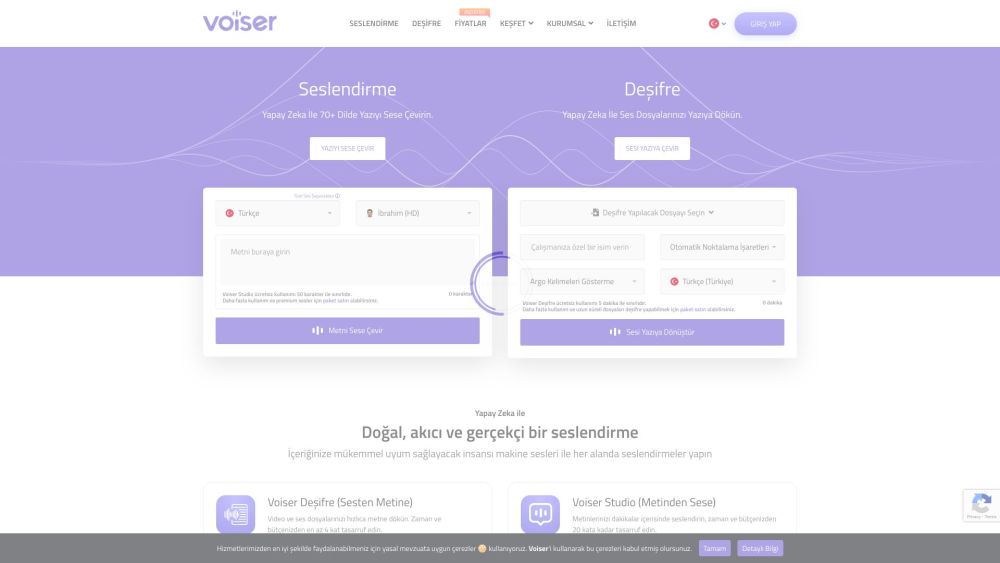
Voiser website preview

Voiser Website screenshot

Understanding Voiser

Voiser is an innovative AI-driven platform designed to transform written text into lifelike speech and convert audio files into accurate text. With a selection of over 550 voices across more than 75 languages, Voiser ensures the closest simulation to human speech available.

Using Voiser Effectively

For text-to-speech conversion, input your text, choose your preferred language and voice, and click 'Convert to Speech'. Voiser will produce an audio file with your text read aloud. For speech-to-text conversion, upload the audio file, select the desired language, and click 'Convert to Text' to get an accurate transcription.

Key Features of Voiser

Voiser includes the following standout features: - Text-to-speech in over 75 languages - Speech-to-text transcription in multiple languages - A variety of 550+ voice options - Highly realistic voice synthesis - Conversion of speech and audio files into text - Various download options - Advanced editing tools - Export formats: Word, Excel, Text, Subtitle

Practical Applications of Voiser

Voiser is versatile and can be utilized for: - Narrating audiobooks - Creating voice overs for video content - Enhancing accessibility for the visually impaired - Language learning and pronunciation practice - Transcribing meetings, interviews, and videos - Developing interactive voice response (IVR) systems - Adding voice functionality to websites and applications - Producing podcasts - Localizing software and games for different languages

  • Voiser Support and Contact Information

    For support or customer service, visit the contact us page.

  • About Voiser Company

    Company Name: Voiser Teknoloji Ltd. Şti.

    Learn more about Voiser on the about us page.

  • Voiser Login

    Access Voiser at: Login

  • Voiser Sign Up

    Create an account at: Sign Up

  • Voiser Pricing

    View pricing options at: Pricing

  • Voiser on YouTube

    Follow Voiser on: YouTube

  • Voiser on LinkedIn

    Connect with Voiser on: LinkedIn

  • Voiser on Twitter

    Follow updates on: Twitter

  • Voiser on Instagram

    See more on: Instagram

Product source: Voiser official website. Check the provider for current plans, limits and availability.

FAQ

Voiser questions and answers

Product context and practical checks for evaluating Voiser.

What is Voiser used for?

Voiser is a text-to-speech and speech-to-text program that uses artificial intelligence to convert written text into natural-sounding speech and audio files into written text. It offers over 550 different voice options in 75+ languages, making it the closest machine voice to a human voice.

How do I get started with Voiser?

Open the official Voiser website and identify the workflow that matches your task. Prepare a brief with a subject, composition, lighting and required output size. Test a first generation and a targeted revision to see how much control you retain.

Which capabilities are described for Voiser?

Voiser includes the following standout features: - Text-to-speech in over 75 languages - Speech-to-text transcription in multiple languages - A variety of 550+ voice options - Highly realistic voice synthesis - Conversion of speech and audio files into text - Various download options - Advanced editing tools - Export formats: Word, Excel, Text, Subtitle

What projects can I evaluate Voiser for?

Voiser is versatile and can be utilized for: - Narrating audiobooks - Creating voice overs for video content - Enhancing accessibility for the visually impaired - Language learning and pronunciation practice - Transcribing meetings, interviews, and videos - Developing interactive voice response (IVR) systems - Adding voice functionality to websites and applications - Producing podcasts - Localizing software and games for different languages Voiser Support and Contact Information For support or customer service, visit the contact us page. About Voiser Company Company Name: Voiser Teknoloji Ltd. Şti. Learn more about Voiser on the about us page. Voiser Login Access Voiser at: Login Voiser Sign Up Create an account at: Sign Up Voiser Pricing View pricing options at: Pricing Voiser on YouTube Follow Voiser on: YouTubeVoiser on LinkedIn Connect with Voiser on: LinkedInVoiser on Twitter Follow updates on: TwitterVoiser on Instagram See more on: Instagram

What should I compare before choosing a Voiser plan?

View pricing options at: Pricing Confirm current prices and allowances on the provider’s website before purchasing.

What inputs should I prepare for a Voiser trial?

Look for text prompts, image references, masks or sketches as appropriate. Compare composition control, supported upload types and the ability to revise a selected area.

How can I check the quality of a Voiser result?

Inspect text, hands, edges, reflections and repeated objects at full size. Check that important product or brand details survive editing.

Which export options should I check in Voiser?

Compare pixel dimensions, transparency, file formats and any enlargement options. Confirm that the downloaded result works in your design or publishing software.

What is a practical way to test Voiser against alternatives?

Prepare a brief with a subject, composition, lighting and required output size. Test a first generation and a targeted revision to see how much control you retain.

Where is the official Voiser website?

The website linked from this profile is https://voiser.net. Use the provider’s own documentation, account area and support channels to confirm current product details.

Visit Voiser