Summarizer

Topicflow - Chrome Extension

Enhance your Google Meet experience with Topicflow - Chrome Extension. Edit meeting notes and enjoy AI transcriptions effortlessly. Boost productivity now!

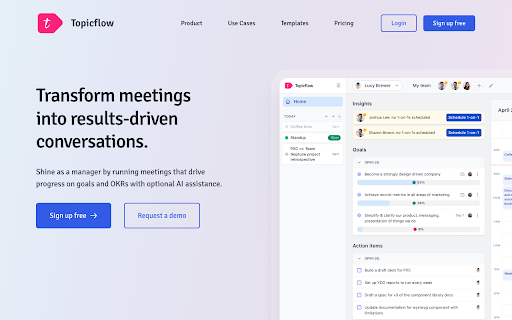
Topicflow - Chrome Extension website preview

Topicflow - Chrome Extension Website screenshot

Introducing Topicflow - Chrome Extension: Google Meet notes editing and AI transcriptions

Topicflow is an innovative Chrome extension that revolutionizes your Google Meet experience by providing advanced note editing capabilities and AI transcriptions. With Topicflow, you can effortlessly view, modify, and collaborate on meeting notes directly within Google Meet, while also leveraging AI-powered transcriptions for comprehensive meeting insights.

How to maximize the potential of Topicflow - Chrome Extension?

Unlocking the full potential of Topicflow is simple. By seamlessly integrating with Google Meet, Topicflow allows you to effortlessly modify meeting notes in real-time, ensuring that everyone stays on the same page. Utilize the power of AI transcriptions to automatically summarize meetings and gain valuable insights. Additionally, Topicflow provides AI suggestions to enhance collaboration and drive better meeting outcomes.

Key Features of Topicflow - Chrome Extension

Google Meet Integration

Topicflow seamlessly integrates with Google Meet, ensuring a seamless and intuitive user experience.

Meeting Note Editing

Effortlessly view, edit, and collaborate on meeting notes directly within Google Meet, promoting efficient and productive meetings.

Transcription for AI Summarization

Leverage AI-powered transcriptions to automatically summarize meetings, saving time and providing deep insights.

AI Suggestions

Receive AI-generated suggestions to enhance collaboration and drive better meeting outcomes.

Use Cases of Topicflow - Chrome Extension

Enhancing Meeting Productivity with Efficient Note Editing

With Topicflow, you can streamline note editing and collaboration, ensuring that meetings are productive and focused.

Improving Meeting Outcomes with AI Summarization

Leverage AI-powered summarization to gain key insights from meetings, enabling better decision-making and follow-up actions.

Facilitating Collaboration through AI Suggestions

Topicflow's AI suggestions foster collaboration by providing valuable recommendations and insights during meetings.

Product source: Topicflow - Chrome Extension official website. Check the provider for current plans, limits and availability.

FAQ

Topicflow - Chrome Extension questions and answers

Product context and practical checks for evaluating Topicflow - Chrome Extension.

What is Topicflow - Chrome Extension used for?

Enhance your Google Meet experience with Topicflow - Chrome Extension. Edit meeting notes and enjoy AI transcriptions effortlessly. Boost productivity now!

How do I get started with Topicflow - Chrome Extension?

Unlocking the full potential of Topicflow is simple. By seamlessly integrating with Google Meet, Topicflow allows you to effortlessly modify meeting notes in real-time, ensuring that everyone stays on the same page. Utilize the power of AI transcriptions to automatically summarize meetings and gain valuable insights. Additionally, Topicflow provides AI suggestions to enhance collaboration and drive better meeting outcomes.

Which capabilities are described for Topicflow - Chrome Extension?

Google Meet IntegrationTopicflow seamlessly integrates with Google Meet, ensuring a seamless and intuitive user experience.Meeting Note EditingEffortlessly view, edit, and collaborate on meeting notes directly within Google Meet, promoting efficient and productive meetings.Transcription for AI SummarizationLeverage AI-powered transcriptions to automatically summarize meetings, saving time and providing deep insights.AI SuggestionsReceive AI-generated suggestions to enhance collaboration and drive better meeting outcomes.

What projects can I evaluate Topicflow - Chrome Extension for?

Enhancing Meeting Productivity with Efficient Note EditingWith Topicflow, you can streamline note editing and collaboration, ensuring that meetings are productive and focused.Improving Meeting Outcomes with AI SummarizationLeverage AI-powered summarization to gain key insights from meetings, enabling better decision-making and follow-up actions.Facilitating Collaboration through AI SuggestionsTopicflow's AI suggestions foster collaboration by providing valuable recommendations and insights during meetings.

What should I compare before choosing a Topicflow - Chrome Extension plan?

Check Topicflow - Chrome Extension’s current pricing page for included usage, renewal terms and any credit charges. Compare the cost of a usable result, including retries, rather than assuming that account registration includes free usage.

What inputs should I prepare for a Topicflow - Chrome Extension trial?

Compare recording length, file types, language support and speaker handling. For voice generation, check pronunciation controls and permission to use any reference voice.

How can I check the quality of a Topicflow - Chrome Extension result?

Listen for mispronounced names, unnatural pauses, clipped words and noise. For transcripts, compare the text with the recording and correct speaker labels.

Which export options should I check in Topicflow - Chrome Extension?

Check audio format, sample rate, separate tracks, captions and timestamp exports. Confirm that the result works in your editing or accessibility workflow.

What is a practical way to test Topicflow - Chrome Extension against alternatives?

Use a short recording with names, numbers and more than one speaker, or a script with difficult pronunciation. Review the exported audio or transcript in full.

Where is the official Topicflow - Chrome Extension website?

The website linked from this profile is https://chromewebstore.google.com/detail/topicflow-chrome-extensio/dpjdbcoajclifiaeeajajigmdppjnefn. Use the provider’s own documentation, account area and support channels to confirm current product details.

Visit Topicflow - Chrome Extension