Summarizer

TL;DWR - Chrome Extension

Boost your web surfing efficiency with TL;DWR - the Chrome extension that promotes brevity, simplifying your online experience.

TL;DWR - Chrome Extension website preview

TL;DWR - Chrome Extension: Boosting Web Surfing Efficiency with Brevity
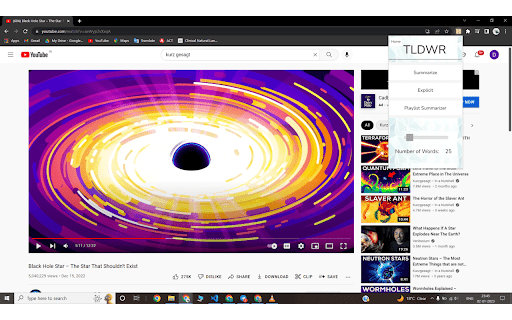
TL;DWR - Chrome Extension Website screenshot

Introducing TL;DWR ai Chrome Extension

TL;DWR ai Chrome Extension is a powerful tool designed to enhance web browsing efficiency by prioritizing brevity. By incorporating cutting-edge summarization, translation, and preemptive searching capabilities, this web extension revolutionizes the way users consume online content.

Maximizing TL;DWR ai Chrome Extension's Potential

Unlocking the full potential of TL;DWR ai Chrome Extension is simple. Install the extension and instantly gain access to a range of features that allow you to summarize websites, YouTube videos, and more. With TL;DWR, you can effortlessly extract the essence of lengthy content, saving you valuable time and energy.

Core Features of TL;DWR ai Chrome Extension

Summarization

Translation

Preemptive Searching

Use Cases of TL;DWR ai Chrome Extension

Condensing Research Papers and Videos

TL;DWR ai Chrome Extension enables you to transform lengthy research papers and videos into concise paragraphs, ensuring you grasp the key information without investing excessive time or effort.

Cross-Linguistic Topic Understanding

With TL;DWR ai Chrome Extension, language barriers become a thing of the past. Enhance your cross-linguistic topic understanding by leveraging the translation capabilities, enabling you to explore content in different languages effortlessly.

Product source: TL;DWR - Chrome Extension official website. Check the provider for current plans, limits and availability.

FAQ

TL;DWR - Chrome Extension questions and answers

Product context and practical checks for evaluating TL;DWR - Chrome Extension.

What is TL;DWR - Chrome Extension used for?

Boost your web surfing efficiency with TL;DWR - the Chrome extension that promotes brevity, simplifying your online experience.

How do I get started with TL;DWR - Chrome Extension?

Open the official TL;DWR - Chrome Extension website and identify the workflow that matches your task. Choose one task with a clear success condition. Keep the input consistent, record the time spent reviewing and compare the complete workflow cost.

Which capabilities are described for TL;DWR - Chrome Extension?

SummarizationTranslationPreemptive Searching

What projects can I evaluate TL;DWR - Chrome Extension for?

Condensing Research Papers and VideosTL;DWR ai Chrome Extension enables you to transform lengthy research papers and videos into concise paragraphs, ensuring you grasp the key information without investing excessive time or effort.Cross-Linguistic Topic UnderstandingWith TL;DWR ai Chrome Extension, language barriers become a thing of the past. Enhance your cross-linguistic topic understanding by leveraging the translation capabilities, enabling you to explore content in different languages effortlessly.

What should I compare before choosing a TL;DWR - Chrome Extension plan?

Check TL;DWR - Chrome Extension’s current pricing page for included usage, renewal terms and any credit charges. Compare the cost of a usable result, including retries, rather than assuming that account registration includes free usage.

What inputs should I prepare for a TL;DWR - Chrome Extension trial?

Identify the files, text or account connections your task needs. Confirm that the product accepts those inputs and offers controls for reviewing its work.

How can I check the quality of a TL;DWR - Chrome Extension result?

Test one representative task and inspect the result for accuracy and completeness. Record where manual corrections or extra tools are needed.

Which export options should I check in TL;DWR - Chrome Extension?

Check export formats, integrations and whether you can keep using your work outside the service. Test a real export before committing to a longer plan.

What is a practical way to test TL;DWR - Chrome Extension against alternatives?

Choose one task with a clear success condition. Keep the input consistent, record the time spent reviewing and compare the complete workflow cost.

Where is the official TL;DWR - Chrome Extension website?

The website linked from this profile is https://chromewebstore.google.com/detail/tldwr/ddildclhomjgjkggmjjdaboebkmoogbn. Use the provider’s own documentation, account area and support channels to confirm current product details.

Visit TL;DWR - Chrome Extension