AI Advertising Assistant

Tappy

Tappy is an AI browser extension designed to help users add thoughtful and human-sounding comments to LinkedIn posts with just one tap. It is used for sales prospecting, personal branding, and finding job opportunities.

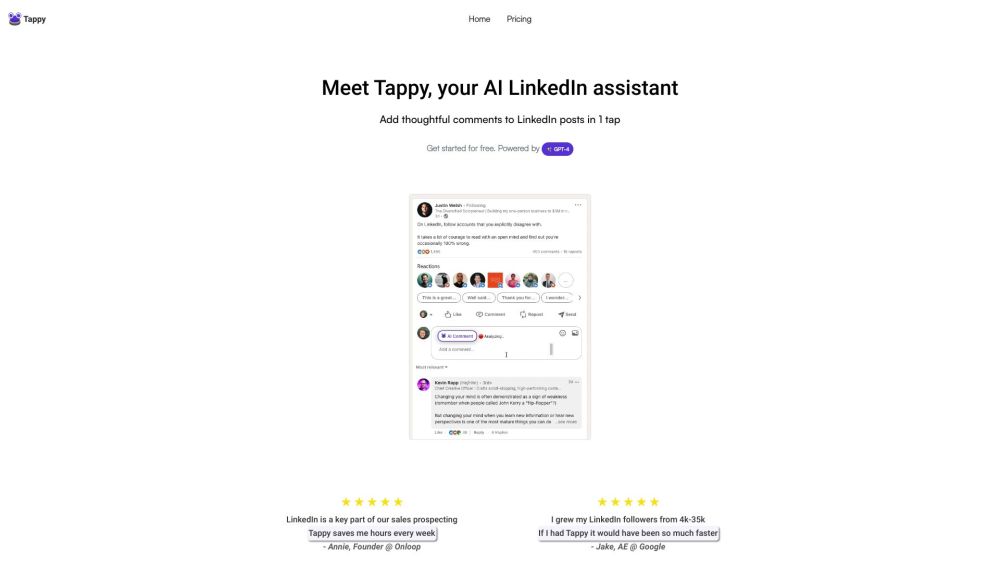
Tappy website preview

Tappy Website screenshot

Unlocking the Power of Tappy

Discover the innovative world of Tappy, an AI browser extension revolutionizing your LinkedIn experience. With Tappy, effortlessly elevate your engagement by adding authentic and personalized comments to LinkedIn posts with just a tap. Whether you are focused on sales prospecting, enhancing personal branding, or seeking job opportunities, Tappy is your go-to tool for making meaningful connections.

Simplicity at Your Fingertips

Using Tappy is a breeze. Install the Chrome extension, input your license key, and immerse yourself in a seamless commenting experience on LinkedIn. Navigate to any post that catches your eye, click on the Tappy icon, and watch as it crafts a thoughtful comment for you. Elevate your engagement game effortlessly. For enhanced features and usage, Tappy offers convenient paid plans to suit your needs.

Empowering Your LinkedIn Presence

Key Features of Tappy:

  • AI-generated comments: Tappy employs cutting-edge AI technology to generate authentic and engaging comments for your LinkedIn interactions.
  • Sales prospecting: Stay ahead in your sales game by engaging with potential leads through personalized comments on their LinkedIn posts.
  • Personal branding: Amplify your online presence by interacting with fellow content creators and industry professionals through impactful comments.
  • Job searching: Enhance your visibility as a job candidate by actively participating in relevant job postings and networking with hiring managers.

Versatile Applications of Tappy

Explore the Possibilities:

  • Sales prospecting: Streamline your sales strategy with personalized comments to nurture leads effectively.
  • Personal branding: Cultivate relationships and boost your personal brand through meaningful interactions on LinkedIn.
  • Job searching: Increase your job prospects by engaging with relevant job listings and recruiters on LinkedIn.
  • Networking: Expand your professional network by engaging with industry peers through insightful comments on their posts.

Connect with Tappy Support

For any assistance or inquiries, reach out to Tappy's dedicated support team at [email protected].

Learn More About Tappy Pricing

Explore Tappy's pricing options and plans by visiting https://www.tappy.ai/pricing.

Product source: Tappy official website. Check the provider for current plans, limits and availability.

FAQ

Tappy questions and answers

Product context and practical checks for evaluating Tappy.

What is Tappy used for?

Tappy is an AI browser extension designed to help users add thoughtful and human-sounding comments to LinkedIn posts with just one tap. It is used for sales prospecting, personal branding, and finding job opportunities.

How do I get started with Tappy?

Open the official Tappy website and identify the workflow that matches your task. Prepare a brief with a subject, composition, lighting and required output size. Test a first generation and a targeted revision to see how much control you retain.

What projects can I evaluate Tappy for?

Explore the Possibilities: Sales prospecting: Streamline your sales strategy with personalized comments to nurture leads effectively. Personal branding: Cultivate relationships and boost your personal brand through meaningful interactions on LinkedIn. Job searching: Increase your job prospects by engaging with relevant job listings and recruiters on LinkedIn. Networking: Expand your professional network by engaging with industry peers through insightful comments on their posts.

What should I compare before choosing a Tappy plan?

Explore Tappy's pricing options and plans by visiting https://www.tappy.ai/pricing. Confirm current prices and allowances on the provider’s website before purchasing.

What inputs should I prepare for a Tappy trial?

Look for text prompts, image references, masks or sketches as appropriate. Compare composition control, supported upload types and the ability to revise a selected area.

How can I check the quality of a Tappy result?

Inspect text, hands, edges, reflections and repeated objects at full size. Check that important product or brand details survive editing.

Which export options should I check in Tappy?

Compare pixel dimensions, transparency, file formats and any enlargement options. Confirm that the downloaded result works in your design or publishing software.

What is a practical way to test Tappy against alternatives?

Prepare a brief with a subject, composition, lighting and required output size. Test a first generation and a targeted revision to see how much control you retain.

What should I review before uploading material to Tappy?

Read the provider’s rules on access, retention, deletion and use of uploaded material. Start with a non-confidential sample that you have permission to use.

Where is the official Tappy website?

The website linked from this profile is https://www.promptdodo.com. Use the provider’s own documentation, account area and support channels to confirm current product details.

Visit Tappy