Web3

STEP 1 - Chrome Extension

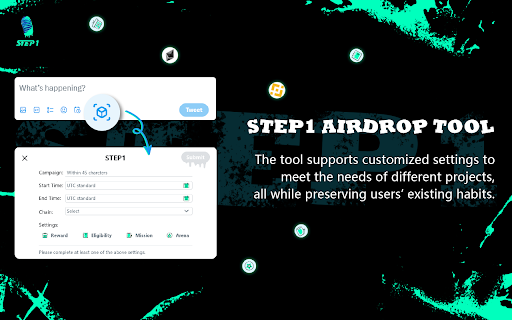
STEP 1 - Chrome Extension: Leverage AI-powered user graphs to track and reward your users effortlessly, boosting engagement and loyalty with ease.

STEP 1 - Chrome Extension website preview

STEP 1 - Chrome Extension Website screenshot

What is the STEP 1 AI Chrome Extension?

The STEP 1 Chrome Extension is a cutting-edge tool powered by AI that uses Web 3 technology and big data to build a user graph for rewarding users.

How does the STEP 1 AI Chrome Extension work?

Leverage the AI-powered user graph to efficiently discover and unlock reward opportunities based on your browsing behavior.

Core Features of the STEP 1 AI Chrome Extension

Advanced AI Algorithms

AI-driven technology analyzes user patterns to help you optimize earning potential.

Big Data Integration

It processes large-scale data sets to deliver accurate and actionable insights, ensuring better reward opportunities.

Use Cases of the STEP 1 AI Chrome Extension

Maximize Rewards with Data-Driven Insights

By analyzing user data, the extension helps you find optimal ways to earn rewards based on your browsing activity.

Product source: STEP 1 - Chrome Extension official website. Check the provider for current plans, limits and availability.

FAQ

STEP 1 - Chrome Extension questions and answers

Product context and practical checks for evaluating STEP 1 - Chrome Extension.

What is STEP 1 - Chrome Extension used for?

STEP 1 - Chrome Extension: Leverage AI-powered user graphs to track and reward your users effortlessly, boosting engagement and loyalty with ease.

How do I get started with STEP 1 - Chrome Extension?

Leverage the AI-powered user graph to efficiently discover and unlock reward opportunities based on your browsing behavior.

Which capabilities are described for STEP 1 - Chrome Extension?

Advanced AI AlgorithmsAI-driven technology analyzes user patterns to help you optimize earning potential.Big Data IntegrationIt processes large-scale data sets to deliver accurate and actionable insights, ensuring better reward opportunities.

What projects can I evaluate STEP 1 - Chrome Extension for?

Maximize Rewards with Data-Driven InsightsBy analyzing user data, the extension helps you find optimal ways to earn rewards based on your browsing activity.

What should I compare before choosing a STEP 1 - Chrome Extension plan?

Check STEP 1 - Chrome Extension’s current pricing page for included usage, renewal terms and any credit charges. Compare the cost of a usable result, including retries, rather than assuming that account registration includes free usage.

What inputs should I prepare for a STEP 1 - Chrome Extension trial?

Identify the files, text or account connections your task needs. Confirm that the product accepts those inputs and offers controls for reviewing its work.

How can I check the quality of a STEP 1 - Chrome Extension result?

Test one representative task and inspect the result for accuracy and completeness. Record where manual corrections or extra tools are needed.

Which export options should I check in STEP 1 - Chrome Extension?

Check export formats, integrations and whether you can keep using your work outside the service. Test a real export before committing to a longer plan.

What is a practical way to test STEP 1 - Chrome Extension against alternatives?

Choose one task with a clear success condition. Keep the input consistent, record the time spent reviewing and compare the complete workflow cost.

Where is the official STEP 1 - Chrome Extension website?

The website linked from this profile is https://chromewebstore.google.com/detail/step1/aghjfakpkmlhmppddoingmepnlignjgd. Use the provider’s own documentation, account area and support channels to confirm current product details.

Visit STEP 1 - Chrome Extension