AI Analytics Assistant

Sourcer AI

Sourcer AI: Elevate your content with our reliable AI fact-checker, ensuring article credibility and accuracy in every piece you publish.

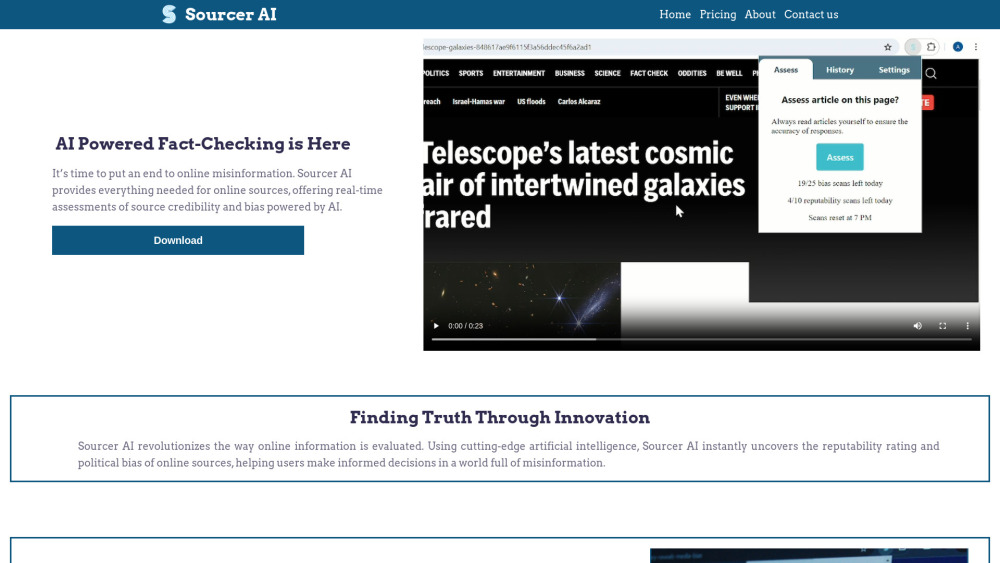
Sourcer AI website preview

Sourcer AI Website screenshot

What is Sourcer AI?

Sourcer AI is an innovative fact-checking platform powered by artificial intelligence, designed to evaluate the accuracy and trustworthiness of online articles. It provides users with real-time assessments to help differentiate between reliable and questionable sources, ensuring that readers have access to credible information.

How to use Sourcer AI?

Using Sourcer AI is straightforward. After installing the extension, click on the icon, select the article you want to analyze, and hit the "Assess" button. Sourcer AI will quickly analyze the content, providing an instant evaluation of the article's credibility and identifying any potential bias.

Key Features of Sourcer AI

Real-time credibility assessment

Detection of political and ideological bias

Practical Applications of Sourcer AI

Verify the reliability of news sources

Identify and understand political bias in content

Product source: Sourcer AI official website. Check the provider for current plans, limits and availability.

FAQ

Sourcer AI questions and answers

Product context and practical checks for evaluating Sourcer AI.

What is Sourcer AI used for?

Sourcer AI: Elevate your content with our reliable AI fact-checker, ensuring article credibility and accuracy in every piece you publish.

How do I get started with Sourcer AI?

Using Sourcer AI is straightforward. After installing the extension, click on the icon, select the article you want to analyze, and hit the "Assess" button. Sourcer AI will quickly analyze the content, providing an instant evaluation of the article's credibility and identifying any potential bias.

Which capabilities are described for Sourcer AI?

Real-time credibility assessmentDetection of political and ideological bias

What projects can I evaluate Sourcer AI for?

Verify the reliability of news sourcesIdentify and understand political bias in content Sourcer AI Support & Customer Service For support, contact us through our Contact Us page. About Sourcer AI Learn more about our company on the About Us page. Sourcer AI Pricing For pricing details, visit our Pricing page. Sourcer AI on Facebook Follow us on Facebook: https://www.facebook.com/profile.php?id=61559159820292&mibextid=LQQJ4d Sourcer AI on LinkedIn Connect with us on LinkedIn: https://www.linkedin.com/company/sourcer-ai Sourcer AI on Twitter Follow us on Twitter: https://x.com/sourcer_ai Sourcer AI on Instagram Check out our Instagram: https://www.instagram.com/sourcer.ai/

What should I compare before choosing a Sourcer AI plan?

For pricing details, visit our Pricing page. Confirm current prices and allowances on the provider’s website before purchasing.

What inputs should I prepare for a Sourcer AI trial?

Look for text prompts, image references, masks or sketches as appropriate. Compare composition control, supported upload types and the ability to revise a selected area.

How can I check the quality of a Sourcer AI result?

Inspect text, hands, edges, reflections and repeated objects at full size. Check that important product or brand details survive editing.

Which export options should I check in Sourcer AI?

Compare pixel dimensions, transparency, file formats and any enlargement options. Confirm that the downloaded result works in your design or publishing software.

What is a practical way to test Sourcer AI against alternatives?

Prepare a brief with a subject, composition, lighting and required output size. Test a first generation and a targeted revision to see how much control you retain.

Where is the official Sourcer AI website?

The website linked from this profile is https://sourcerai.co. Use the provider’s own documentation, account area and support channels to confirm current product details.

Visit Sourcer AI