Summarizer

SimpliTerms

SimpliTerms is a Chrome extension that simplifies complex terms and privacy policies with AI in just one click.

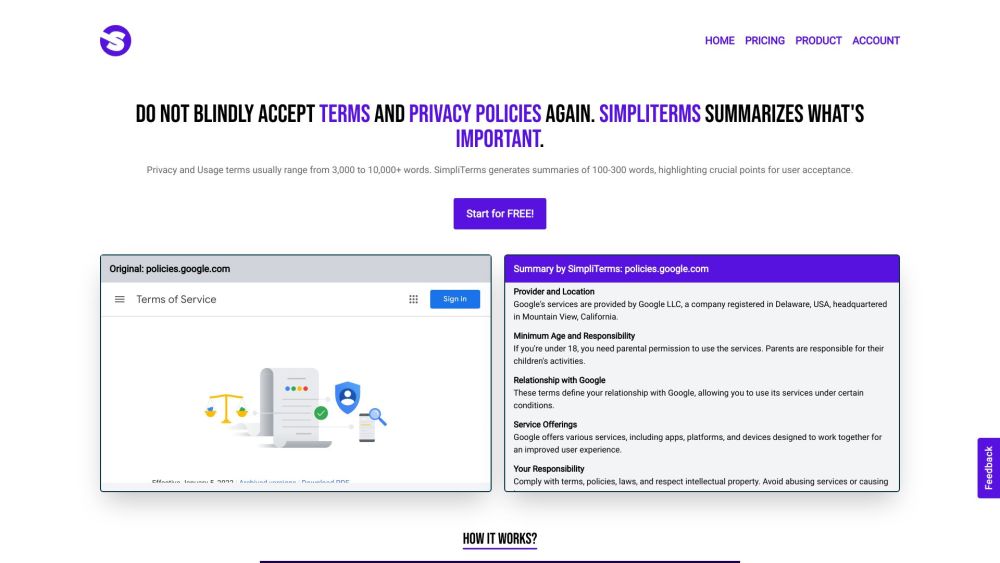
SimpliTerms website preview

SimpliTerms Website screenshot

What is SimpliTerms?

SimpliTerms is a Chrome extension designed to make understanding complex terms and privacy policies easier through AI-powered summaries, available with just one click.

How to use SimpliTerms?

To use SimpliTerms, simply click on the extension icon, and it will provide a concise summary of the policies on the current webpage.

Core Features of SimpliTerms

Uses AI to distill key points from privacy and terms of use policies

Creates 100-300 word summaries emphasizing crucial acceptance points

Enables users to comprehend terms before agreeing

Reduces the time spent reading lengthy documents

Aids in avoiding legal issues by clarifying terms

Reveals what data websites collect from users with a single click

Use Cases for SimpliTerms

Perfect for frequent users of various websites and services, especially those who regularly try new services

Product source: SimpliTerms official website. Check the provider for current plans, limits and availability.

FAQ

SimpliTerms questions and answers

Product context and practical checks for evaluating SimpliTerms.

What is SimpliTerms used for?

SimpliTerms is a Chrome extension that simplifies complex terms and privacy policies with AI in just one click.

How do I get started with SimpliTerms?

To use SimpliTerms, simply click on the extension icon, and it will provide a concise summary of the policies on the current webpage.

Which capabilities are described for SimpliTerms?

Uses AI to distill key points from privacy and terms of use policiesCreates 100-300 word summaries emphasizing crucial acceptance pointsEnables users to comprehend terms before agreeingReduces the time spent reading lengthy documentsAids in avoiding legal issues by clarifying termsReveals what data websites collect from users with a single click

What projects can I evaluate SimpliTerms for?

Perfect for frequent users of various websites and services, especially those who regularly try new services Customer Support and Contact Information For more details, visit the contact us page(https://www.simpliterms.com/contact) About SimpliTerms Company Name: SimpliTerms. Pricing Information For pricing details, visit: https://www.simpliterms.com/#pricing SimpliTerms on YouTube Watch our videos at: https://www.youtube.com/channel/UCDDpPZVsq9J7DfLrbuWkmlAConnect on LinkedIn Follow us at: https://www.linkedin.com/company/simplitermsFollow on Twitter Stay updated at: https://twitter.com/simplitermsFollow on Instagram See our updates at: https://www.instagram.com/simpliterms/

What should I compare before choosing a SimpliTerms plan?

For pricing details, visit: https://www.simpliterms.com/#pricing Confirm current prices and allowances on the provider’s website before purchasing.

What inputs should I prepare for a SimpliTerms trial?

Identify the files, text or account connections your task needs. Confirm that the product accepts those inputs and offers controls for reviewing its work.

How can I check the quality of a SimpliTerms result?

Test one representative task and inspect the result for accuracy and completeness. Record where manual corrections or extra tools are needed.

Which export options should I check in SimpliTerms?

Check export formats, integrations and whether you can keep using your work outside the service. Test a real export before committing to a longer plan.

What is a practical way to test SimpliTerms against alternatives?

Choose one task with a clear success condition. Keep the input consistent, record the time spent reviewing and compare the complete workflow cost.

Where is the official SimpliTerms website?

The website linked from this profile is https://www.simpliterms.com. Use the provider’s own documentation, account area and support channels to confirm current product details.

Visit SimpliTerms