Writing Assistants

Serenade - Chrome Extension

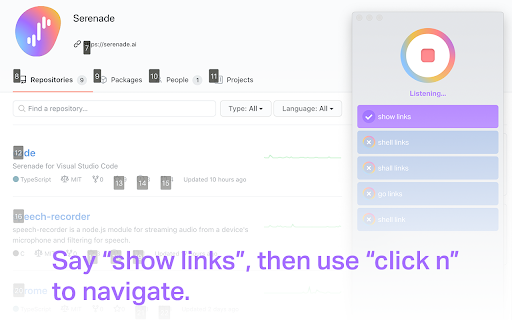
Serenade - Chrome Extension: Code by speech and supercharge your browsing productivity. Hands-free coding made easy with voice commands.

Serenade - Chrome Extension website preview

Serenade - Chrome Extension Website screenshot

What is Serenade Chrome Extension?

Serenade is an innovative tool that enables users to write code through voice commands, offering seamless integration with Chrome to boost productivity by minimizing manual typing. Its Chrome extension allows hands-free coding directly in your browser.

How to Use Serenade Chrome Extension?

To get started, download and install the Serenade app on your preferred operating system, be it Windows, macOS, or Linux. Then, simply add the Serenade Chrome extension. From there, you can begin issuing voice commands to code, navigate, and control browser actions without the need for a keyboard or mouse.

Core Features of Serenade Chrome Extension

Voice-controlled code generation

Productivity-enhancing browser integration

Use Cases of Serenade Chrome Extension

Effortless tab management with voice commands

Hands-free browsing for improved workflow

Voice-enabled interaction with web elements

Product source: Serenade - Chrome Extension official website. Check the provider for current plans, limits and availability.

FAQ

Serenade - Chrome Extension questions and answers

Product context and practical checks for evaluating Serenade - Chrome Extension.

What is Serenade - Chrome Extension used for?

Serenade - Chrome Extension: Code by speech and supercharge your browsing productivity. Hands-free coding made easy with voice commands.

How do I get started with Serenade - Chrome Extension?

To get started, download and install the Serenade app on your preferred operating system, be it Windows, macOS, or Linux. Then, simply add the Serenade Chrome extension. From there, you can begin issuing voice commands to code, navigate, and control browser actions without the need for a keyboard or mouse.

Which capabilities are described for Serenade - Chrome Extension?

Voice-controlled code generationProductivity-enhancing browser integration

What projects can I evaluate Serenade - Chrome Extension for?

Effortless tab management with voice commandsHands-free browsing for improved workflowVoice-enabled interaction with web elements

What should I compare before choosing a Serenade - Chrome Extension plan?

Check Serenade - Chrome Extension’s current pricing page for included usage, renewal terms and any credit charges. Compare the cost of a usable result, including retries, rather than assuming that account registration includes free usage.

What inputs should I prepare for a Serenade - Chrome Extension trial?

Compare repository access, context limits, supported languages and tool permissions. Check whether the assistant can read relevant files and run your existing checks.

How can I check the quality of a Serenade - Chrome Extension result?

Review the diff, run tests and inspect error handling and dependency changes. Generated code should meet the same review standard as a human contribution.

Which export options should I check in Serenade - Chrome Extension?

Prefer changes you can inspect and keep in version control. Check whether code, tests and configuration can be exported without depending on a hosted preview.

What is a practical way to test Serenade - Chrome Extension against alternatives?

Choose a small reproducible bug with an existing failing check. Measure whether the tool fixes the cause, preserves behavior and produces a reviewable change.

Where is the official Serenade - Chrome Extension website?

The website linked from this profile is https://chromewebstore.google.com/detail/serenade-for-chrome/bgfbijeikimjmdjldemlegooghdjinmj. Use the provider’s own documentation, account area and support channels to confirm current product details.

Visit Serenade - Chrome Extension